21
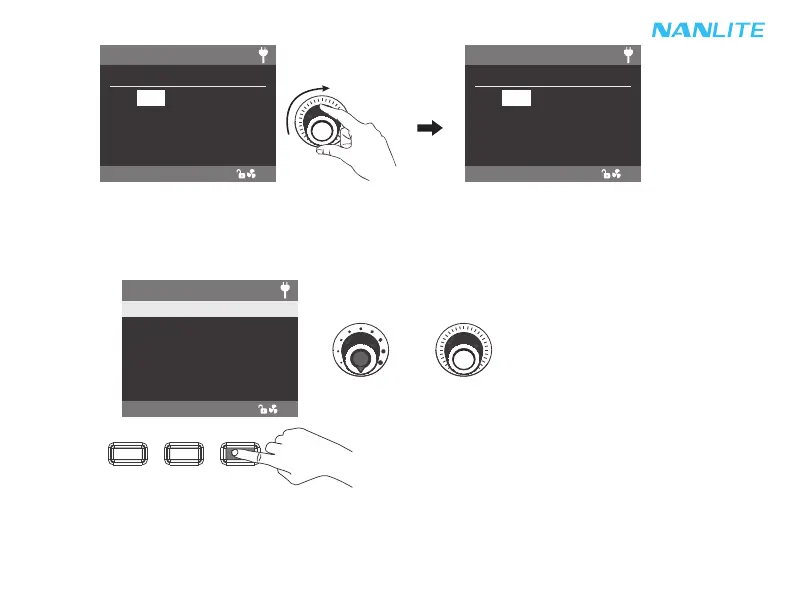
4. MENU: Press the MENU button to enter the menu.
Note:
①All the effects are set in same method.
②When setting the STORM AUTO and EXPLOSION AOTO, need to rotate "Right knob" to trigger the effect.
·Rotate "Right knob" to select the setting items and press "Right knob" to enter the corresponding secondary menu.
Then rotate "Right knob" again to select corresponding options and press "Right knob" to set. Press the MENU
button to return to the previous menu.
CCT EFFECT MENU LOCK
Rotate "Left knob" to set the corresponding parameters.
Left knob Right knob
ON
CCT: 2700K - 6500K
SPEED: 8s
EFFECT MODE
CH: 512
EFFECT: CCT LOOP
DIM: 0.0%
ON
CCT: 2700K - 6500K
SPEED: 8s
EFFECT MODE
CH: 512
EFFECT: CCT LOOP
DIM: 0.1%
MENU
OUTPUT MODE
ADDRESS/DMX
RESET BLUETOOTH
WIRELESS PROTOCOL
FAN CONTROL
ROTATE SCREEN
ON
CH: 512



 To Next Page