8
NARVON SUMMIT
SERVING THE PRODUCT
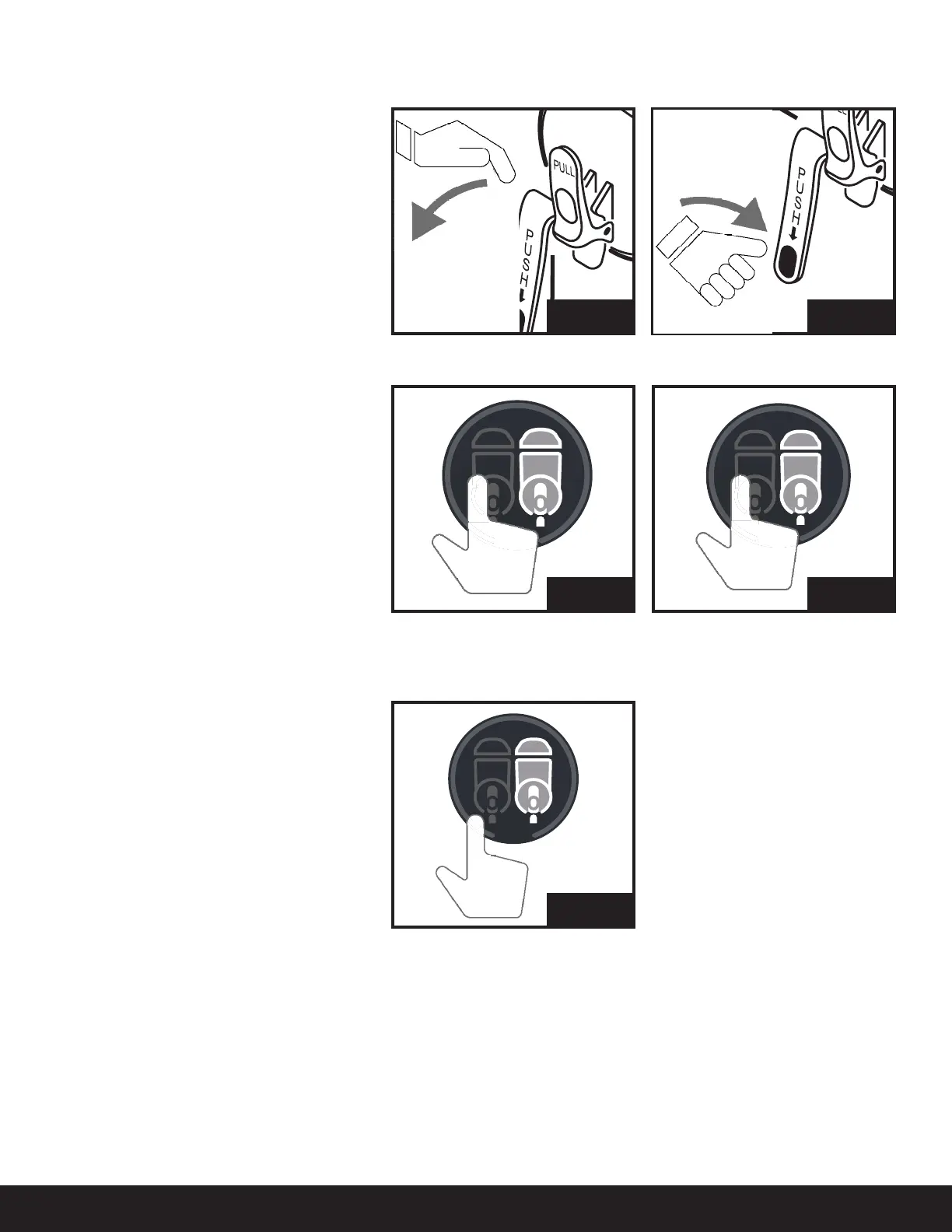
The Push and Pull tap allows us to serve the
product in two different ways:
IF ICE CRYSTALS APPEAR
AFTER HOURS
(STANDBY MODE)
Pull: Pull the handle. (Fig. 7)
Push: Push the handle. (Fig. 8)
Select Defrost Mode: Press OPERATING
MODE Until the display shows: DEFROST
(Fig. 9)
This allows you to defrost the product quickly.
Wait until Defrost nishes. (During Defrost,
Slush and Stand By mode of any tank is
deactivated)
Prepare Slush: Press OPERATING MODE Until
the display shows: SLUSH (Fig. 10)
In this way, the slush always remains
homogeneous and prevents the formation of
excessively large ice crystals.
Select Standby Mode: Press OPERATING
MODE Until the display shows: STANDBY
(Fig. 11)
During the periods when the establishment
is closed, it is possible to use the machine in
standby mode. Doing this will allow you to save
a considerable amount of electrical energy.
Fig. 9
Fig. 11
Fig. 10
OPERATION
Fig. 7 Fig. 8



 To Next Page