USB-6525 User Guide and Specifications 2 ni.com
Figure 2. USB-6525 Back View
Installing Software
Software support for the USB-6525 for Windows 2000/XP is provided by
NI-DAQmx.
The NI-DAQmx CD contains example programs that you can use to get
started programming with the USB-6525. Refer to the NI-DAQmx for USB
Devices Getting Started Guide, that shipped with your device and is also
accessible from Start»All Programs»National Instruments»NI-DAQ
for more information.
Note For information about non-Windows operating system support, refer to ni.com/
info
and enter rddqld.
Hardware
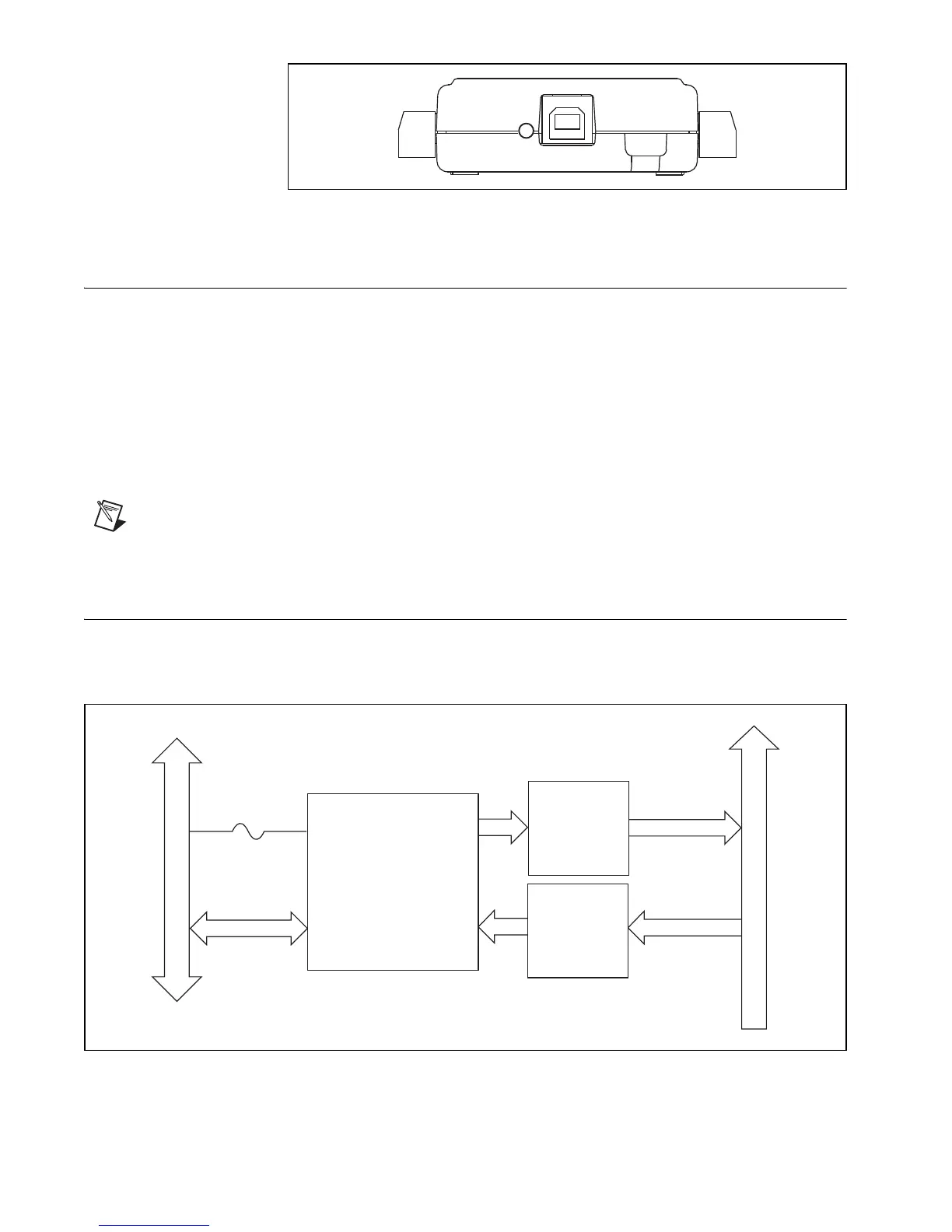
The block diagram in Figure 3 shows key functional components of the
USB-6525.
Figure 3. USB-6525 Block Diagram
P0.<0..7>A/B
P1.<0..7>+/–
Digital I/O Terminal Block
Vbus
Full-Speed USB Interface
USB
SSRs
P0
P1
USB Microcontroller
Current-
Limiting
Isolated
Inputs


 To Next Page
 Loading...