4
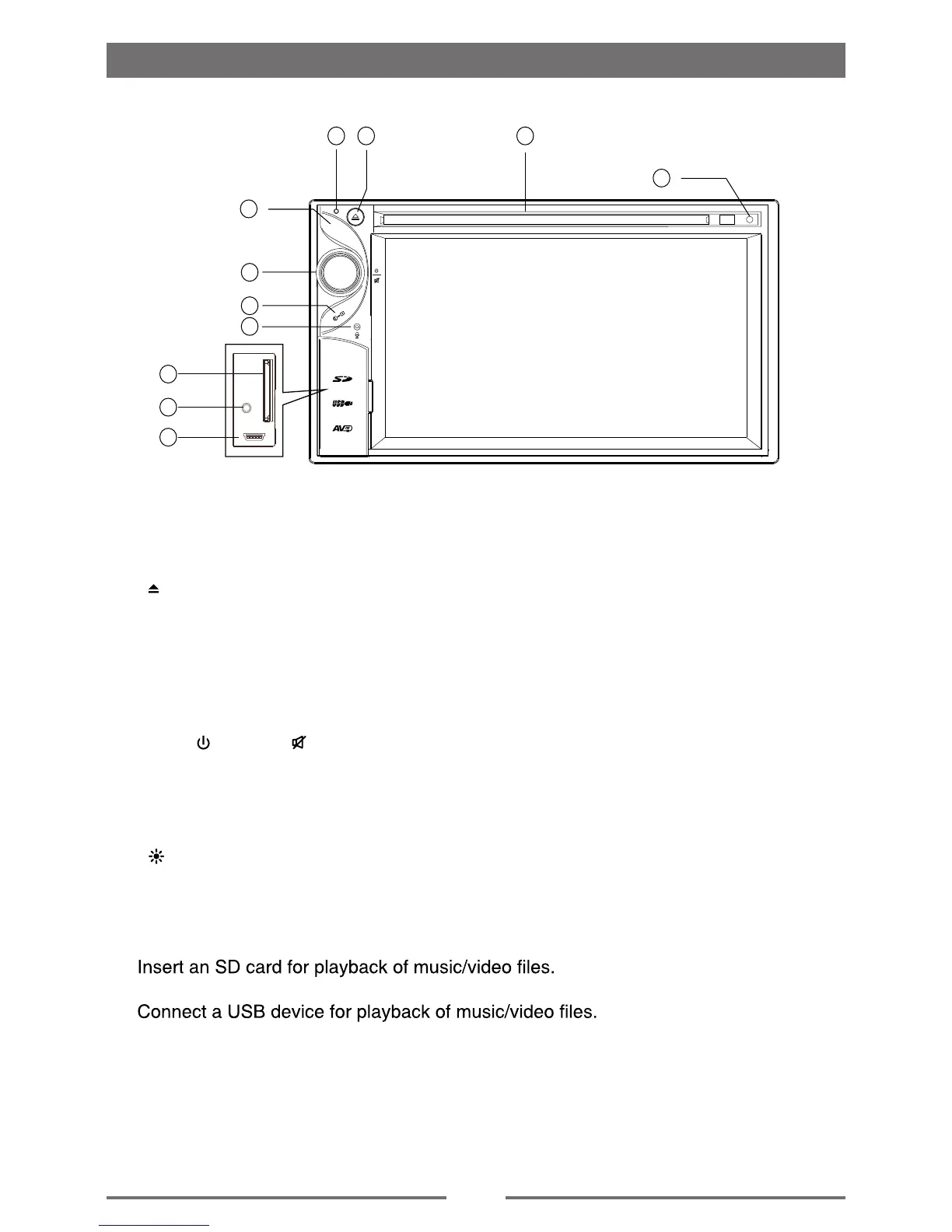
Front Panel
Before Using
1. [ ] Button
Press to eject a disc.
2. Remote Sensor
3. tols csiD
4. Reset Hole
kcol latnerap dna drowssap tpecxe( t luafed yrotcaf ot sgni t tes m etsys teser ot sserP
settings).
5. [VOL /
/ MUTE / ] Knob
Rotate to adjust the volume.
P ress momentarily to activate the MUTE function. Press again to resume normal
listening.
Press to turn the unit ON. Press and hold to turn the unit OFF.
6. [ ] Button
.n e ercs fo sse nth gi rb e ht tsujdA
7. MENU Button
. t i nu eh t o t de i l ppa sec r uos oed i v / o i dua e l ba l i ava eh t neewt eb hc t iws o t sse rP
8. SD Interface Connector
9. Mini USB Connector
10. A/V Input
nac sec i ved oed i v / o i dua suo i r av mo r f s l ang i s hc i hw hguo r h t kca j m m5 . 3 a s t peccA
be applied to the unit.
Notice:
The graphic in this manual is for reference only, and may be
different from the actual unit. Reference to actual unit is suggested.
1 3
11
4
5
7
6
8
10
9
2
11. MIC
. ee r f sdnah h t oo t eu l b r o f enohpo r c im n i t l i uB
MENU



 To Next Page