3
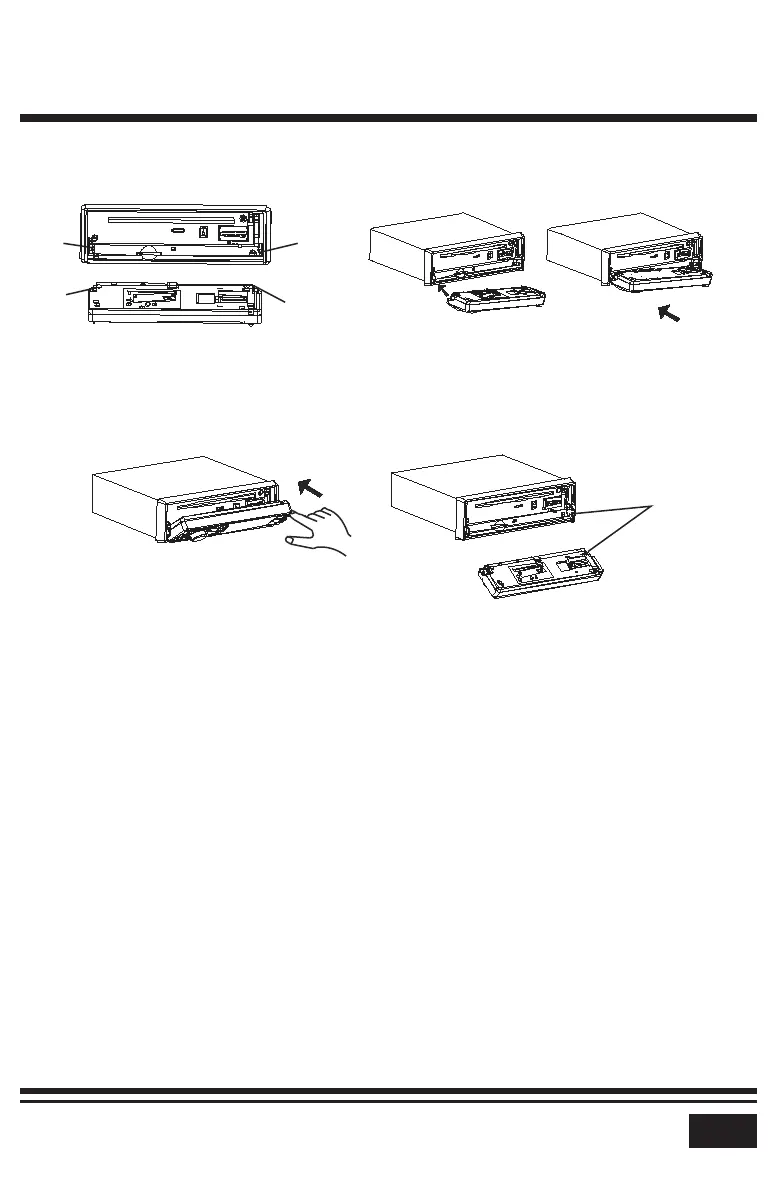
B u l g e
H o l l o w
B u l g e
H o l l o w
P a n e l C o n n e c t o r
a. Flip the control panel up untill you hear a click sound this indicates that
the control panel is latched onto the unit.
4. Attach the control panel onto the unit as illustrated below.
* Frequent detachment, opening and closing of the control panel will cause
panel connections to accumilate dirt and dust. It is recommended that you
periodically gently wipe the connections with a clean, dry, soft cloth.
5. Plug in your wiring harness and test that all functions work correctly.
6. Install the main unit according to the installation diagram on page 2.
a. Slide the cradle into the dash cavity.
b. Bend tabs of the cradle where necessary to ensure the cradle is secure.
c. Slide the unit into the cradle.
d. Use the metal strap to secure the unit at the rear if possible.
INSTALLATION STEPS


 To Next Page