6 7
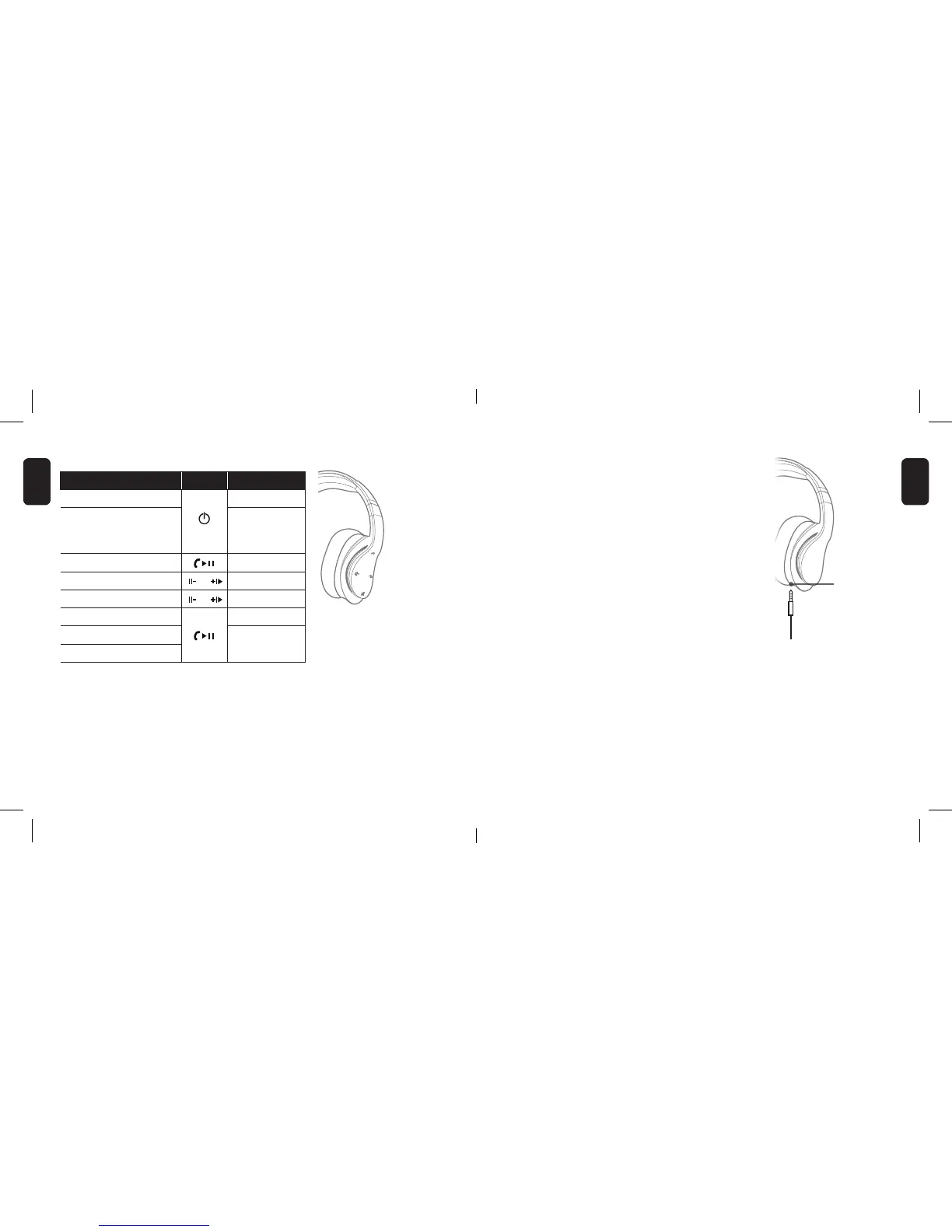
USE WITH THE AUX CABLE
Alternatively connect the NCredible AX1 using the
supplied Aux cable by plugging the cable directly
into the Aux port located on the bottom left side
of your headphones.
CONVENIENT STORAGE
To save space, the NCredible AX1
Headphones can be folded inward
and conveniently placed in the
carrying pouch.
SPECIFICATIONS:
Driver: 40mm per ear cup
Bluetooth 4.0
Frequency: 20H-20KHz
Battery Capacity: 3.7V/500mA
OPERATING NCREDIBLE AX1
LED INDICATORS
• Red and blue LEDs ash: Headphones are in pairing mode.
• Red LED blinks twice every 20 seconds: Power is running low,
time to charge.
• Blue LED gradually ashes: NCredible AX1 headphones in use.
Aux Port
NOTE: Music playback
is paused during call
functions and resumes
when the call ends.
To... Button Press
Turn on/off headphones and hold 4 secs
Start Bluetooth pairing
When
headphones
turned off, press
and hold 8 sec
Play/Pause x1
Volume up/down / ≥1
Go to next/previous track / ...and hold
Answer/end call x1
Reject an incoming call
Last-number redial
x2 quickly
ENGLISH
ENGLISH


 To Next Page