B10 Smart Bite Watch HOW TO REGISTER ANTI-THEFT ALARM TH9s
Reg RED
Reg GREEN
Reg BLUE
Reg YELLOW
Reg WHITE
Reg Light
Reg Camera
A-EFT CHA1
A-EFT CHA2
A-EFT CHA3
A-EFT CHA4
A-FET CHA1
A-FET CHA2
A-FET CHA3
A-FET CHA4
Clear all CHA
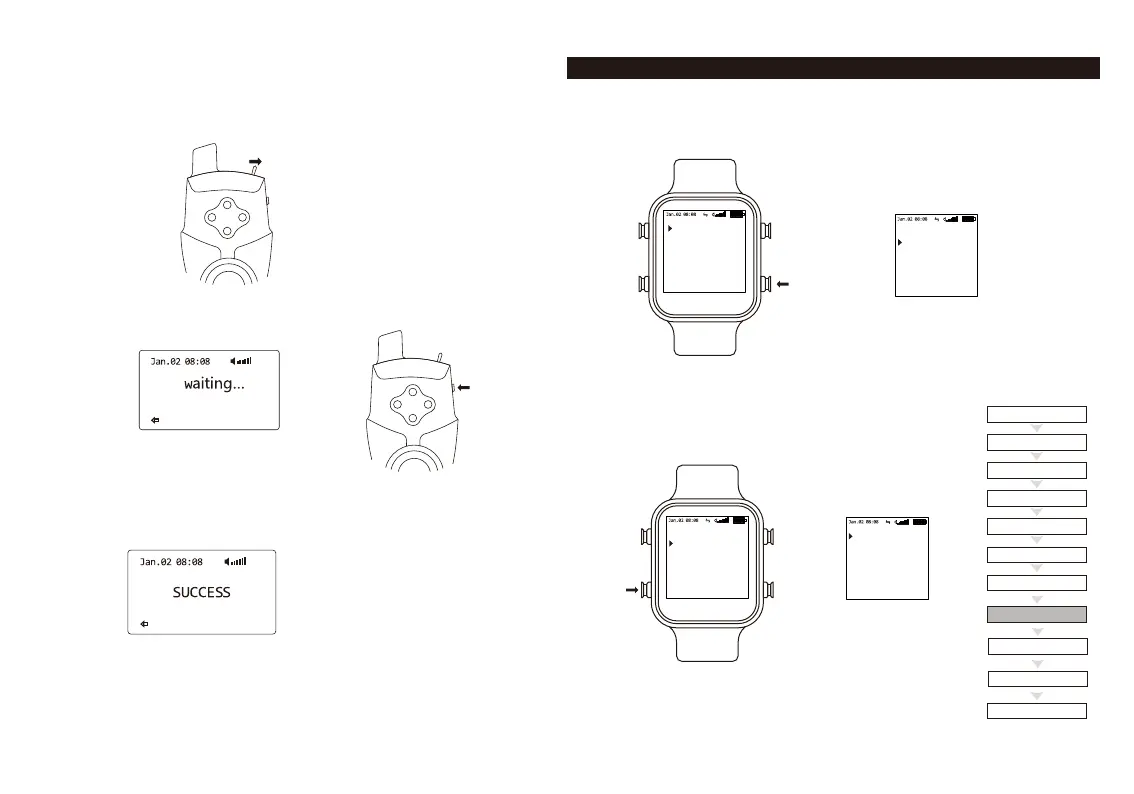
5. Turn on the TH9s Anti-Theft Alarm.
6. Press the right button on the TH9s twice.
7. Registration was successful when the display shows “SUCCESS”.
Please press the
ANTI THEFT button.
4. Choose one of the A-EFT channels (A-EFT CHA1, A-EFT CHA2, A-EFT CHA3,
A-EFT CHA4). We recommend to start with A-EFT CHA1. Press the button down
to select the channel.
1.Remote setup
2.Register alarm
3.Vitual band
4.Range test
5.Drop back set o
6.Date time set
7.Motor on
1.Remote setup
2.Register alarm
3.Vitual band
4.Range test
5.Drop back set o
6.Date time set
7.Motor on
1.Remote setup
2.Register alarm
3.Vitual band
4.Range test
5.Drop back set o
6.Date time set
7.Motor on
1. Turn on the B10 Smart Bite Watch.
2. Press the menu button on the receiver down and
hold it to enter system menu.
3. Scroll down and choose "Register Alarm" menu.



 To Next Page