The Neato robot is an autonomous vacuum cleaner designed to simplify home cleaning. It is equipped with features for navigation, scheduling, and maintenance, ensuring efficient and convenient operation.
Function Description:
The Neato robot is a home robot that vacuums floors automatically. Users can set it up to clean their homes without manual intervention. It is designed to navigate around furniture and obstacles, returning to its charge base when cleaning is complete or when its battery is low. The robot can be scheduled to clean at specific times, and it offers different cleaning modes, including "House" for general cleaning and "Spot" for concentrated cleaning in a smaller area.
Important Technical Specifications:
- Charging: Requires an initial overnight charge of approximately 12 hours. For optimal battery performance, it is recommended to charge and completely discharge the battery two to three times.
- Clearance for Charge Base: The charge base requires a 3' (1 m) clearance on both sides and in front to allow the robot to find it easily.
- Battery: Features a Battery ON/OFF switch located under the dirt bin. Status lights indicate battery charge level and error conditions (Solid Green for fully charged, Blinking Green for charging but able to clean, Blinking Amber for charging and unable to clean yet, Solid Amber for error).
- Navigation: Uses a laser top for navigation and drop sensors to prevent falls.
- Dirt Bin and Filter: Equipped with a removable dirt bin and filter for debris collection.
Usage Features:
- Initial Setup:
- Remove protective film from the screen and charge base.
- Plug the power cord securely into the charge base and adjust its length.
- Push down the Battery ON/OFF switch to turn on the robot.
- Place the charge base against a wall in an area with sufficient clearance.
- Place the rounded side of the Neato against the metal contacts on the charge base to charge.
- Select your preferred language using the on-screen arrows and the SELECT button.
- Waking Up the Robot: Press the Home button to wake up Neato. It may take a few seconds to respond.
- Menu Navigation: From the home screen, press the SELECT button to access the MENU. Use the SCROLL arrows and SELECT button to navigate.
- Clock Configuration: Select "Set Clock" from the Main Menu to set the time (12-Hour or 24-Hour Clock).
- Scheduling Cleaning: Select "Schedule" from the Main Menu. Choose "Set or Change" to program cleaning times, "Remove Day" to delete a scheduled day, or "Turn Off" to disable scheduling.
- Preparing Your Home for Cleaning:
- Clear small objects, toys, and clothing from the floor.
- Tie up loose wires, curtains, and other low-hanging items.
- Use boundary markers (included in the package) to prevent the robot from entering restricted areas. These can be cut to size.
- Keep the robot away from liquids and wet areas. Move or cover pet bowls and plant trays.
- Ensure the robot operates indoors; it is not designed for outdoor cleaning or freezing temperatures.
- Be aware that shiny surfaces and black floors might confuse the robot's navigation.
- Starting Cleaning:
- House Cleaning: Press the Home button to start a full house cleaning.
- Spot Cleaning: Press the Spot button to clean a 4' (1.2 m) x 6' (1.8 m) square in front of the robot.
- Pausing Cleaning: Press the Home or Spot button to pause cleaning.
- Stopping Cleaning: Use the arrows to highlight "Stop Cleaning" on the screen, then press SELECT. Alternatively, during a paused state, access the "Pause Menu" and select "Stop Cleaning."
- Sleep Mode: Hold the Home button for 5 seconds to put the Neato into sleep mode.
Maintenance Features:
- Regular Maintenance: The robot requires regular maintenance for reliable operation.
- Dirt Bin and Filter:
- Empty the dirt bin and clean the filter and airways/openings after each use.
- Replace the filter every one to two months.
- Sensors: Use a dry cotton swab to clean the two drop sensor windows on the bottom of the robot.
- Robot Top and Laser Area: Clean the top of the robot and the area around the laser top with a damp cotton cloth.
- Brushes:
- Remove the brush guard by pulling up on both sides.
- Remove hair and dirt from the brush and brush ends.
- Replace the brush and the guard over the brush.
Registration and Support:
- Registration: Register your Neato at www.neatorobotics.com to activate your warranty, receive product updates, and special offers.
- Help and Warranty: Visit www.neatorobotics.com for helpful information, FAQs, tips for optimal operation, and warranty details.
Robot Parts (as per diagram):
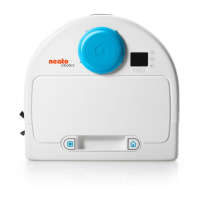
Top View:
- Dirt Bin
- Robot Top
- Laser Top
- Screen
- Bumper
- Cleaning House button
- Cleaning Spot button
Bottom View:
- Brush Guard
- Brush
- Side Brush
- Drop Sensor Window
- Battery Door
- Serial Number Label
- Charging Contacts
- Wheel

 Need help?
 General





 To Next Page