
 Need help?
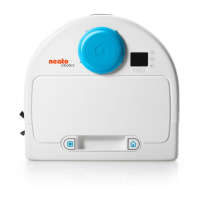
Do you have a question about the Neato Robotics D800 and is the answer not in the manual?
Details the colors and behaviors of the battery LED to indicate charge level and faults.
Explains the Wi-Fi LED colors and behaviors for network connectivity status.
Describes the Play button LED colors and behaviors for robot status and errors.
Instructions for selecting a clear area and securely placing the charge base.
Lists the functionalities and benefits of using the MyNeato mobile application.
Description of available cleaning modes like Eco and Turbo for different floor types.
Explanation of how the Neato creates a house map for zone cleaning and No-Go Zones.
Instructions on how to define areas the Neato should avoid cleaning using the app.
The Neato Intelligent Robot Vacuum is a sophisticated cleaning device designed to provide unparalleled performance and ease of use, revolutionizing the vacuuming experience. It is suitable for indoor use and features smart navigation to efficiently clean various floor types.
The Neato robot vacuum is designed to autonomously clean entire floor plans on a single level, moving automatically from room to room. Users can initiate cleaning via the MyNeato app or manually using the robot's physical controls. The robot supports different cleaning modes, including Eco and Turbo, to suit various cleaning requirements. Eco Mode sets the brush and blower to medium power, allowing the robot to clean the largest area on a single charge and operating quietly, ideal for hardwood floors. Turbo Mode provides stronger suction and a faster rotating brush, making it ideal for carpets, though it consumes more battery power.
A key feature of the Neato robot is its ability to create a floor plan map of the user's house after its first cleaning run. This map allows users to define "No-Go Zones," which are areas the robot should avoid cleaning, such as child's play areas or pet bowls. The robot also supports auto-recharge and resume functionality; if the cleaning area is large, the robot will return to its charge base, recharge, and then resume cleaning from where it left off.
The MyNeato app serves as the primary interface for controlling and monitoring the robot. Through the app, users can start and pause cleaning, select cleaning modes, view cleaning coverage maps, create routines to schedule cleanings, receive instant cleaning status notifications, check battery status, and get alerts about software updates and maintenance. The app also allows for operating the robot from multiple smart devices within a household by signing into the same MyNeato account.
For enhanced navigation, especially around delicate furniture, the D9 and D10 models offer an "Extra Care navigation" feature. When enabled, the robot navigates more carefully, maintaining a wider buffer around objects.
Before initial use, the Neato robot must be connected to the MyNeato app. The charge base should be positioned in a clear area with good Wi-Fi coverage. The robot's battery comes partially charged and should be fully charged until the battery LED turns green (up to 3 hours) before the first use. It is crucial to use only the supplied Neato Original charge base and battery.
To prepare for cleaning, small objects, stray socks, jewelry, and cords should be removed from the floor to prevent damage or entanglement. If the cleaning area includes cliffs, drops, balconies, fireplaces, or stairs, physical barriers or No-Go Zones should be created to prevent the robot from falling. Users should also move or cover pet bowls and plant trays to keep the robot away from liquids.
Manual operation is also possible. To clean an entire house, ensure the Play LED is white and press the Play button once. The robot will then clean the entire floor plan. To clean a single room, the robot can be manually placed in that room, the Play button pressed, and the door closed. The robot will clean the room and return to its original placement. After a single-room cleaning, it should be manually returned to the charge base.
The robot provides clear LED indicators for battery status, Wi-Fi connectivity, and operation status. The Battery LED changes color to indicate battery level (green for full, yellow for low, red for critically low or fault). The Wi-Fi LED indicates connection status (white for connected, pulsing white for pairing, off for disconnected). The Play button LED indicates whether the robot is awake, cleaning, paused, or has an error. The Info button provides audible information about the robot's status or errors.
Scheduling cleanings is made easy with "Routines" in the MyNeato app. Users can select specific days and times for weekly cleanings and choose the desired cleaning mode for each routine. If the robot becomes stuck or stops at an unknown location, the "Locate" feature in the MyNeato app can be used to make the robot emit a sound, guiding the user to its physical location. The robot also receives automatic software updates to ensure it always has the latest features.
Regular maintenance is crucial for reliable operation and to maintain warranty coverage. After each use, the dirt bin should be emptied, and the airways and opening cleaned. The filter should also be cleaned and replaced every 1 to 2 months, or more frequently depending on usage. To remove the filter, users pinch the handle and pull it out.
The main brush should be cleaned monthly. This involves removing the side brush and setting it aside, then following the steps outlined in the manual for brush cleaning.
The top of the Neato robot and the area around the laser top should be cleaned with a soft cotton cloth. The three drop sensor windows on the bottom of the robot should be cleaned with a dry cotton swab.
For replacement parts and accessories, it is recommended to always purchase Neato Original accessories. Using unauthorized or third-party accessories can damage the robot and void the warranty. Recommended replacement schedules are: filters every 1 to 2 months, brushes every 6 to 12 months, and batteries every 12 to 18 months. Information on accessories and replacement parts can be found on the Neato Robotics website.
 General
| Model | D800 |
|---|---|
| Dustbin Capacity | 0.7 Liters |
| Bin Capacity | 0.7 Liters |
| Scheduling | Yes |
| Wi-Fi | Yes |
| Smart Home Integration | Amazon Alexa, Google Assistant |
| Voice Control | Yes |
| Warranty | 1 year limited |
| Product Type | Robot Vacuum |
| Navigation | LaserSmart |
| Battery Type | Li-Ion |
| Cleaning Modes | Spot |
| Floor Types | Carpet |
| App Support | Yes |
| Boundary Markers | Yes, included |
| Dimensions | 13.2 x 13.2 x 3.9 inches |




 To Next Page
