EN
06
07
EN
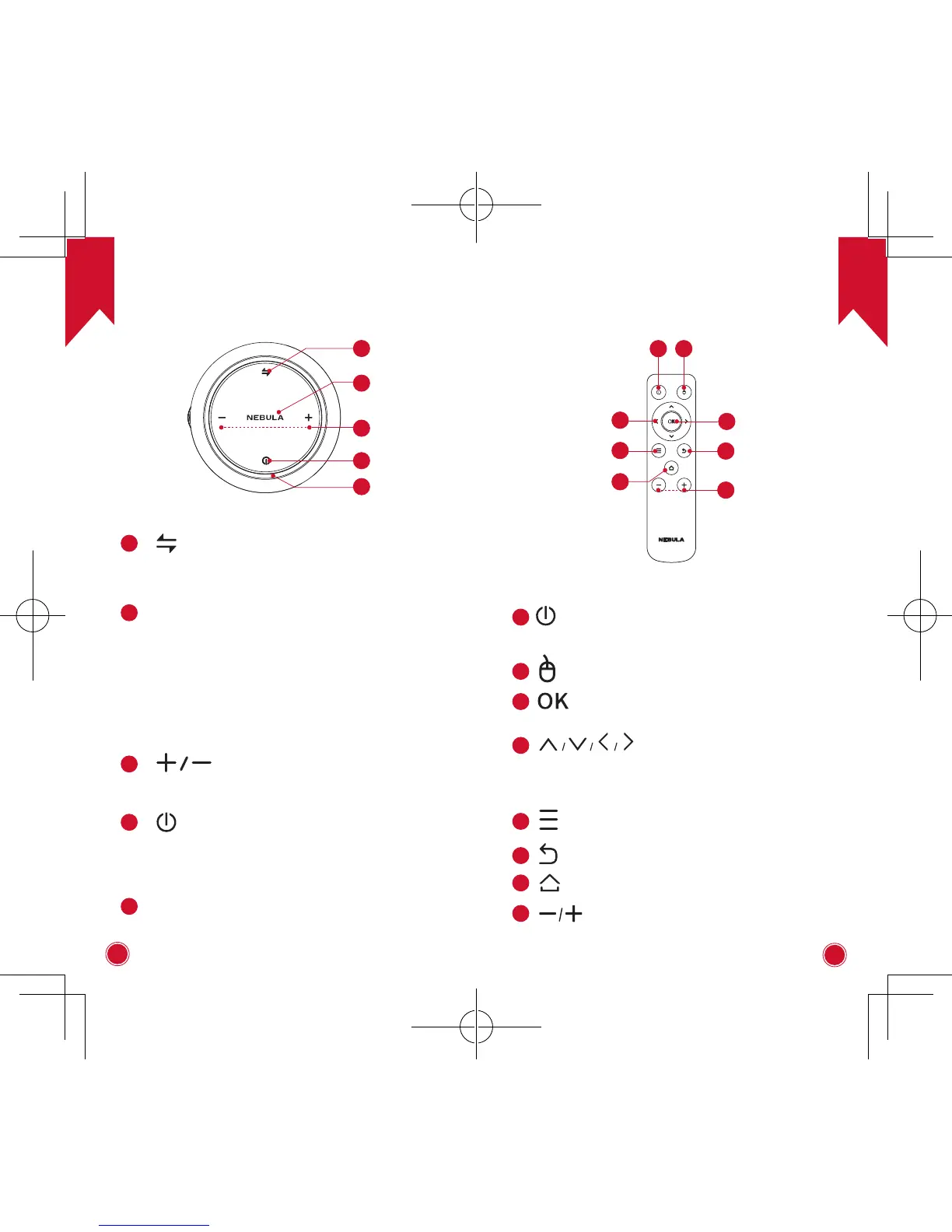
4. Top View
3
4
5
2
1
1
• Press to switch between Bluetooth speaker
mode and projector mode.
2
LED indicators
• Solid blue: Operating in projector mode.
• Flashing blue: Ready to pair / Bluetooth
pairing (Bluetooth speaker mode).
• Solid blue: Bluetooth connected (Bluetooth
speaker mode).
• Solid red: Charging.
• Solid green: Fully charged.
3
• Press to turn volume up / down.
4
• Hold for 2 seconds to power on / off.
• Press to switch between standby and
resume when powered on.
5
Air ventilation (inlet)
5. Remote Control
7
8
2
1
3
4
6
5
1
• Press to select an option: shutdown,
standby, reboot or enter Bluetooth
Speaker mode.
2
• Press to enter / exit mouse key mode.
3
• Press to confirm a selection or entry
• Pause / resume play
4
Navigation buttons
• Navigate menus or adjust the selected
content.
5
• Access more options during play
(available depend on the source).
6
• Return to the previous menu.
7
• Open the home menu.
8
• Volume down / up



 To Next Page