90
• TO SET RINGING OF HEADSET
The procedure below shows how to enable/disable the
ringing of headset.
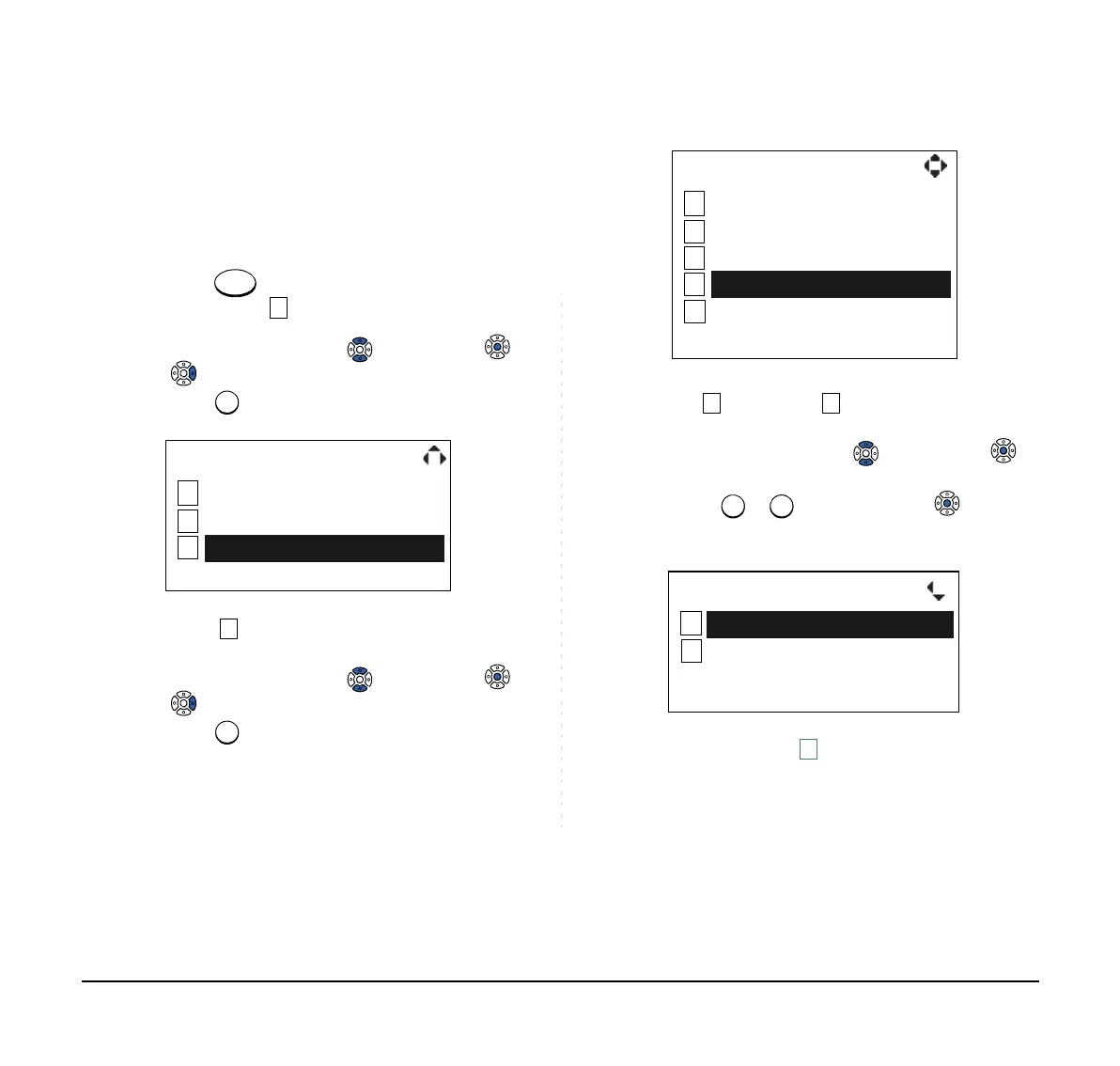
STEP 1: While indicating the current time on LCD,
press
key to open the Menu screen.
Then, select Settings.
Select an item by either of the following operations.
• Highlight an item by using , and then press ,
or the OK soft key.
• Press key.
STEP 2: Select Headset.
Select an item by either of the following operations.
• Highlight an item by using , and then press ,
or the OK soft key.
• Press key.
STEP 3: To disable/enable the ringing of headset, se-
lect Disable or Enable.
Select an item by either of the following operations.
• Highlight an item by using , and then press or
the OK soft key.
• Press or key, and then press or the OK
soft key.
1
2
[Menu]
3
OKBack
Directory
Call History
Settings
Note:
Default setting is Disable.
Note:
The enabled item is highlighted.
1
2
[Settings]
3
OKBack
4
5
Peripherals
Ring Volume
Off Hook Ring
Back Light
Headset
Back OK
[Headset]
1
2
Enable
Disable



 To Next Page