49
• TO SET KEY TOUCH TONE
The procedure below shows how to set Key Touch
Tone. Key Touch Tone is a tone generated when the
digit keys are pressed while the terminal is off-hook.
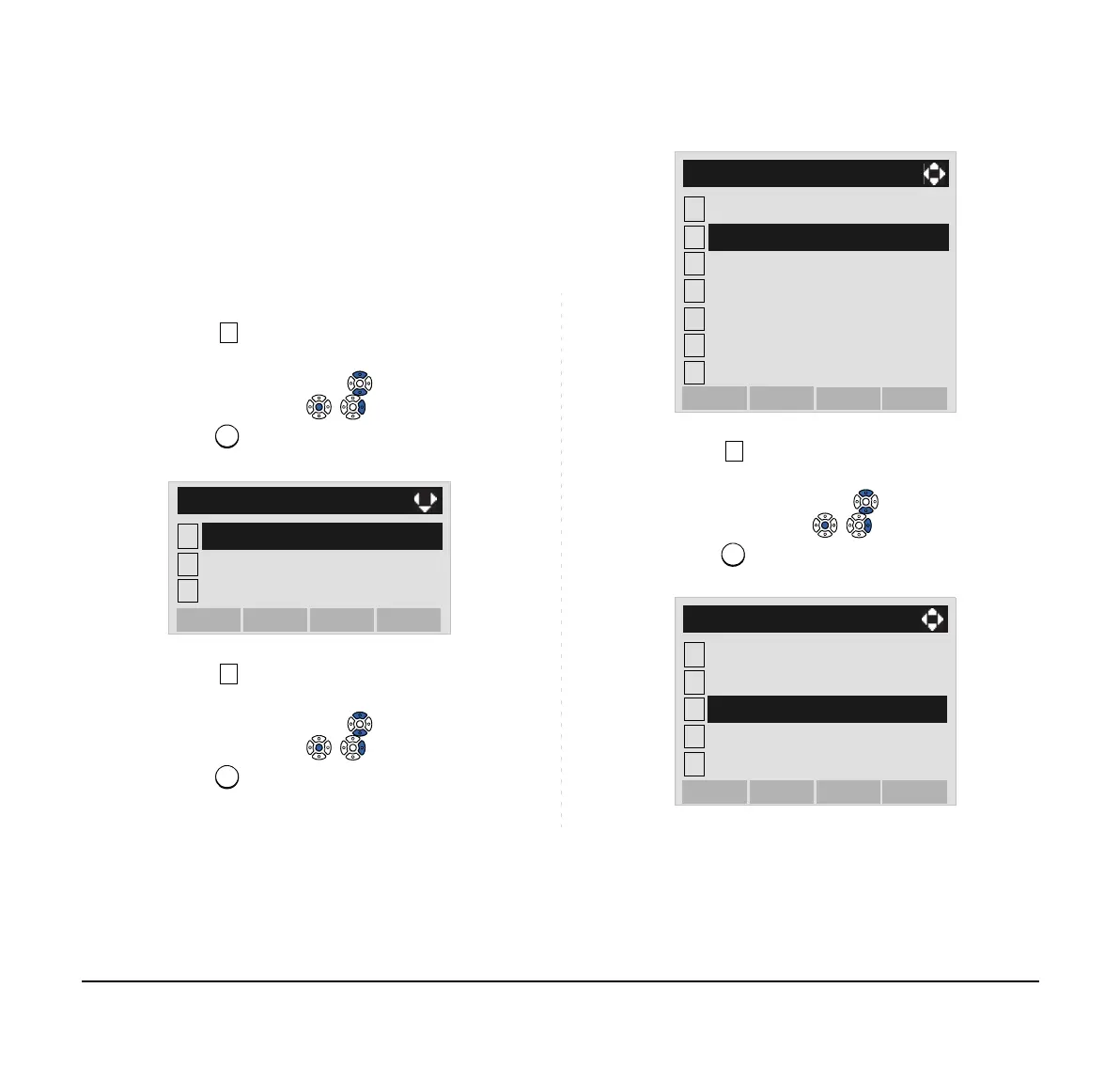
STEP 1: Display the Menu screen, and select Setting.
STEP 2: Select User Setting.
Select an item by either of the following operations.
• Highlight an item by using or the UP/DOWN soft
key, and then press , or the OK soft key.
• Press key.
STEP 3: Select Talk.
Select an item by either of the following operations.
• Highlight an item by using or the UP/DOWN soft
key, and then press , or the OK soft key.
• Press key.
STEP 4: Select Key Touch Tone.
Select an item by either of the following operations.
• Highlight an item by using or the UP/DOWN soft
key, and then press , or the OK soft key.
• Press key.
1
2
Data Backup/Restore
[Setting]
3
Download
OKMenu
User Setting
1
2
Display
[User Setting]
3
4
5
6
7
Change Password
Peripherals
OKBack
Security
Incoming Call
Talk
Usability
1
2
[Talk]
3
4
5
OKBack
Hold Music
Prefix
RTP Alarm
DTMF Tone
Key Touch Tone



 To Next Page