English
Mounting
DO NOT mount the monitor yourself. Please ask your supplier. For proper
Please inspect the location where the unit is to be mounted. Mounting on
wall or ceiling is the customer’s responsibility. Not all walls or ceilings are
capable of supporting the weight of the unit. Product warranty does not cover
Failure to comply with these recommendations could result in voiding the
warranty.
To ensure safe installation, use two or more brackets to mount the unit.
Mount the unit to at least two points on the installation location.
Please note the following when mounting on wall or ceiling
•
in North America.
•
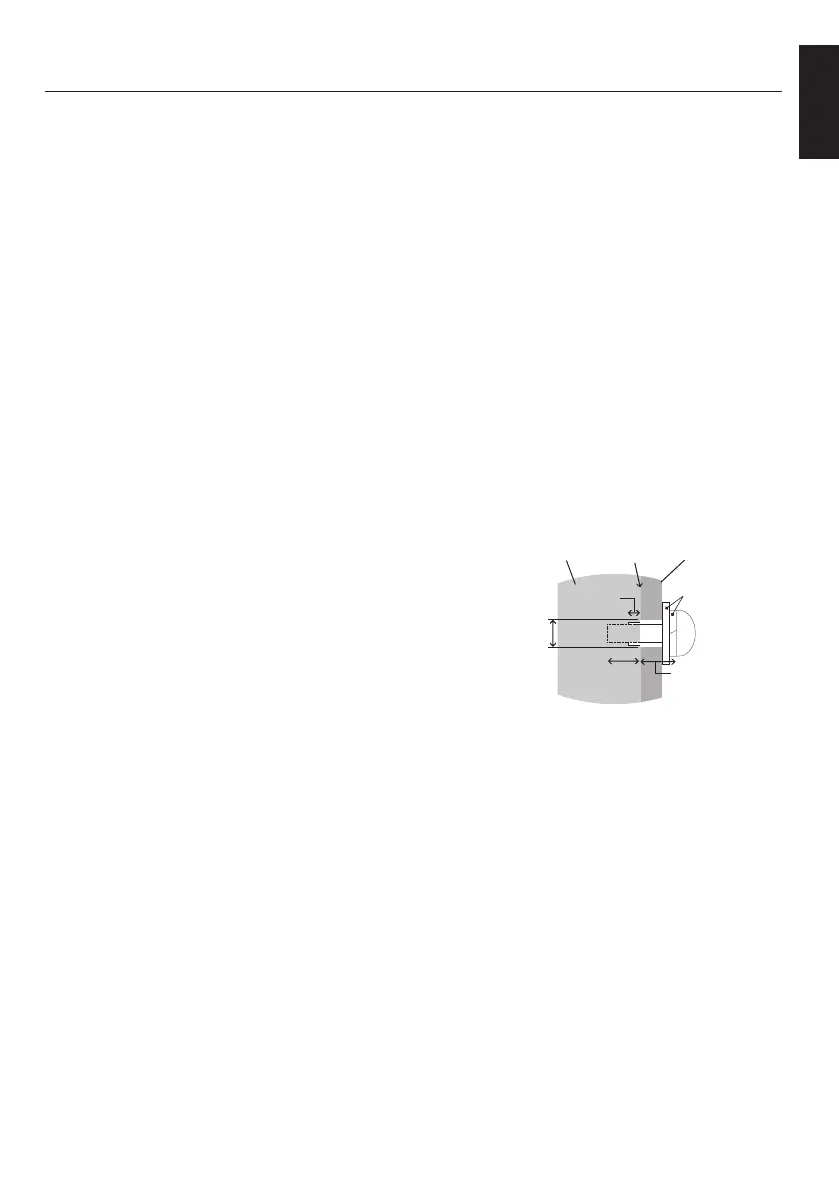
and washers in length). If using screws
• Prior to mounting, inspect the installation
location to ensure that it is strong enough to support the weight of the unit
so that the unit will be safe from harm.
• For detailed information, refer to the instructions included with the
mounting equipment.
• Make sure that there is no gap between the monitor and the bracket.
•
of the monitors may happen due to temperature changes. Due to this it is
recommended that over one millimeter gap is kept between adjacent
monitor edges.
• When installing, do not apply pressure to the screen or excessive force to
any part of the monitor by pushing or leaning on it. This may cause the
monitor to become distorted or damaged.
Screw
Unit
Thickness
of bracket
and washers
under
No gap
Washers
Mounting
Bracket
No thread
2.0 mm
BT421_setup.indb 7 2019/06/14 12:47:18







 To Next Page