English−10
Parts Name and Functions
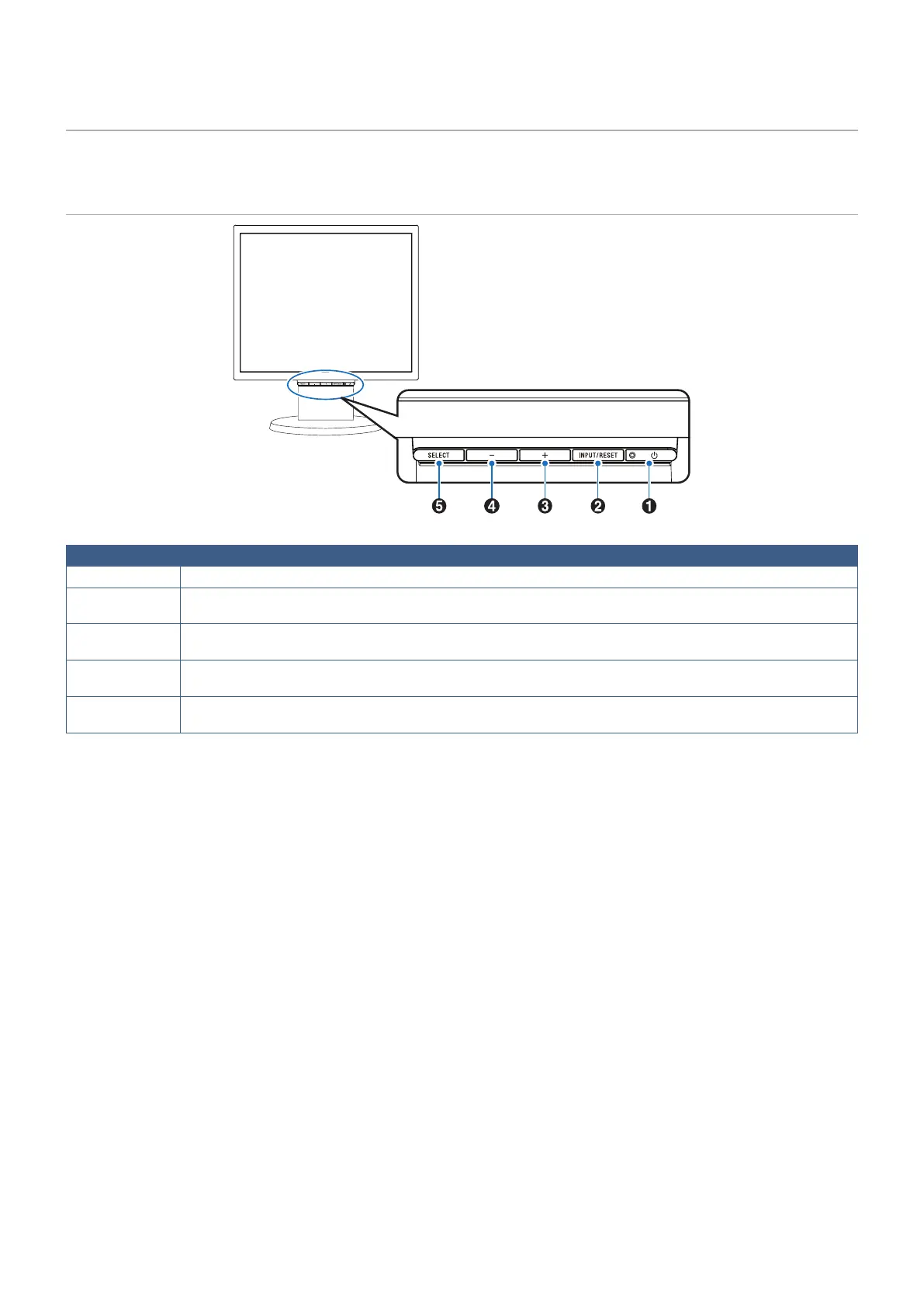
Control Panel
Item Function
A LED/Power
Indicates that the power is on. Turns the monitor on and off.
B INPUT/RESET
When the OSD menu is not displayed on the screen, it selects the input signal. When the OSD menu is displayed on the
screen, it resets the function adjustment.
C +
When the OSD menu is not displayed on the screen, it opens the [VOLUME] menu. When the OSD menu is displayed on
the screen, it navigates to the right or raises settings adjustments.
D –
When the OSD menu is not displayed on the screen, it opens the [BRIGHTNESS] menu. When the OSD menu is
displayed on the screen, it navigates to the left or lowers settings adjustments.
E SELECT
When the OSD menu is not displayed on the screen, it opens the OSD menu. When the OSD menu is displayed on the
screen, it selects a function icon or adjusts the function of the selected icon.
NOTE: You can directly change to [LOW BLUE LIGHT] mode by touching the SELECT button for 3 seconds or more.



 To Next Page