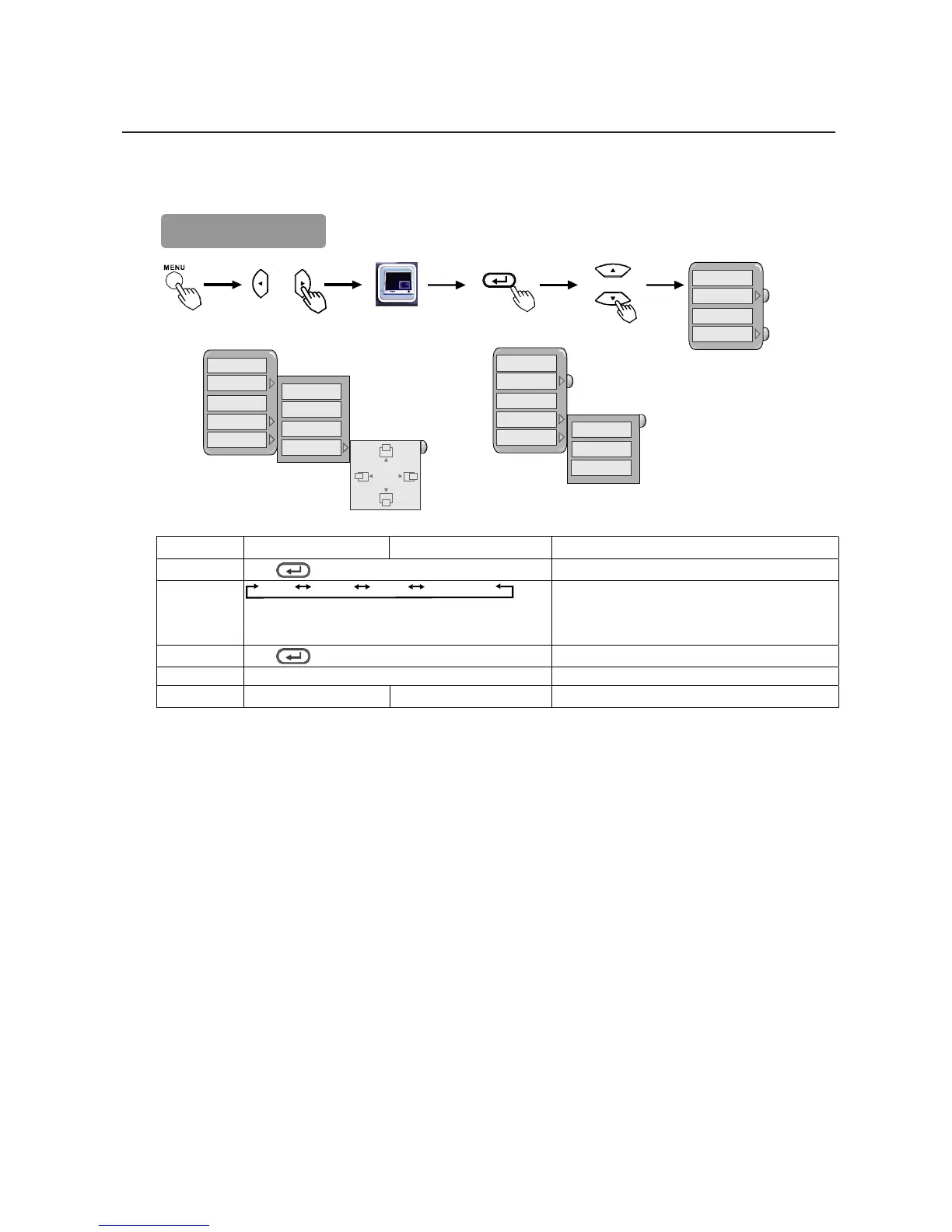
Picture-in-Picture
OFF
PIP
PBP
POP
OFF
PIP
PBP
POP
AUDIO SOURCE
SMALL
MEDIUM
LARGE
PIP POSITION
MULTI 1+12
MULTI 1+3
MULTI 1+1
OFF
PIP
PBP
POP
AUDIO SOURCE
PIP function description
Selected
W X
Setup hint
OFF
Press
Enter button to turn off.
Turn off Picture-in-Picture function
PIP POSITION
SMALL MEDIUM LARGE PIP POSITION
PIP Position:
Use the S T buttons to adjust pictures to the up or down positions.
Use the W X buttons to adjust pictures to the right or left positions.
Change PIP display size & position.
PBP
Press
Enter button to turn on.
Turn on Picture-by-Picture function
POP (MULTI 1+12) ÅÆ (MULTI 1+3) ÅÆ (MULTI 1+1) use the S Tbuttons to select the PIP setting.
AUDIO SOURCE MAIN PIP Select MAIN or PIP audio function.






 To Next Page