This document serves as a user guide for the NEC SL 2100 Telephony Networks system, providing instructions for various call management, voicemail, and system configuration features.
Device Description:
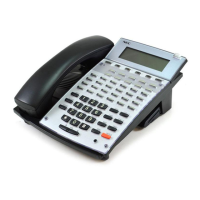
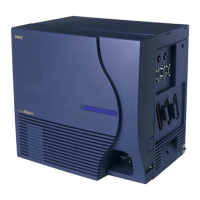
The NEC SL 2100 is a telephony system designed for business communication, offering a range of features for managing calls, voicemails, and system settings. It supports both digital and IP phones, including 12-button digital, 24-button digital, IP DESI-Less, and DECT cordless models. The system is designed to be user-friendly, with many functions accessible via dedicated buttons, soft keys, and dial codes.
Function Description:
Abbreviated Dialing/Speed Dial:
The system supports both Station Speed Dial and System Speed Dial.
- Station Speed Dial: Each extension has 10 bins (0-9). To set, press Speaker 755, then the bin number (0-9), dial 9# and the phone number, then press Hold. To dial, press Speaker #7 and the bin number.
- System Speed Dial: The system has 1000 bins (000-999). To set, dial Speaker 753, then the bin number (000-999), dial the phone number, and press Hold to save (no '9' is needed before the number). To dial, press Speaker #2 and the bin number.
Call Forwarding:
- To Voice Mail: Press Speaker or lift handset, dial 741 1, then 3999. Hang up, and the extension button will flash. To clear, dial Speaker 741 0 and hang up.
- To Cell or Off-site: Press Speaker or lift handset, dial 741 (for All Calls), 742 (for When Busy), 743 (for No Answer), or 744 (for Busy no answer), then 1, dial 9# and the cell number. Hang up, and the extension DSS button will flash. To clear, dial Speaker 741 0 and hang up.
Set Alarm-Wakeup:
The system supports two alarm types: Alarm 1 (sounds once) and Alarm 2 (sounds daily). To set, press Speaker button, dial 727 (1 or 2), and enter a 4-digit military time. To clear, press Speaker button, dial 727 (1 or 2), and enter 9999.
Paging:
- Internal Paging: Dial 7011.
- External Paging: Dial 7031.
- All Call Paging: Dial *10.
Group Listening:
To allow others to hear your conversation over the speaker while on a handset or headset, press your Speaker button twice until it flashes.
MW Lamp (Message Waiting Lamp):
To turn on, call someone on the intercom, then press the MW soft key in the display. The top right MW lamp will flash on your phone and their phone. To call the person back, press Speaker *0.
Making & Answering Calls:
- Outside Call: Dial 9 and the number, then lift handset or press Speaker button.
- Transfer Call: While on a call, press the Trf soft key, then dial the extension number.
- Park a Call: Press the Park button or Trf #6 and the Park location (01-64).
- Pick Up Parked Call: Press the lit park button or *6 and the Park location (01-64).
- Transfer Call to Voice Mail (without ringing): While on a call, press Trf soft key, dial extension number or DSS key, dial 8, and hang up. The call will go directly to the mailbox.
- Call a Station: Dial 3-digit extension number, lift handset or press Speaker button.
- Call a Station Hands-Free: Dial 3-digit extension number, press 1 or Voice soft key.
- Picking Up Ringing Call: Lift handset or press Speaker *#.
- Directed Call Pickup: Dial ** & extension number, lift handset.
- Last Number Redial: Dial #5.
Conference Calls:
To initiate, make your first call, press Conf soft key. Dial the second call (9 + Number or intercom Ext#), then press Add soft key. Then press Begin soft key. To add more participants, press Conf soft key, dial the next call, then press Add or Rel soft key.
Call Log:
To delete entries from the Call Log in your display, press CL soft key to select missed calls, then press Del button.
Do Not Disturb (DND):
Press DND, then Set All. This will send your calls to Voice Mail. To unset DND, press DND, then Cncl.
Change Ring Tone:
Press Speaker, dial 720, then 1 (for intercom) or 2 (for outside line), then dial 1-8 to select a tone. Press Speaker to confirm.
Voicemail:
- Setup: Press your VM Softkey. Press 0 for mailbox options (VM 0 4 1 7 #).
- Record Greeting: Press 4.
- Record Name: Press 76.
- Set Mailbox Password: Press VM soft key, dial 67, then 7, enter a 4-digit code, then 6 (for outside calls only) or 7 (for inside & outside calls). To delete a password, dial VM 67 7 ???? 6, then hang up. A password must be set to retrieve messages from off-site.
- Pick Up Messages: Press VM: or dial Speaker 3999 & extension number. Press 5 to listen.
- During playback: 2 (rewind 2 seconds), 22 (rewind 4 seconds), 4 (fast forward 2 seconds), * (pause), 3 (erase), 72 (save), 73 (replay from beginning), 84 (time/date stamp), 62 (call person back), 63 (forward message).
- Record & Send Message to Mailboxes: Press VM: or dial Speaker 3999 & extension number. Dial 77, record message, press #. Enter mailbox extension to send, press # for another mailbox or to finish. Press * to deliver to all mailboxes.
- Retrieve Messages from Off-site: Dial your main phone number. When voicemail answers, press # and extension number. If someone answers, have them transfer you to 3999. When voicemail answers, press # and extension number.
Usage Features:
- Button Programming Inquiry: Press the Help key, then press any button on your phone. The display will show what is programmed.
- Last 20 Received Calls / Last 10 Dialed Calls: The phone display shows these lists, accessible via a scroll function.
Maintenance Features:
The document does not explicitly detail maintenance features. However, the ability to set and clear various call forwarding, alarm, and DND settings can be considered user-level maintenance for personal phone settings. The system's architecture suggests that broader system maintenance would be handled by a telephony administrator or service provider (Converged Telephony Networks).
Important Technical Specifications (Inferred):
- Speed Dial Capacity: 10 Station Speed Dial bins per extension, 1000 System Speed Dial bins.
- Paging Zones: Internal, External, All Call.
- Call Forwarding Options: All Calls, When Busy, No Answer, Busy No Answer.
- Alarm Types: Single-event and daily recurring.
- Voicemail Features: Password protection, message playback controls (rewind, fast forward, pause, erase, save, replay, time/date stamp), call back, forward message.
- Supported Phone Types: Digital 12-Button, Digital 24-Button, IP DESI-Less, DECT Cordless.
The document is a comprehensive guide for end-users to effectively utilize the NEC SL 2100 system for daily communication needs.

 Need help?
 General




 To Next Page