9
EN
Sewing mode icon introduction
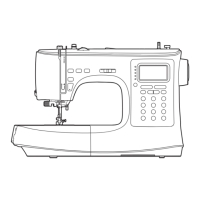
Setting stitch
①
Horizontal mirror function
②
Vertical mirror function
③
Elongation / Density setting
④
Balance calibration on current stitch
pattern
⑤
Reverse sewing
⑥
Initial auto-lock
⑦
Pattern unit sewing
⑧
Stitch cycling setting
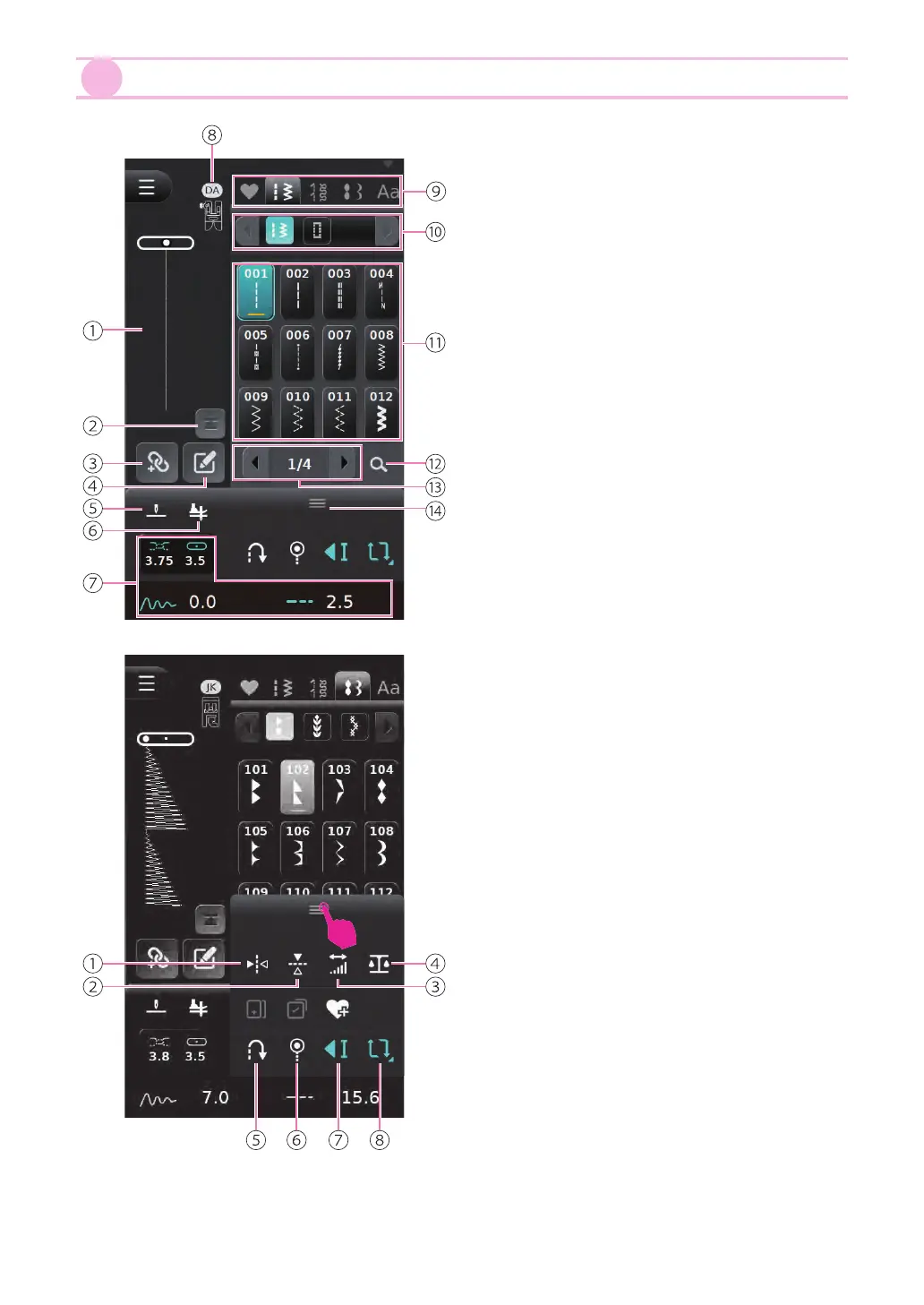
Selecting stitch
①
Needle position display
②
Back to initial stitch
③
Combination mode
④
Edit mode
⑤
Needle up/down setting
⑥
Pivot setting
⑦
Sewing values adjustment(upper thread
tension, needle position, length, width)
⑧
Suggested presser foot icon and reference
number
⑨
Stitch pattern/letters category
⑩
Stitch pattern group
⑪
Stitch pattern list
⑫
Stitch pattern search
⑬
Switch pages
⑭
Toolbox


 To Next Page