17
EN
Embroidery mode
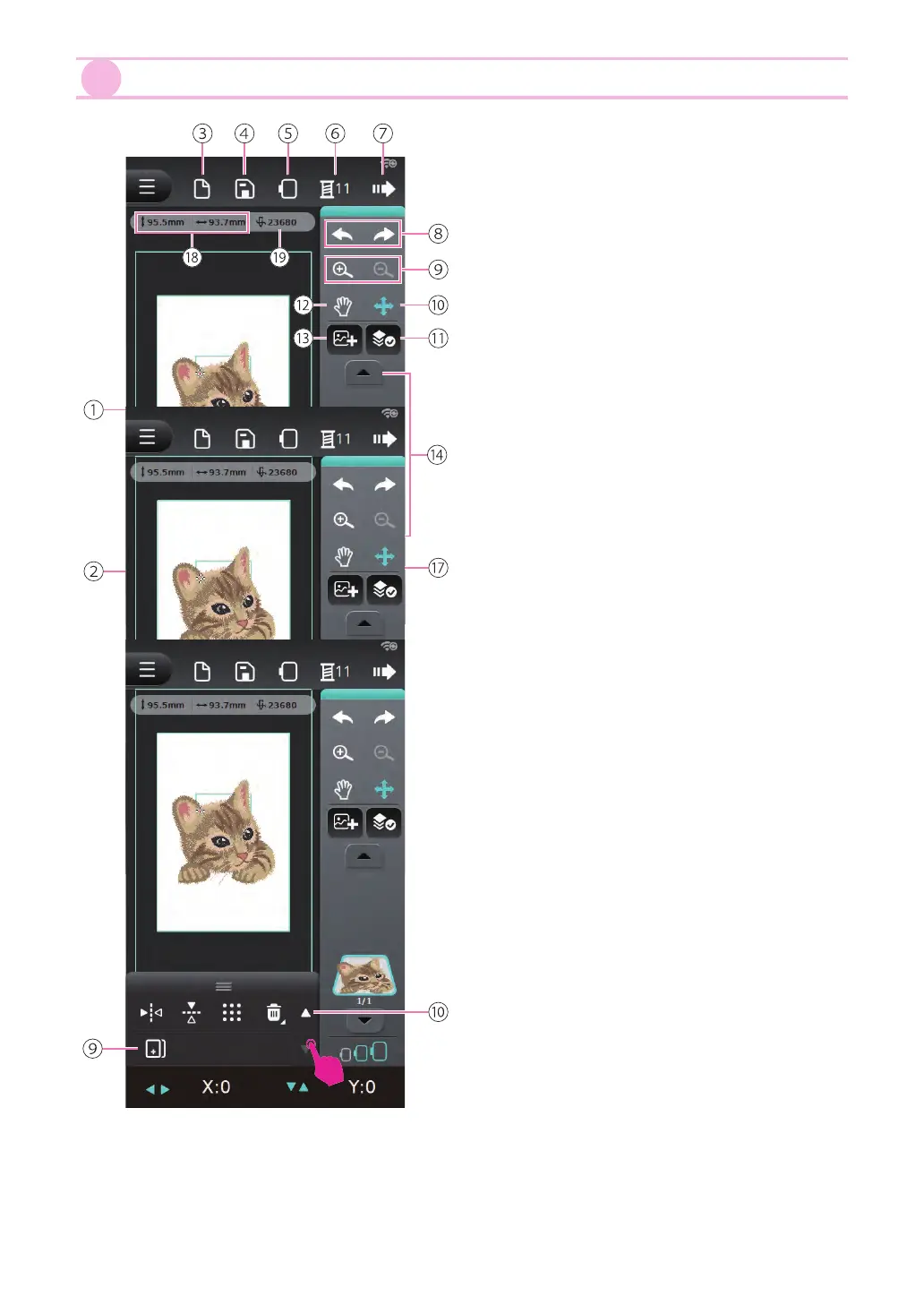
When the embroidery pattern is selected, you
can adjust the angle, size, position and color
in your preference.
①
Preview screen
②
Toolbox
③
New le
④
Save le
⑤
Embroidery hoop list
⑥
Color setting
⑦
Next
⑧
Undo/Redo
⑨
Zoom in/Zoom out
⑩
Move the patterns
⑪
Select all layers
⑫
Drag the object
⑬
Add new patterns
⑭
Switching layers
⑮
Layer
⑯
The current layer / Total layers
⑰
Suggested embroidery hoop
⑱
Embroidery pattern size
⑲
Embroidery pattern total stitches
Expand the toolbox to display the edit options.
Click Page switching button to view other edit
options.
①
Move layers
②
Text
③
Lock aspect ratio
④
Rotate
⑤
Horizontal mirror function
⑥
Vertical mirror function
⑦
Check the embroidery pattern size
⑧
Delete
⑨
Duplicate
⑩
Page switching button


 To Next Page