KREA TOUCH ES
21
21
21
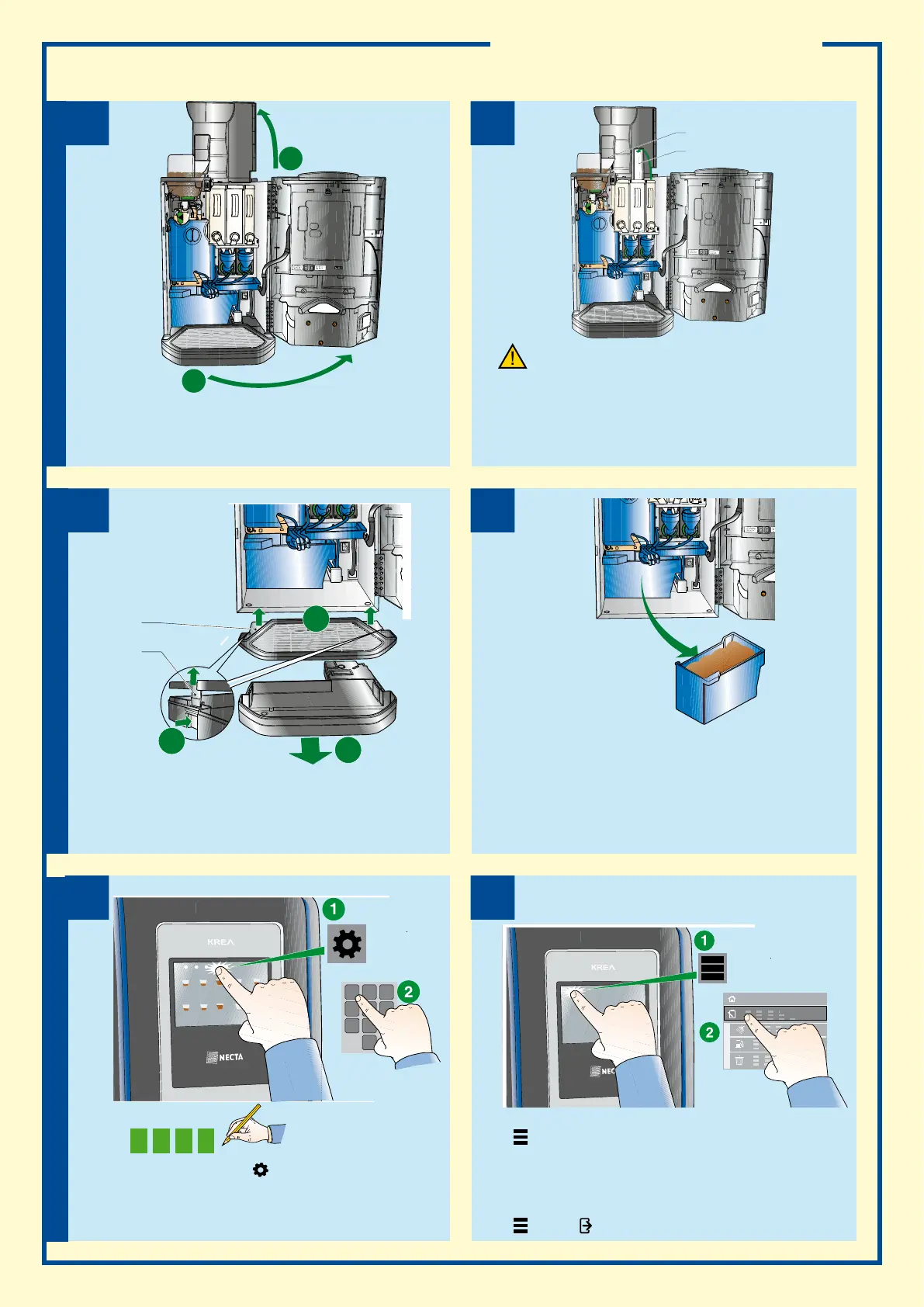
prodUct loadiNg
tray clEaNiNg“daily opEratioNs” fUNctioN
Product loading
1. Open the appliance door
2. Lift the upper panel
Product loading
1. Load coffee beans through the port (A)
2. Load the soluble products into container (B), making sure that the
powder is not compressed
3. If the soluble product level control is active, use the “Daily opera-
tions” function to enter the quantity of product loaded
liquid residue tray
1. When the message “TRAY FULL” is displayed, open the appliance
door
2. Grab the tray on its sides, lift slightly and pull
3. Press on hook B to unhook lid A of the liquid residue tray
4. Empty and wash the tray
solid residue trays
1. When the message “Solid residue tray” is displayed, open the appli-
ance door
2. Grab the liquid residue tray on its sides, lift slightly and pull
3. Remove the solid residue tray, empty and wash it.
4. Reposition the tray in the reverse order
5. From the “daily operations” functions, reset the counter that man-
ages the “solid residue tray” function
b
a
Write down the programmed
access password
1. From the selection screen, tap
to access the menu
2. Enter the programmed password
1. Tap
to access the menu
2. Touch the “daily operations” function
3. Access the desired function
• Container filling: to indicate the quantity of product loaded
• Residue product reset: to cancel the “residue tray full” display
• Washing functions
4. Tap
and then
to exit the menu
Ensure that the products to be loaded have been
stored correctly and have not expired
2
1
2
3
4
7
5
1 2
3
4 6
7 8
5
0
Menu







 To Next Page