PERITONE Instruction Manual - GB
Advanced Instructions
12
Firstly, the EMG Threshold level (THRS) requires setting up as accurately
as possible. The threshold level will vary from one patient to another.
The threshold level is a goal or target a patient strives to achieve when
contracting their muscles or when performing exercises.
To set up the threshold the patient should be asked to contract and/or
perform the exercise holding the position for approx. 5 seconds and then
relax for 5-10 seconds before repeating the contraction or movement.
Note the peak microvolt µV reading displayed on the LCD. The microvolt
readings will change due to muscle variation.
Calculate the average of the two peak readings and set the threshold
between 40-50% of this reading.
Example: Average Peak reading: 30µV take 40% of this value = 12µV
threshold setting.
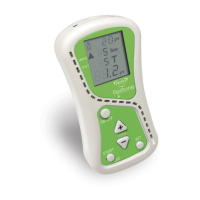
To adjust the threshold setting (shown at the top of the LCD screen)
press the THRS + or – buttons.
Setting the EMG parameters
•
Pressing the SET button consecutively takes you through a looped menu
from which you can change the parameters for biofeedback including
volume, work/rest times, trials, feedback sound, serial data and band settings.
Press SET
to see:
VOL
Press the THRS + or THRS – button to adjust the sound volume between 0 – 10.
WRK
Press the THRS + or THRS – button to adjust the work time in seconds (2-99).
RST
Press the THRS + or THRS – button to adjust the rest time in seconds (2-99).
TRS
Press the THRS + or THRS – button to adjust the number of trials (repetitions).
FAB Press the THRS + or THRS – button to select either:
FBL FAB - to get audio feedback when the patient exceeds the threshold.
FOF FBL - to get audio feedback when patient goes below the threshold.
FOF - to turn off any audio biofeedback.
DON Press the THRS + or THRS
–
button to switch serial data on or off.
DOF Switch on if connected to PC (this will stop the device from turning off).
WDE Press the THRS + or THRS – button to select WDE wide filter band or
NRW NRW narrow filter band.


 To Next Page