Menu Mode (C.Fn: Sett Customized Function)
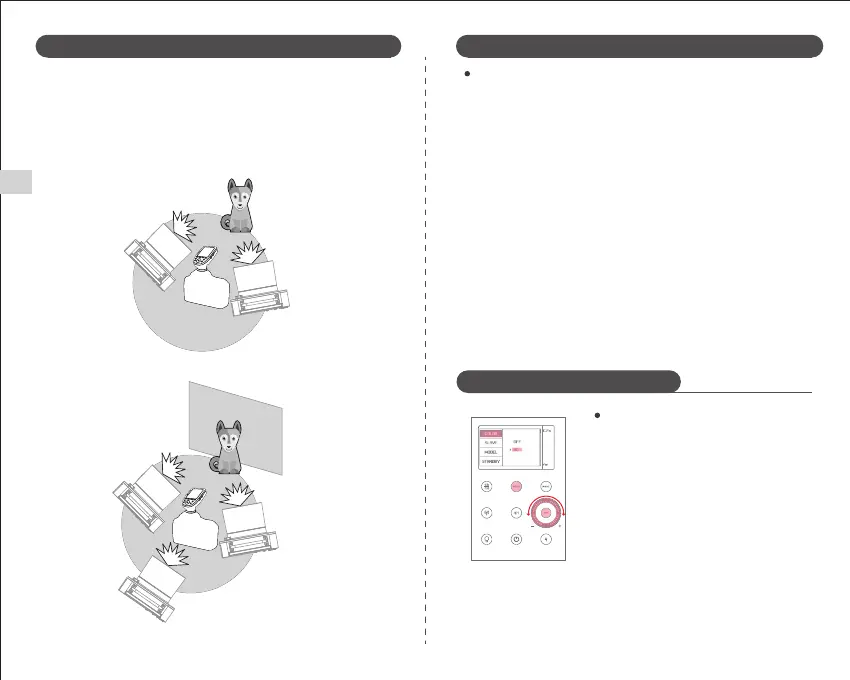
(3) Automatic flash shooting with three slave groups.
Wireless Multi Flash Shooting: Users can split the slave unit into two or three
groups and use TTL auto flash while changing the flash ratio (magnification).
In addition, the flash user can set and shoot with different flash modes for
each flash group.
(2) Automatic flash shooting with two slave groups
① Press the "MENU" button to enter the C.Fn
menu. "Ver x.x" in the lower right corner
indicates the software version number.
② Turn the adjustment knob to select the custom
function icon. Press the "SET" button to highlight
the custom function number.
③ Rotate the adjustment knob to set the required
number. Press the "SET" button to confirm and
press "SET" again to exit the selection.
④ Press the "MENU" button to exit the setting.
10
A
B
A
B
C
1. The external environment 2.4G signal interference (such as wireless base
stations, 2.4G Wi-fi routing, Bluetooth devices, etc.).
Please adjust the channel CH setting of the flash trigger (recommended +10),
find a channel without interference to use, or turn off other 2.4G devices
whilst working.
2. Please confirm whether the flash has been recycled or the recycling time has
kept up with the continuous shooting speed (flash ready indicator has been lit),
and is not in the overheat protection or other abnormal state.
You can try to adjust the flash power setting, such as TTL mode. Please try to
change to M mode (since TTL mode requires a single pre-flash).
3. The distance between the trigger and flash is too close (distance <0.5m).
Please turn on the flash trigger "close to wireless mode":
Qpro series: Set C.Fn-DIST for 0-30m.
4. The flash and the trigger are both low on power.
Please replace the battery (recommended to use 1.5V disposable alkaline type
batteries for the trigger).
C.Fn: Set Customized Function
Causes and Solutions of 2.4G Wireless Flash Leakage
X.X
Wireless Flash Shooting: Wireless (2.4G) Transmission Wireless Flash Shooting: Wireless (2.4G) Transmission
3
10
20
50
80
100
100
3
8
20
50
80
100
100
2
6
20
40
70
90
90
2
5
10
30
60
80
80
2
4
8
20
50
70
70
2
4
8
20
40
70
70
2
4
8
20
40
60
60
2
4
8
18
35
50
50
2
4
8
16
30
40
40
2
4
8
12
20
40
40
EN


 To Next Page