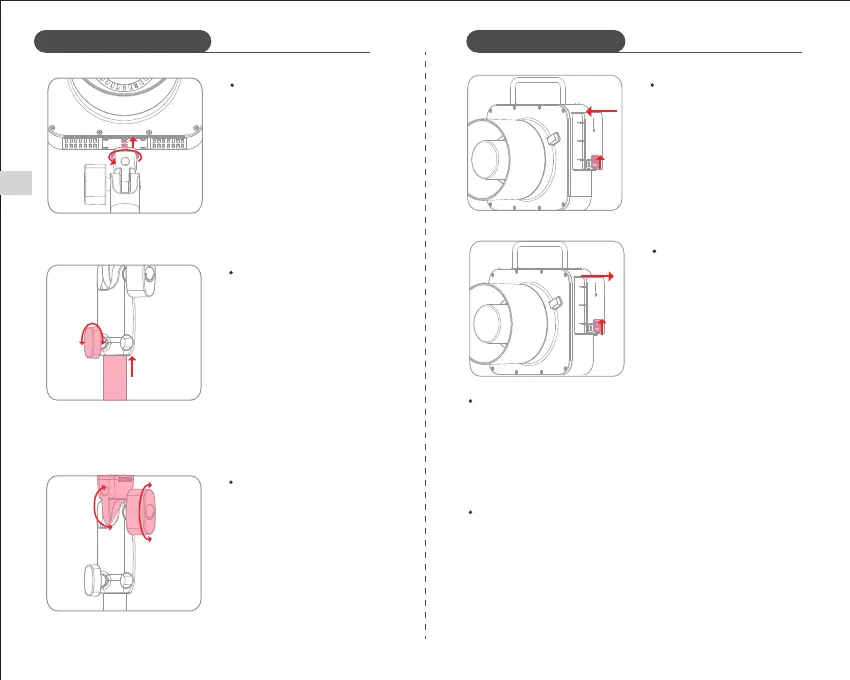
Slide the battery release tab upward,
the battery can be removed after
it automatically pops out.
Simply insert the battery into the
battery slot in the direction shown
until the battery latch locks into
place.
Removing the Lithium Battery
Installation of the Lithium Battery
Insert the screws at the top of the
handle and the two positioning
points as shown. Turn the locking
knob until the handle is secure.
Installing the Handle
04
Insert the top of the tripod into the
bottom of the handle, tighten the
locking knob until the light stand
is securely attached.
※This product does not include
a tripod (separate purchase
required).
Installing the Tripod
Loosen the Angle Locking Knob of
the support bracket, adjust the angle
of the flash to a suitable angle and
then re-tighten.
Adjusting the Angle of the Flash
Using Battery power
Long press the power button for 1 second to control the power of the product.
The device has an automatic shutdown function. It is recommended that you
turn off the power when not to be used for a long period of time.
The flash will automatically turn off when there is no operation within the
time set in C.Fn-STANDBY (30-120min).
Battery Management
1. The product uses a lithium battery, with a long service life, which can be
recharged up to 300 times.
2. Safe and reliable, built-in circuit with protection against overheating,
overcharge, overdischarge , overcurrent and short-circuiting.
3. Use the DC charging port to charge the battery via the included power
adapter. A full charge takes approx. 3 hours.
Battery Features
Installation Instructions
EN


 To Next Page