Modeling Lamp
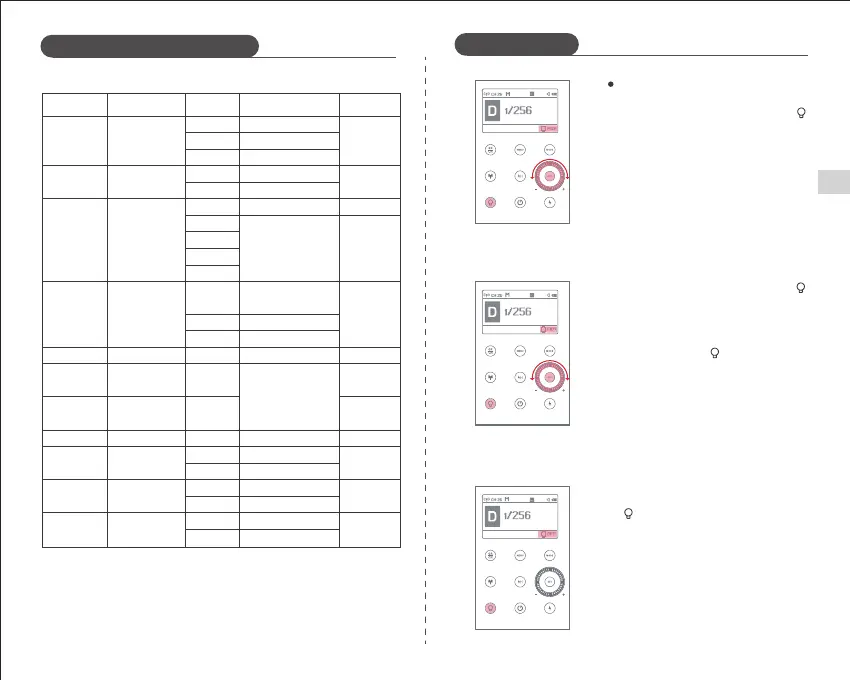
③ Short press the modeling lamp switch button
" " When the modeling lamp and the word
"OFF" appear in the lower right corner of the
screen, the modeling lamp is off.
C.Fn: Set Customized Function
Customized
Functions Icons
SLAVE
MODEL
STANDBY
LIGHT
DELAY
UNITS
ALT
LCD
ID
BEEP
RESET
Functions
M Mode
M Mode
M Mode
Wireless
Mode
M/Multi Mode
OFF
OFF
OFF
01-99
OFF
Reset
ON
Automatic shutdown
without any operation
Turns off automatically
after 15 seconds
Always OFF
7 Levels
Always ON
Rear Curtain Flash Available
UNITS and ALT must be used
in combination: UNITS sets
the total number of lights;
ALT sets how many times
the light is triggered
S1 Mode
S2 Mode
OFF
S1
S2
-3~+3
OFF
01-99
ON
OFF
NO
YES
CONT
INTER
OFF
30min
60min
90min
120min
15sec
OFF
ON
Always ON
Automatically turns off when recycled.
S1/S2 Optic
Mode Selection
Modeling Lamp
Auto Power Off
Backlight
illumination
Duration
Flash Delay
OFF,0.01~30S
Flash Times
Set the number of
triggers required to
fire the flash
1~4
2~4
LCD Contrast
Wireless ID
Buzz Alert
Reset Parameters
Set an Icon
Settings and Instructions
Flash Mode
NOT Supported
① Short press the modelling light button " ".
The modeling light and the word "PROP"
will appear in the bottom right corner of
the screen. You can now change the output
power by rotating the dial to adjust the
brightness of the modeling light. The higher
the power setting, the brighter the
modelling light.
② Short press the modelling light button " ".
The modeling light and the word "PROP"
will appear in the bottom right corner of
the screen. Press and hold the modeling
lamp switch button " " again for 2
seconds. The bottom right corner of the
screen will show a highlighted percentage
which will alter by rotating the adjustment
knob to change the brightness percentage
(10% ~ 100%) .
Modeling Lamp Mode
11
C.Fn: Set Customized Function
EN


 To Next Page