en Familiarising yourself with your appliance
6
5 Familiarising yourself with your appliance
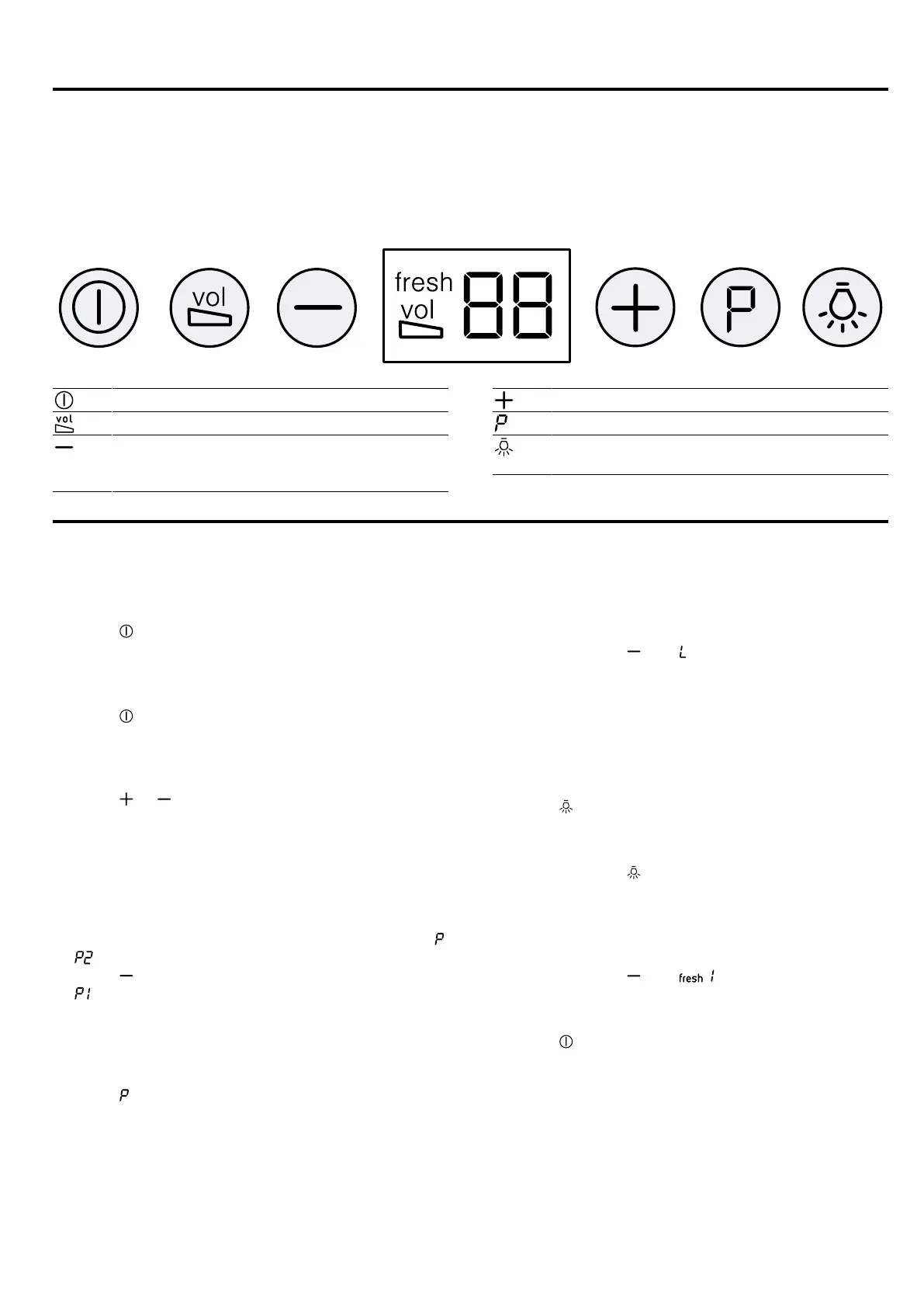
5.1 Controls
You can use the control panel to configure all functions of your appliance and to obtain information about the operat-
ing status.
Switching the appliance on or off
Switching noise reduction on or off
Decreasing the fan setting/
Fan run-on/
AirFresh function
Increase the fan setting
Switching on intensive mode
Switching the lighting on or off/
Setting the brightness
6 Basic operation
6.1 Switching on the appliance
1.
Pull out the filter pull-out.
2.
Press .
a The appliance starts at fan setting2.
6.2 Switching off the appliance
1.
Press .
2.
Slide in the filter pull-out.
6.3 Selecting a fan setting
▶
Press or .
Note:When the filter pull-out is pushed in, only fan set-
tings 1, 2 and 3 can be selected.
6.4 Switching on intensive mode
If particularly strong odours or vapours develop, you
can use intensive mode.
1.
In order to switch on the intensive setting 2, press .
a appears in the display.
2.
Press to switch on the intensive setting 1.
a appears in the display.
a After approx. six minutes, the appliance automatic-
ally switches to a lower fan setting.
6.5 Switching off intensive mode
▶
Press .
a Intensive mode is ended early.
6.6 Switching on the fan run-on
During the fan run-on, the appliance continues to run
for a short time and then switches off automatically.
▶
Press and hold until appears in the display, or
slide in the filter pull-out.
a The appliance switches off automatically after ap-
prox. 10 minutes.
6.7 Switching on the lighting
The lighting can be switched on and off independently
of the ventilation system.
▶
Press .
6.8 Setting the brightness
▶
Press and hold until the required brightness is
reached.
6.9 Switching on the AirFresh function
The fan runs for approx. fiveminutes per hour.
▶
Press and hold until appears in the display.
6.10 Switching off the AirFresh function
▶
Press .


 To Next Page