9Chapter 2 . Basics
Headset inserted
Wi-Fi
Hotspot
No SIM card installed
Screenshots
Mute mode enabled
Airplane mode enabled
Bluetooth enabled
Download status/Bluetooth share: received files
Uploading data/Bluetooth share: sent files
Alarms enabled
Call in progress
Missed calls
New messages
Do not disturb
Battery saver
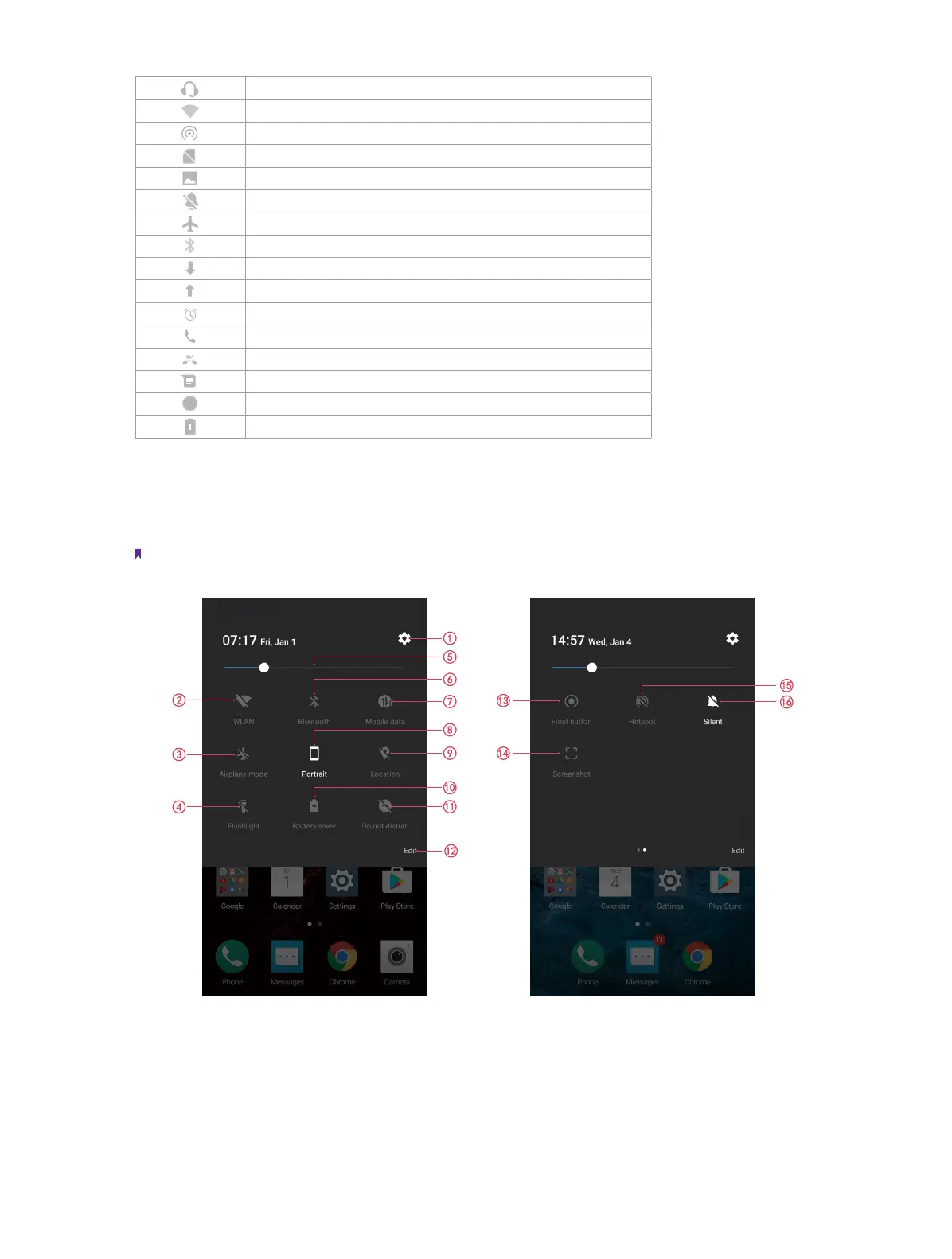
2. 4 Quick settings panel
Swipe down from the top of any screen twice to open the Quick settings panel.
Note: On the Lock screen, swipe only once to open the Quick settings panel.
Touch the shortcut switches on the Quick settings panel to enable or disable the functions.
1. Settings: Tap to configure the settings.
2. WLAN: Tap to enable WLAN.
3. Airplane mode: Tap to enable airplane mode.
4. Flashlight: Tap to enable flashlight.



 To Next Page