Tips
Pen Firmware Updates
For Android Device Users
For All Users
Turn on flight mode to prevent any possible interruption by notification while recording.
Please update the firmware to the latest version. After connect the pen to App, Go to management > Firmware update.
※
Do not disconnect or turn off the power while the update is in progress.
*
For M1(F50), N2(F121) users, please update the pen firmware, to use hover function that indicates the position of the pen on PaperTube app.
Please make sure Bluetooth enabled on your device before connection.
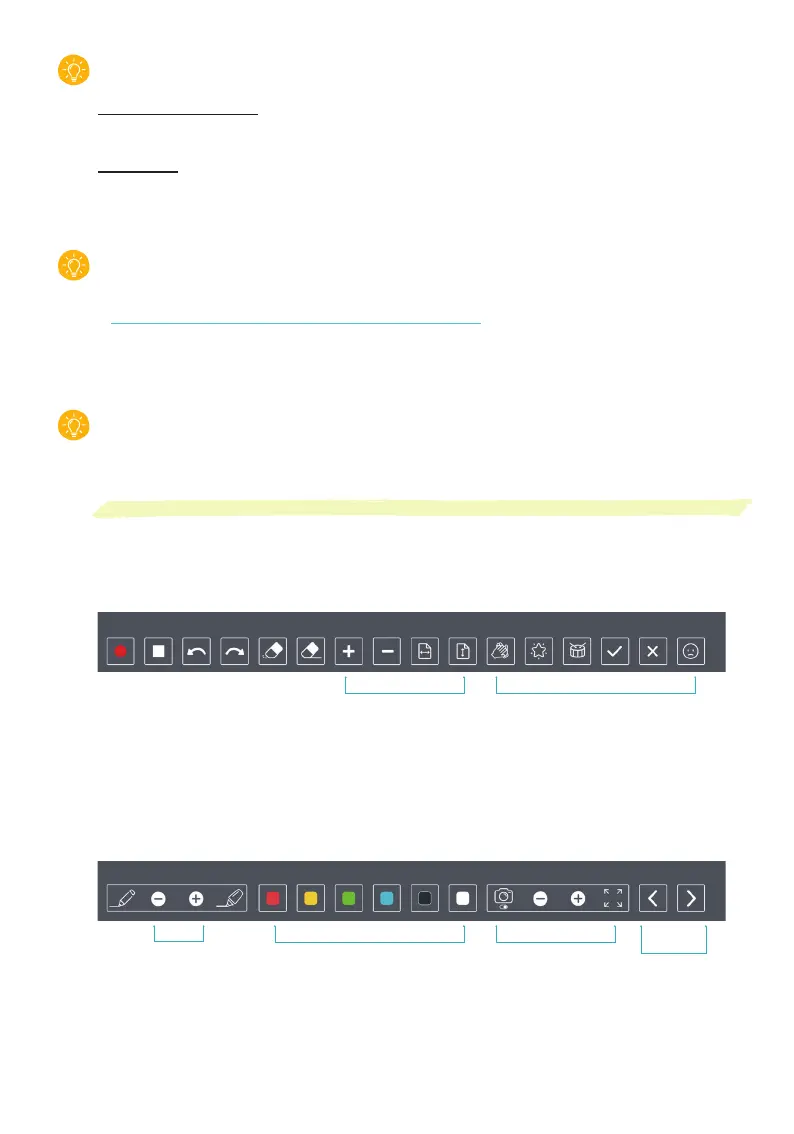
PaperTube™ Controller Function
Connect a Neo smartpen dimo to PaperTube™ app and touch the icon with the pen.
PaperTube controller which can let you select various effects on PaperTube app screen just by touching
with Neo smartpen helps you to create video contents easily without navigating.
1. Start recording
2. Stop recording
3. Undo
4. Redo
5. Eraser
6. Delete all
7. Zoom in
8. Zoom out
9. Page width fit
10. Page height fit
11. Zapplause
12. Magic
13. Drum
14. Pass
15. Fail
16. Disappointed
Sound effectPage Control
1 2 3 4 5 6 7 8 9 10 11 12 13 14 15 16
17. Ballpoint pen
18. Stroke thickness down
19. Stroke thickness up
20. Highlighter
21. Red
22. Yellow
23. Green
24. Light Blue
25. Black
26. White
27. Camera on/off
28. Camera opacity down
29. Camera opacity up
30. Camera full-view
31. Previous Page
32. Next Page
Camera Control
For PDF
documents
Pen ColorsThickness
17 18 19 20 21 22 23 24 25 26 27 28 29 30 31 32


 To Next Page