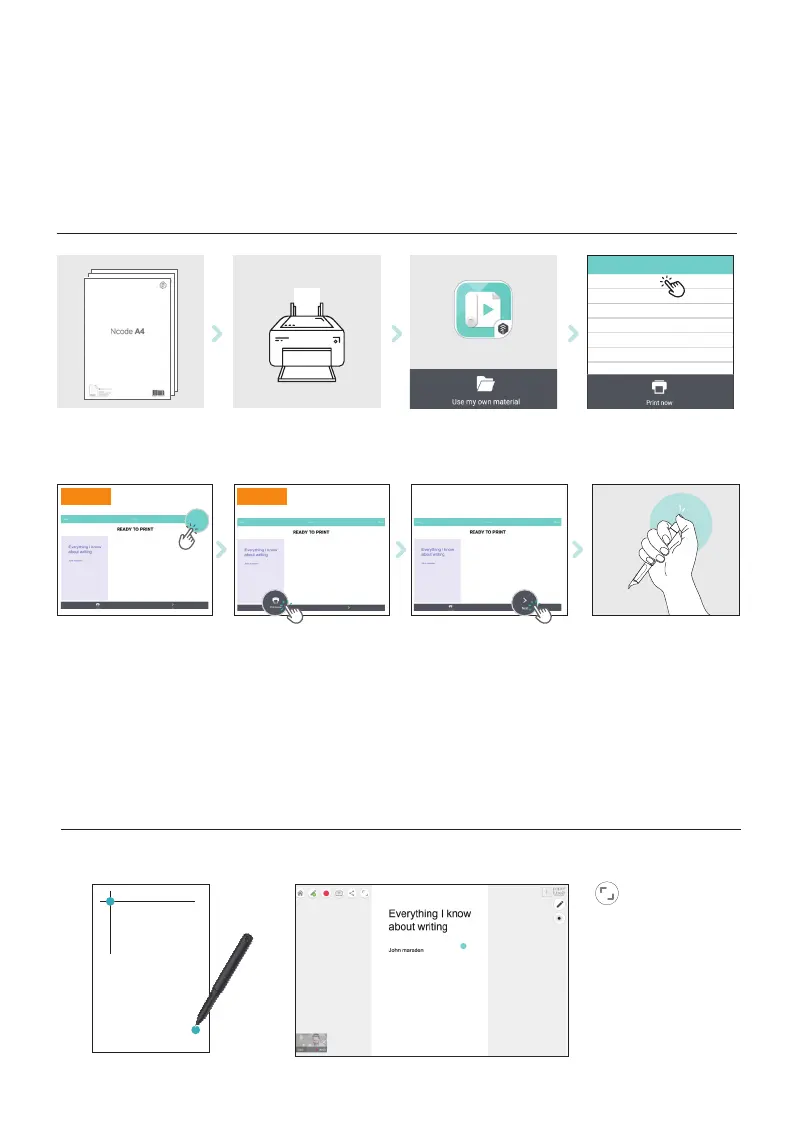
USE MY OWN MATERIAL_Print mode
※
Ncode imprinted paper product needed. shop at Amazon.com
※
For matching the paper and the screen of PaperTube app, please follow the on-screen instructions.
Connecting the pen to App
Calibration
Prepare Ncode A4
option 1. Share the file
and print on PC.
option 1. option 2.
Insert Ncode A4 into paper
tray of the printer
option 2. Print from
smart devices.
Select ‘use my own material’
When printed Ncode A4
is ready, touch ‘Next’
Browse and select pdf.
Then, start print mode
Turn on the pen and
connect to App
showcase your story.pdf
make a video with a pen.pdf
Ncode A4
Printed
Ncode A4
Adjust calibration
This process will adjust the
writing area and the app screen
area to be synchronised.
Share


 To Next Page