Appendix B
MACH 10 Residential Ultrasonic Meter Installation and Maintenance Guidee 31
Activating the MACH 10)R450i
Complete the following steps to activate and test the MACH 10)R450i.
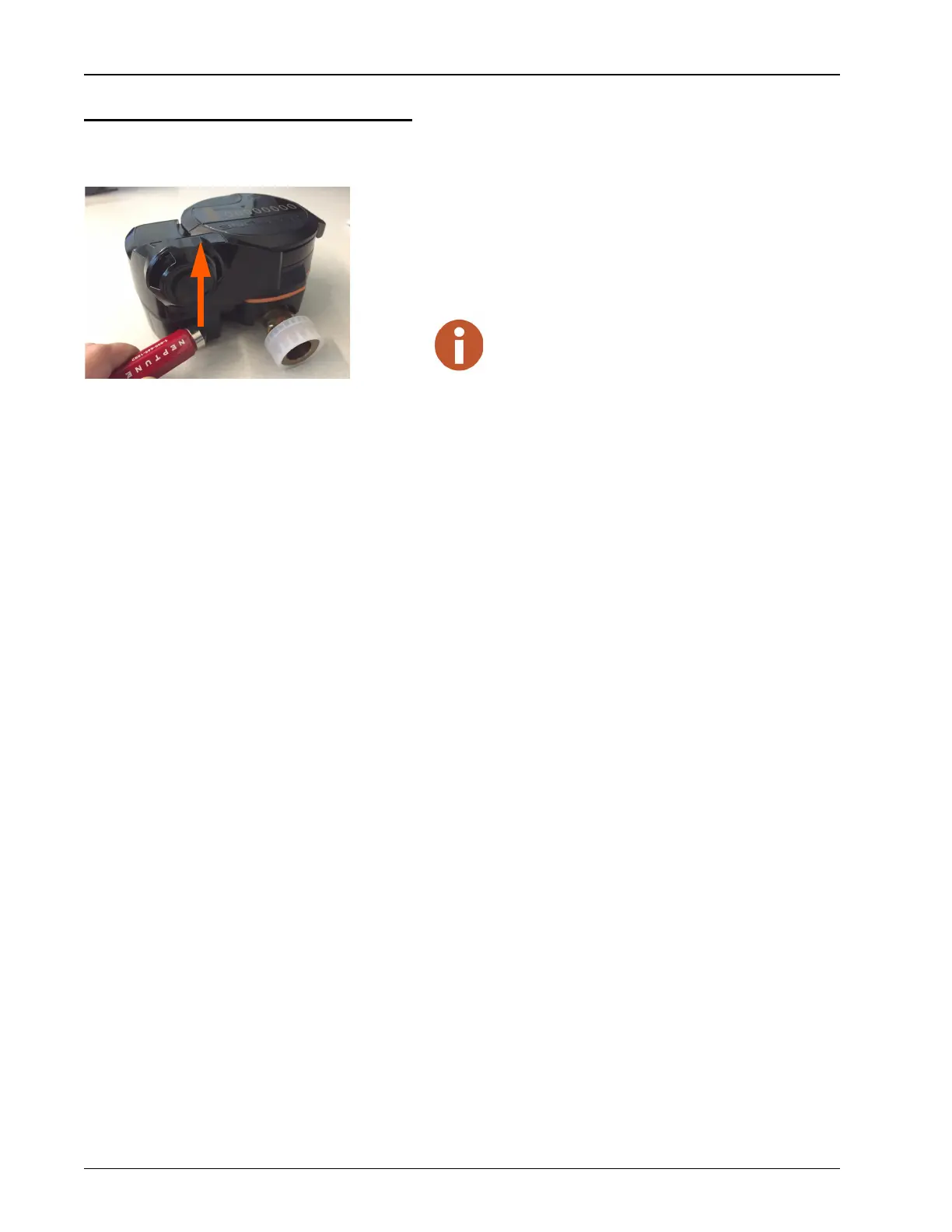
1 Position the magnet over the magnetic area on MACH 10)R450i, as
shown in Figure 22.
2 Start at the bottom of the register box and bring the magnet up
towards the top.
Figure 22 Magnet Activation of the MACH 10)R450i
Result of Activation
After the MACH 10)R450i is activated:
• The MACH 10)R450i transmits its configuration packet to the
collector approximately 30 seconds following the magnet swipe.
• The MACH 10)R450i sends the register reading to the collector
approximately 15 seconds following the configuration packet.
• When the collector receives the configuration packet, the host sends
an email or Short Message Service (SMS) confirmation to the
installer to allow for verification of proper installation and
MACH 10)R450i location. The following is an example of the
email text.
Example of MACH 10)R450i Config Email
Subject: 1224/G/-89/US 29/MIU Config
MIU RSSI...............Pass[-93]
Collector RSSI.........Pass[-89]
Register...............Valid Read
Collector..............US 29
Signal/Noise...........37
Noise..................126
MIU ID.................110001224
================================
During the 30 seconds before the configuration
transmission, the MACH 10)R450i acquires the strongest
R450 Data Collector (R450 DC) for that location.


 To Next Page