Saturn B/M Enhanced Functions – Chapter 1. Introduction
1.6
Password Cont’d
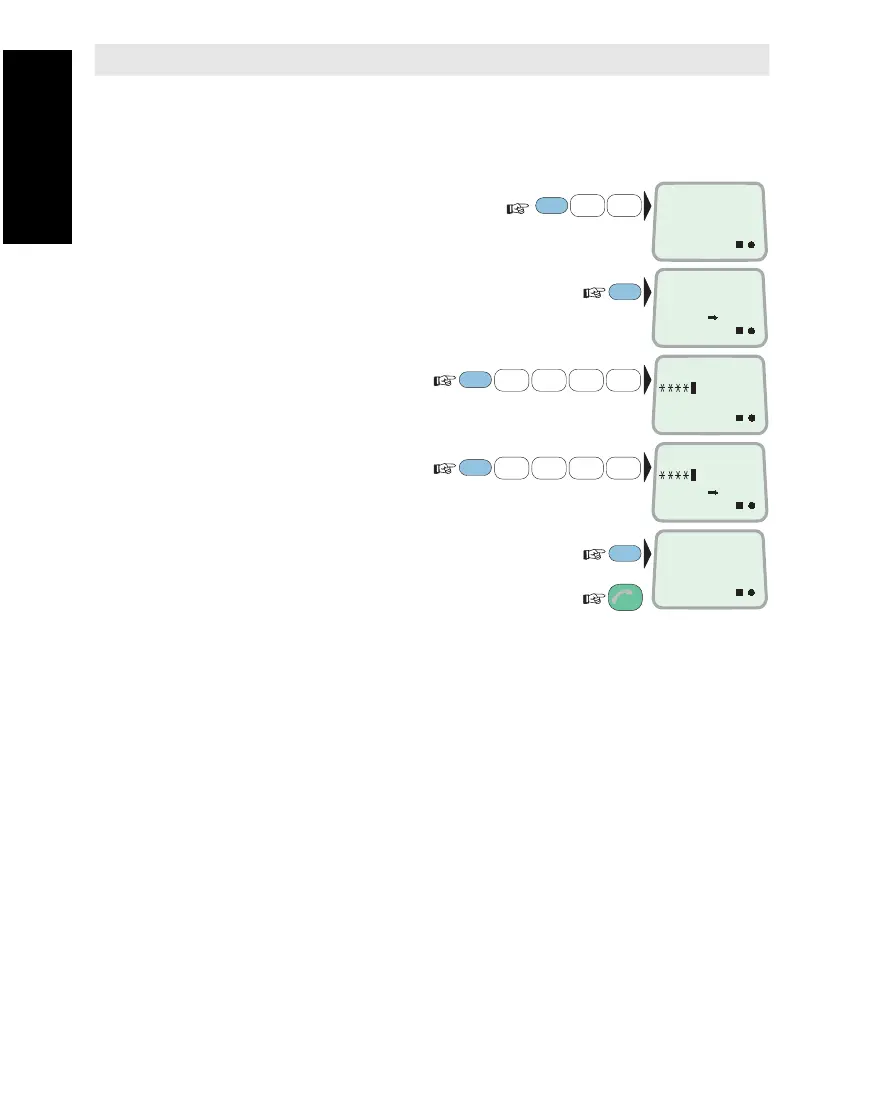
Setting Password from RENTER Level
The procedure below assumes that the Saturn terminal is set in
RENTER access level, see "Renter/Owner Level".
1 Select SET PASSWORD
function (13):
2 Current level:
3 Key in new RENTER
password, e.g. 1 2 3 4 :
4
Verify RENTER password:
The verified password is correct:
Revert to IDLE:
Regaining Default RENTER Password
If accidentally losing the password, it can be reset to the default
password 1 2 3 4 5 6.
Proceed as under "Renter/Owner Level: To Set Access Level".
1 Select SET USER LEVEL function (12).
2
Display current level.
3 At the "LEVEL" prompt, key in 9 9 9.
4 At the "PASSWORD" prompt, key in the restore code provided by
the agent.
5 The RENTER password is now reset to default password
1 2 3 4 5 6.
Regaining Default OWNER Password
The OWNER password is reset to default value as described above,
except that the restore code must be provided by the manufacturer.
FUNC
ON
1
ABC
3
GHI
SET
PASSWORD
13
4
JKL
1
ABC
2
DEF
PLAY
3
GHI
ENTER
4
JKL
1
ABC
2
DEF
PLAY
3
GHI
ENTER
ON
PASSWORD FOR
RENTER
ESC
3x
ENTER
ON
PASSWORD FOR
RENTER
ENTER
NEW PASSWORD
ON
VERIFY
ON
Password Cont’d



 To Next Page