Saturn B/M Enhanced Functions – Chapter 3. Optional 3.3
Restricted LES
General
The terminal may be programmed to restrict calls from selected ports
to be made through the default Land Earth Station for each Ocean
Region.
Blocking an Ocean Region is achieved by setting its default Land
Earth Station to LES0.
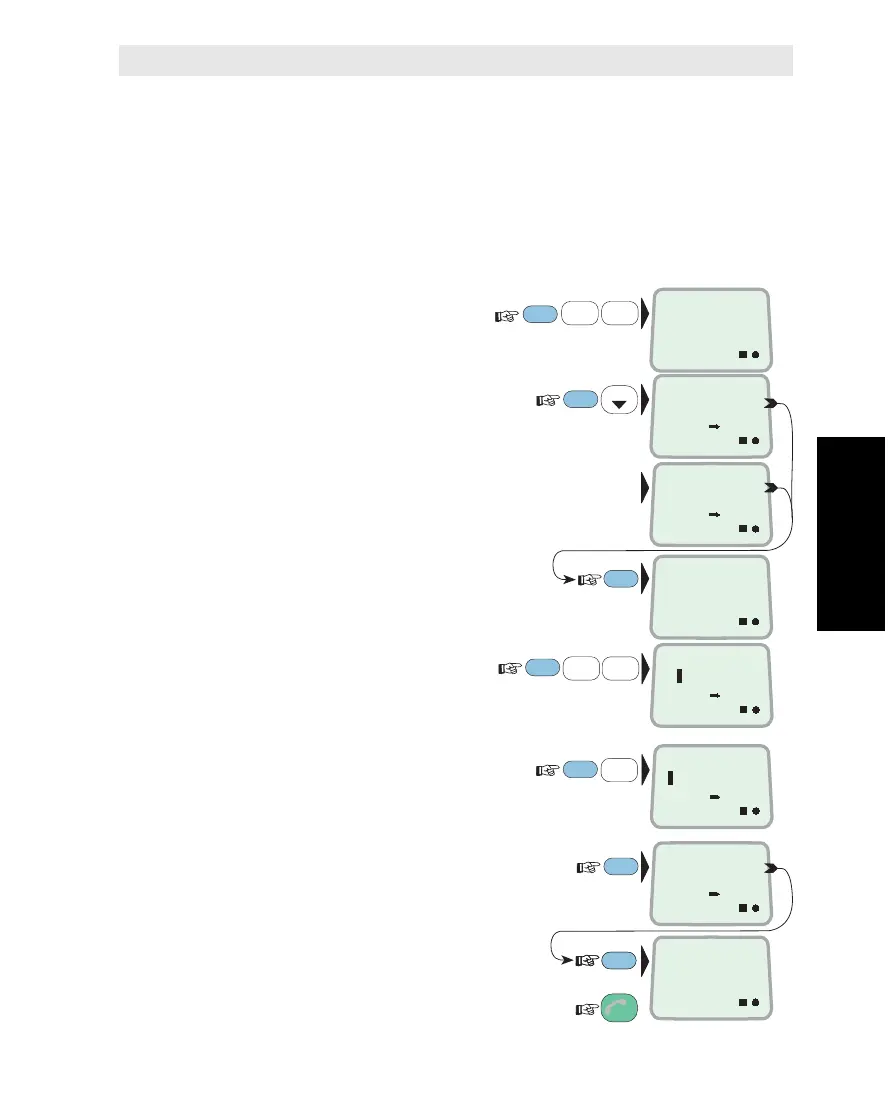
Activation
1 Select ENHANCED
SETUP function (89):
2 Scroll down to check which
ports are currently restricted:
If no ports are LES restricted:
Current operation status (SETUP
operation requires OPERATOR level):
If PASSWORD PROTECTED, refer
to "Renter/Owner Level".
3
Select HANDSETand TEL.1 ports:
0=handset, 1-5=TEL.1 - 5
(Use DEL to deselect ports)
4
Assign operation access level, e.g. 4:
2=OPERATOR, 3=RENTER, 4=OWNER
5 Verify settings:
and revert to IDLE:
FUNC
ON
MORE/
HELP
9
LIGHT
YZÆ
8
VWX
TAX
1
ABC
LIST
0
ÄÖÜ
4
JKL
ENHANCED
SETUP
89
ON
RST LES
PORTS: 35
ON
RST LES
PASSIVE
ON
OPER.
– –
ON
WHICH PORTS
01
ENTER
ENTER
ON
RST LES
PORTS: 01
ENTER
ON
OWN.
– –
ESC
3x
MORE/
HELP
MORE/
HELP
ENTER
ON
SETUP OPE.
4
Restricted LES



 To Next Page