EasyManua.ls Logo

Ness ELK-IP232 - User Manual

Ness ELK-IP232
14 pages
Print Icon
To Next Page IconTo Next Page
Loading...
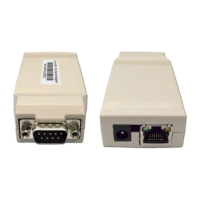
ELK-IP232
Ethernet to Serial Bridge
INSTALLATION
AND CONFIGURATION
MANUAL
http://www.ness.com.au
email: support@ness.com.au
1/07

Questions and Answers

  • L
    Lauren BarnesJul 30, 2025
    How to fix Ness Network Router if IP232 Configuration Utility cannot find ELK-IP232?
    • K
      Kristina RobinsonJul 30, 2025
      If the IP232 Configuration Utility cannot find the ELK-IP232, ensure the IP232 is powered on and connected to the network. Allow one minute after powering up for the initialization to complete before attempting to “Find” it with the utility. Verify all cable connections and check if the green LED on the RJ45 connector is blinking, which indicates network traffic. Use the “DEFAULT” jumper to set the DHCP/IP address to known values. If your network router isn't assigning IP addresses, or the IP232 has a static address, use a crossover cable for a direct connection from the PC to the IP232.
  • C
    Christopher HinesAug 15, 2025
    What to do if Ness Network Router cannot connect to the serial port?
    • K
      Katie CookAug 15, 2025
      If your Ness Network Router cannot connect to the serial port, use the IP232 configuration utility to note the baud rate and flow control settings. Verify the connected serial device is configured accordingly. The connected serial device must be set for 8 data bits, no parity, and 1 stop bit. If flow control is enabled, try temporarily disabling it on both ends. If hardware flow control is required, verify the cable is wired for it. Test the cable by connecting it between two other devices and verifying they communicate correctly.

Summary

Features and Specifications ELK-IP232

Basics of Networking for ELK-IP232 Setup

Installation and Hookup of ELK-IP232 Bridge

About USB to RS232 Serial Adapters

Discusses compatibility and recommendations for USB to RS232 adapters for the IP232.

Configuration and Setup for ELK-IP232

Basic Network Setup for IP232

Outlines initial steps for connecting the IP232 to a local network using DHCP or static IP.

Notes on Flow Control and Router Setup

Connecting to the ELK-IP232 Over a Network

Bench-testing and Specific System Setup for ELK-IP232

Updating the ELK-IP232 Firmware

Troubleshooting Guide for ELK-IP232

Forcing DHCP;IP Settings and Glossary of Terms

Ness ELK-IP232 Specifications

General IconGeneral
ModelELK-IP232
CategoryNetwork Router
ProtocolsTCP/IP, UDP
Power Supply12V DC
Operating Temperature0°C to 40°C

Related product manuals