EasyManua.ls Logo

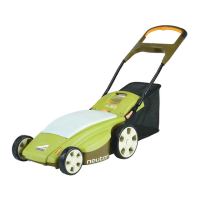
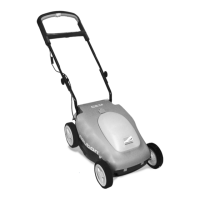
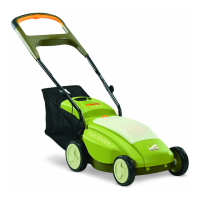
Neuton EM 5.1 - User Manual

Neuton EM 5.1
52 pages
Print Icon
To Next Page IconTo Next Page
Loading...
Cordless Electric Mower
Safety &
Operating
Instructions
Model: EM 5.1
COUNTRY HOME PRODUCTS
®
, INC.
www.neutonowners.com

Table of Contents

Questions and Answers

  • A
    alicia53Jul 30, 2025
    What to do if my Neuton EM 5.1 Lawn Mower battery loses charge quickly?
    • T
      Tyler BallJul 30, 2025
      If your Neuton Lawn Mower battery loses charge quickly, ensure it was fully charged before use. Charge the battery if needed. Note that it may take at least five charges to achieve maximum cutting time. The grass may be too high or thick, so try raising the cutting height or mowing a narrower swath. Also, the battery may be old and need replacement after a few years.
  • B
    Brittany AndersonAug 5, 2025
    How to fix a Neuton EM 5.1 Lawn Mower rear bagger that isn't collecting grass well?
    • K
      Kristin RodriguezAug 5, 2025
      If your Neuton Lawn Mower rear bagger isn't collecting grass effectively, start by checking if the bagger is full; empty and clean it if needed. The grass might be too long, or the mower might be cutting too low, so raise the cutting height. You may also be moving too fast, so slow down. Check for clogs in the rear discharge; remove the safety key and battery, turn the mower over, and clear any debris from the rear discharge plate and below the deck. Clean the mesh holes on the rear bagger if they are clogged. If the rear bagger is wet, allow it to dry completely before using it again.
  • B
    Brandon CampbellAug 11, 2025
    Why is my Neuton EM 5.1 Lawn Mower vibrating so much?
    • P
      Patricia CookeAug 12, 2025
      Excessive vibration in your Neuton Lawn Mower could be due to a loose blade. To resolve this, remove the safety key and the battery, then turn the mower over and ensure the blade is tightly attached. Alternatively, the blade might be unbalanced, bent, or damaged. In this case, remove the safety key and battery, turn the mower over, remove the blade, and inspect it. Replace the blade if necessary.
  • J
    Justin ShieldsAug 17, 2025
    Why is my Neuton EM 5.1 Lawn Mower hard to push?
    • J
      John CallahanAug 17, 2025
      If your Neuton Lawn Mower is hard to push, the grass may be too high or thick. Try raising the cutting height or narrowing your cutting swath. Another possibility is that the wheels may not be rotating freely. Remove the safety key and battery, turn the mower over, and check the wheels for any damage.
  • Q
    qmcdonaldAug 23, 2025
    What to do if my Neuton EM 5.1 Lawn Mower is not cutting grass well?
    • J
      Jennifer OsborneAug 23, 2025
      If your Neuton Lawn Mower's cutting performance is unsatisfactory, first check if the battery was fully charged. Charge it if necessary. The blade may be dull, bent, loose, or damaged, so remove the safety key and battery, turn the mower over, and inspect the blade. Sharpen or replace the blade, if required. Also, the grass may be too high or thick for the current cutting height. Try raising the cutting height or narrowing your cutting swath.

Summary

Chapter 2: Important Safety Considerations

Safety and Information Labels

Identifies and explains warning and danger labels on the mower.

Protecting Yourself and Those Around You

Provides essential safety guidelines for the operator and bystanders.

Dressing Appropriately

Advises on suitable clothing and protective gear for mowing.

Chapter 3: Setting Up Your NEUTON Mower

Chapter 4: Operating Your NEUTON Mower

Pre-Start Checks

Lists essential checks to perform before starting the mower each time.

Starting the Motor and Engaging the Blade

Explains the correct procedure for starting the mower's motor and blade.

Stopping the Motor and Blade

Describes how to safely stop the mower's motor and blade.

Chapter 5: Charging and Caring for the Battery

Charging the Battery

Details the process for charging the mower's battery.

Recharging After Each Use of the Mower

Emphasizes the importance of recharging the battery after every use.

Chapter 7: Maintaining and Storing Your NEUTON Mower

Cleaning Your Mower

Details the process for cleaning the mower to ensure peak performance.

Removing and Attaching the Blade

Explains how to safely remove and attach the mower blade.

Sharpening the Blade

Provides instructions on how to sharpen the mower blade for optimal cutting.

Chapter 8: Troubleshooting Tips

Mower stops while mowing (for reasons other than releasing the control bar)

Helps diagnose and resolve unexpected mower stoppages.

Excessive vibration or noise

Provides solutions for problems related to mower vibration and noise.

Mower runs, but cutting performance is unsatisfactory, or there is a loss of power

Helps diagnose issues with poor cutting performance or loss of power.

Operating Your Mower

LIMITED TWO-YEAR WARRANTY

Neuton EM 5.1 Specifications

General IconGeneral
Power SourceBattery
Battery Voltage40 V
Cutting Height AdjustmentCentral
Voltage40 V
Motor TypeBrushless
TypeElectric Lawn Mower

Related product manuals