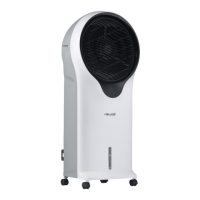
The NewAir Evaporative Air Cooler (SKU: NEC500WH00) is designed to provide efficient and convenient cooling for your indoor spaces. This evaporative cooler functions by drawing in warm, dry air, passing it over a water-saturated cooling pad, and then releasing cooler, moisturized air into the room. This process not only lowers the ambient temperature but also adds humidity, making it particularly effective in dry climates.
Usage Features:
The evaporative cooler is user-friendly and comes with both a control panel on the unit and a remote control for convenient operation.
Power and Speed Control:
- To turn the unit on, press the "ON/SPEED" button.
- To adjust the fan speed, press the "ON/SPEED" button repeatedly until your desired speed (Low, Medium, or High) is reached. The current fan speed will be indicated on the display panel.
- To turn the unit off and return to standby mode, press the "OFF" button.
Cooling and Humidifying Function:
- After selecting the desired fan speed, press the "COOLER/HUMIDIFIER" button to activate the cooling and humidifying function. This engages the water pump, which circulates water over the cooling pad, thereby cooling and adding moisture to the air. A blue cooling icon will appear on the display panel when this function is active.
- Important Note on Fan Speed 3: If the initial fan speed is set to 3, the unit will automatically revert to speed 2 for five minutes. This allows the cooling pad to become thoroughly saturated with water for optimized cooling. After five minutes, the unit will automatically switch back to speed 3. If the initial fan speed is set to 1 or 2, this temporary speed adjustment will not occur.
Airflow Modes:
The NEC500WH00 offers two automatic airflow modes, which can be selected by pressing the "MODE" button:
- Natural Mode: Indicated by a palm tree icon on the display panel, this setting adjusts the airflow speed between 1, 2, and 3, simulating a natural breeze.
- Sleep Mode: Indicated by a moon icon, this setting cycles through fan speed settings and gradually lowers the speed at different intervals, depending on the initially selected fan speed, to provide a quieter operation during sleep.
Timer Function:
- The evaporative cooler is equipped with a 7.5-hour programmable timer.
- To set the timer, press the "TIMER" button. Each press adds 0.5 hours to the set time. The set time will be displayed in the middle of the display panel.
Oscillation Feature:
- To activate the oscillation feature, press the "SWING" button. The fan head will automatically oscillate counterclockwise, directing cool air in a cyclone pattern for a more focused cooling effect.
Water Tank and Ice Pack Usage:
- Filling the Water Tank: To fill the water tank, turn the water tank knob counterclockwise 90° to remove the tank. Before first use, it is recommended to clean the tank with warm water and a light detergent solution. Fill the tank with clean water, ensuring not to overfill it by observing the water level indicator on the front of the cooler. Replace the tank by turning the knob clockwise 90° to lock it in place.
- Ice Pack for Enhanced Cooling: The unit includes an optional ice pack for additional cooling. Freeze the ice pack before use. Do not open the ice pack or ingest its contents. Place the frozen ice pack into one of the water tank's chambers. The ice pack is not essential for operation but will enhance the cooling effect, especially in higher temperatures, and will last approximately four hours before melting.
Safety Features:
- Low Water Level Alert: If the water level in the tank drops below the minimum level, the unit will emit an audible alert for ten seconds and then automatically turn off.
- Water Tank Removal Safety: If the water tank is removed while the unit is operating, the cooler will automatically turn off.
Remote Control:
- The NEC500WH00 comes with a remote control that uses a CR2032 3V coin-type battery (included). Aim the remote control at the unit to select functions. The effective range is approximately 24 inches. The remote control offers buttons for "ON/SPEED," "OFF," "TIMER," "SWING," "COOLER/HUMIDIFIER," and "MODE."
Maintenance Features:
Regular cleaning and maintenance are crucial for the longevity and optimal performance of your evaporative cooler.
General Maintenance:
- Always unplug the evaporative cooler from the power supply before performing any servicing or cleaning.
- Clean the unit's exterior with a soft cloth and a mild soap and warm water solution. Avoid harsh cleaners, gasoline, paint thinner, or benzene, as these can damage the cooler.
- Thoroughly dry all parts with a soft cloth before reconnecting to the power supply.
- Empty the water tank after each use. Regular, scheduled cleaning of the water tank before each use is also recommended.
- If the evaporative cooler will be stored for an extended period, place it back in its original carton and keep it in a clean, dry place.
- The filter, tank, and cooling pad need to be removed for cleaning. After cleaning, reassemble them in the following order: water tank, cooling pad, and dust filter.
Cleaning the Dust Filter:
- To prevent clogging, clean the dust filter at least once a month.
- Remove the dust filter from the back of the unit by pushing down on the two tabs above the filter and pulling it out.
- Gently scrub the filter with a soft brush and rinse with water.
- Allow it to air dry thoroughly before placing it back into the unit.
Cleaning the Cooling Pad:
- First, remove the dust filter to expose the cooling pad.
- Turn the knob on the pad clockwise and pull the pad out from the back of the unit.
- Rinse the cooling pad with clean water.
- Allow it to air dry thoroughly before placing it back into the unit.
Cleaning the Water Tank:
- Unplug the evaporative cooler and empty the water tank after use.
- Rinse the water tank with a warm water and light detergent solution or a water and vinegar solution.
- Rinse it with clean water and dry it thoroughly before placing it back into the cooler.
By following these instructions, you can ensure your NewAir Evaporative Air Cooler operates effectively and remains in good condition for a long time.

 Need help?
 General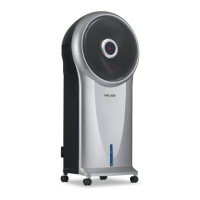




 To Next Page