Instructions
Newlec Helpline: 0800 783 6909
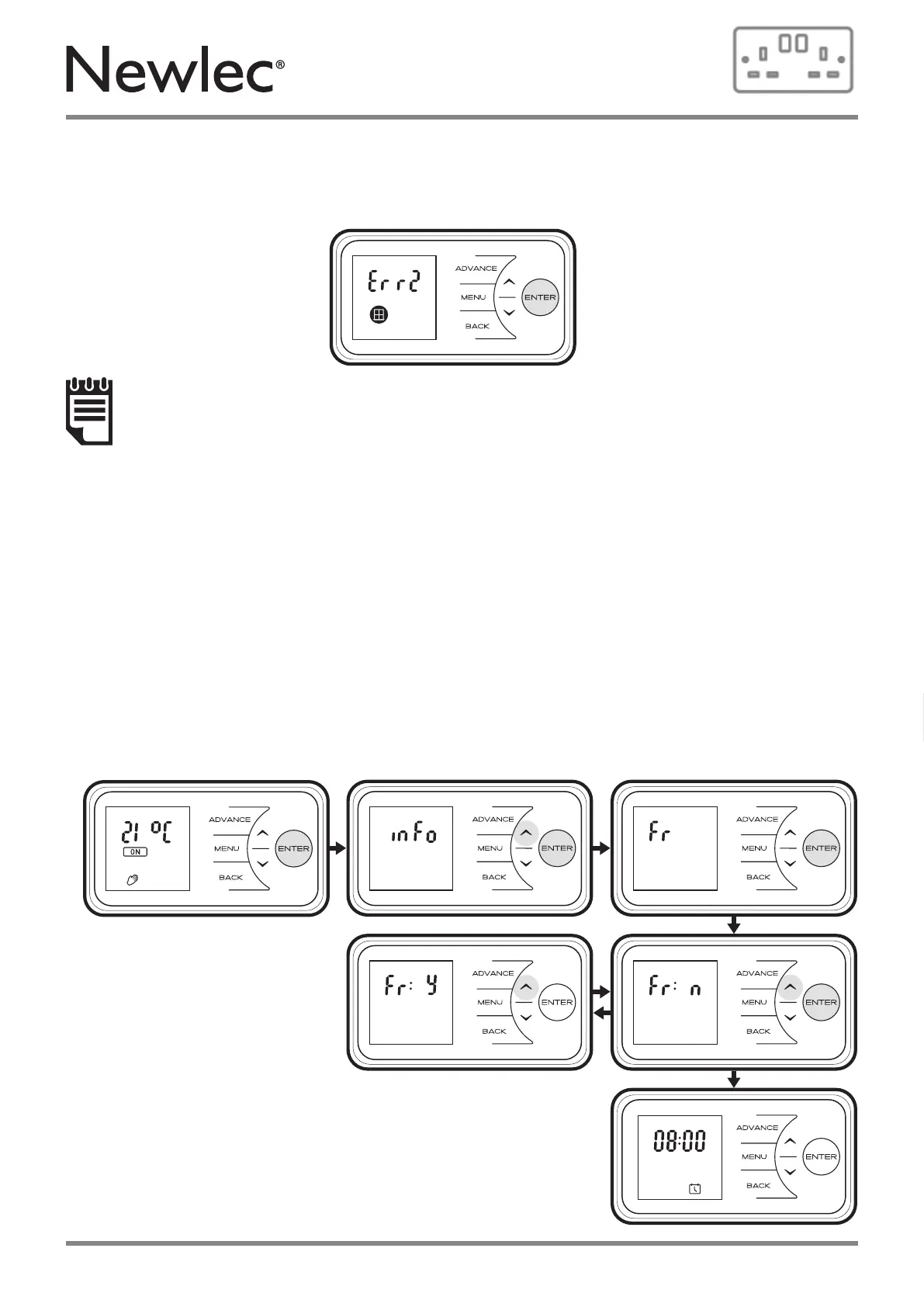
Factory reset - Returns all settings to factory pre-sets.
• Press & hold Enter button for 5 seconds
• Press Down or Up to view Factory reset screen
• Press Enter to see factory reset options
• Press Down or Up to toggle between Y and N for reset.
• Press Enter to confirm
Factory reset sequence will now take place, you will then be prompted to reset the time/date,
see “Setting the Date and Time” on page 16.
Hold the Enter button for 10 seconds to cancel the error message
NOTE:
In environments where the product may read sudden decreases in temperature, this
feature may activate in error. This can occur in drafty or poorly insulated environments
as well as if the heater is undersized for the room. This feature should be disabled using
the instructions above if activating for reasons other than the intended purpose. If you
think that your environment is not as described here and this feature is activating, please
contact our customer care team with the details on the rear page of this document.
If Open Window detection is activated an Error Message will be displayed if the Heater
detects an open Window “Err 2” will be displayed and the backlight & icon will flash.
24



 To Next Page