Instructions
Newlec Helpline: 0800 783 6909
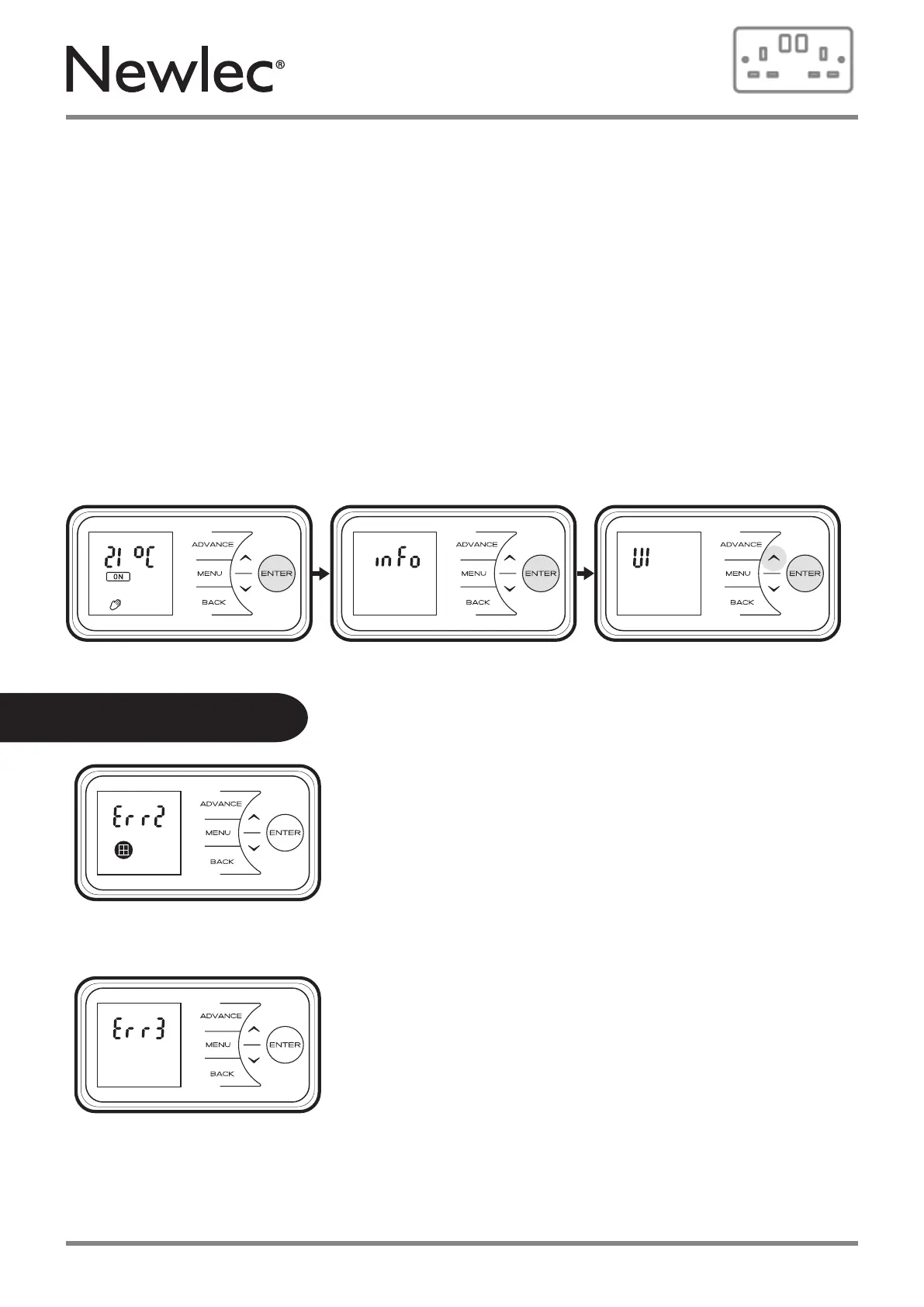
Service/User Info – Service info is displayed: UI rev, product ID
• Press & hold Enter button for 5 seconds
• Press Enter to view Info screen
• Press Enter to view UI revision number
• Press Back to return to UI screen
• Press Up to move to product ID screen
• Press Enter to view Product ID number
Product ID is a 12 digit code, spread across 3 screens
• Press Down or Up to scroll through the ID number
• Press Enter to return to product ID screen
Press Back 3 times to return to the home screen.
Error message 2 will be displayed when the product
detects an open window in the room.
This error can be cleared by holding the Enter button for
10 seconds. Refer to the Open Window Detection Function
on page 23 and 24 for further details.
Error message 3 will be displayed on screen if the
product has overheated.
This error can be cleared by removing the
obstruction from the heater then holding the
Enter button for 10 seconds.
Error Messages
25



 To Next Page