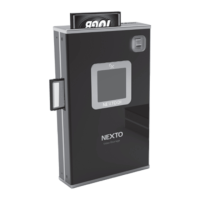
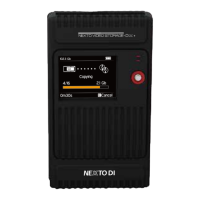
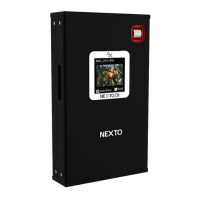
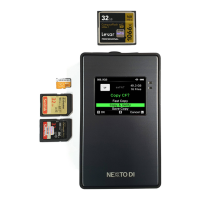
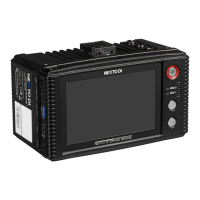
The NEXTO STORAGE BRIDGE (NSB-25) is a modular memory card backup system designed for professionals who need reliable data backup in the field without a PC. It offers a comprehensive solution for backing up and managing various memory card formats, as well as providing video and picture preview capabilities.
Function Description
The primary function of the NSB-25 is to back up data from memory cards to internal hard drives or SSDs. It features a 2.5-inch SATA hard drive or SSD slot and an internal Li-Poly rechargeable battery, making it suitable for use in locations without an electrical power source. The device supports a wide array of memory card formats, including SxS, XQD, CFast, P2, Express P2, AXSM, REDMAG, AJA Quad, CF, SD, SDHC, and SDXC, through its built-in slots and expandable bridge memory modules.
One of its key features is the ability to perform simultaneous backups to multiple drives, known as MCopy. This allows the NSB-25 to create three copies of data concurrently: two to internal hard drive modules and one to an external USB 3.0 (or RAID) drive. This multi-copy function enhances data reliability and provides redundancy for critical footage. When only one Bridge Pellet or one USB external drive is equipped, the device operates in XCopy Ready mode, performing a single copy. If two or more Bridge Pellets or one USB external drive are equipped, it switches to MCopy Ready mode for multi-copy operations.
The NSB-25 also includes a Sync function, which copies all files from one internal drive module to another. This intelligent feature only copies files and folders that have changed since the last synchronization, optimizing backup time and storage. Additionally, an Export Folder function allows users to move selected folders from an internal hard drive module to another drive when multiple storage units are connected.
Beyond backup, the NSB-25 can play back 2K video clips and preview 4K clips on its 5-inch color TFT LCD monitor or an external monitor via its HDMI interface. This enables users to review their footage directly on location, ensuring content integrity before leaving the shoot.
For computer connectivity, the NSB-25 can be connected to a PC via its USB 3.0 interface, functioning as an external hard drive. This allows for easy data transfer to a computer. However, it's important to note that when connected to a computer, the NSB-25 cannot act as a memory card reader for other connected memory cards or external USB hard drives.
Usage Features
The NSB-25 is designed for ease of use, with all functions operable via three buttons (Power, Enter, Back) and a touch screen LCD. The LCD displays the operative status and provides a clear interface for navigation.
Memory Card Backup and Verify:
When a memory card is inserted, the NSB-25 parses the card, comparing its data with existing backups to determine if it contains new or previously copied data.
- Fast Copy: Creates a new folder on the hard drive (or SSD) and copies all memory card data into it.
- Copy & Verify: Similar to Fast Copy, but after copying, it compares the data on the memory card with the copied data on the hard drive, verifying each bit for accuracy.
- Safe Copy: Before copying, the hard drive (or SSD) is verified for bad sectors. If detected, copying begins in a new, safe area.
- If a memory card has been previously copied and not modified, users can choose to Verify the data, Copy again (creating a new folder), or Delete the data on the memory card for reuse.
Hard Drive Installation:
The device includes two slots for Bridge Pellets (sold separately), which can house 2.5-inch SATA hard drives or SSDs up to 9.5mm in height. Installation involves covering the drive with a protection rubber filler, connecting it to the bridge pellet's connector, and securing the aluminum case with screws. Bridge Pellets and memory card modules are interchangeable and easily carried.
External USB Hard Drive Support:
The NSB-25 can connect to an external USB 3.0 hard drive, enabling copy and sync functions to this external storage. This allows for creating multiple copies of data simultaneously, enhancing backup reliability.
Video and Photo Playback:
The "Show Video & Photo" function allows users to browse folders and view video clips and photos stored on the bridge pellet, external drive, or memory card. Thumbnails of video files are displayed, and the device indicates "Unsupported" for files it cannot play. During video playback, users can control total play time, progress of play (with fast seeking), current play time, play speed, play/pause, audio level, and volume. HDMI output is available for viewing on external monitors.
Folder Management:
Users can browse a list of backup folders, view details like total files, total size, and the number of video and photo files. The device also allows for deleting selected backup folders.
Hard Drive (or SSD) Management:
This section provides tools for managing the bridge pellet and USB external drives.
- Drive Info: Displays total capacity and used space of the selected drive.
- Self Test: A built-in utility to detect physical errors on the hard drive. It offers a SMART Test (quick test) and a Full Test (comprehensive sector-by-sector scan). If errors are detected, users are advised to consult an authorized dealer.
- Delete TMP Folders: Cleans up temporary (TMP) folders generated when a backup fails. These folders contain abnormal or invalid files resulting from X-copy/M-copy errors.
Setup Functions:
The NSB-25 offers various customizable settings:
- Auto Power Off: Users can set an idle time (30, 40, 50, 60, or 90 seconds) after which the device automatically powers off to conserve battery.
- CRC Check during Copy: Enables or disables CRC (Cyclic Redundancy Check) during copying, with the CRC code stored in the LOG file for later verification.
- Show Video Clip during Copy: Allows users to enable/disable showing video thumbnails during the memory card copy process.
- Sound: Controls sound on/off for backup success/failure indicators and audio playback.
- Folder Rename: Enables changing the folder name format from date-based to camera-based (e.g., C1_YYYYMMDD.000).
- Date & Time: Allows setting the date (D/M/Y) and time (H/M/S).
- Language: Future firmware updates will support various languages.
- Firmware Update: Enables updating the device firmware via CF/SD cards or bridge pellets.
Maintenance Features
Battery Charging:
The internal Li-Poly rechargeable battery can be charged using the AC power adapter (approximately 6 hours for a full charge) or via a USB 3.0 cable (approximately 12 hours). The LED indicator shows red during charging and turns off when fully charged. It's recommended to keep the battery charged and recharge it completely every three months to maintain its life, even if not in use.
LOG File Generation:
The NSB-25 automatically generates a CRC-protected LOG file on each attached drive (bridge pellet & USB external drive). This file tracks usage information, including XCopy, MCopy, Sync, and computer connectivity, providing a detailed record of operations. Users can check the log file details through the interface.
Firmware Upgrade:
The device supports firmware updates to introduce additional improved or new functions. Firmware can be updated via CF/SD cards or bridge pellets. The LCD indicates the update progress, and it's recommended to use the AC power adapter during this process to prevent power interruptions.
Troubleshooting Tips:
- Power On/Off Issues: If the device doesn't turn on, the internal battery might be discharged; connect the power adapter. If frozen, press the power button for at least 7 seconds to safely power off.
- Memory Card Insertion: Only one memory card should be inserted at a time; the device will only detect the first one.
- Backup Errors: If a video file cannot be copied or edited on a computer, it might indicate a bad sector on the bridge pellet's hard drive. Users should consult an authorized dealer for service.
Safety Instructions:
The manual emphasizes several safety precautions, including protecting the device from humidity, water, extreme temperatures, dust, and impact. It warns against opening the product housing, damaging the Li-Poly battery (which could lead to explosion or fire), and using the AC power adapter in wet conditions. Maintenance and repairs should only be carried out by authorized centers. Regular charging of the Li-Poly battery is crucial for its longevity.



 To Next Page
 General