Nexus® 1500+ Meter Quickstart Guide
Doc# E154714 V.1.07 Q-7
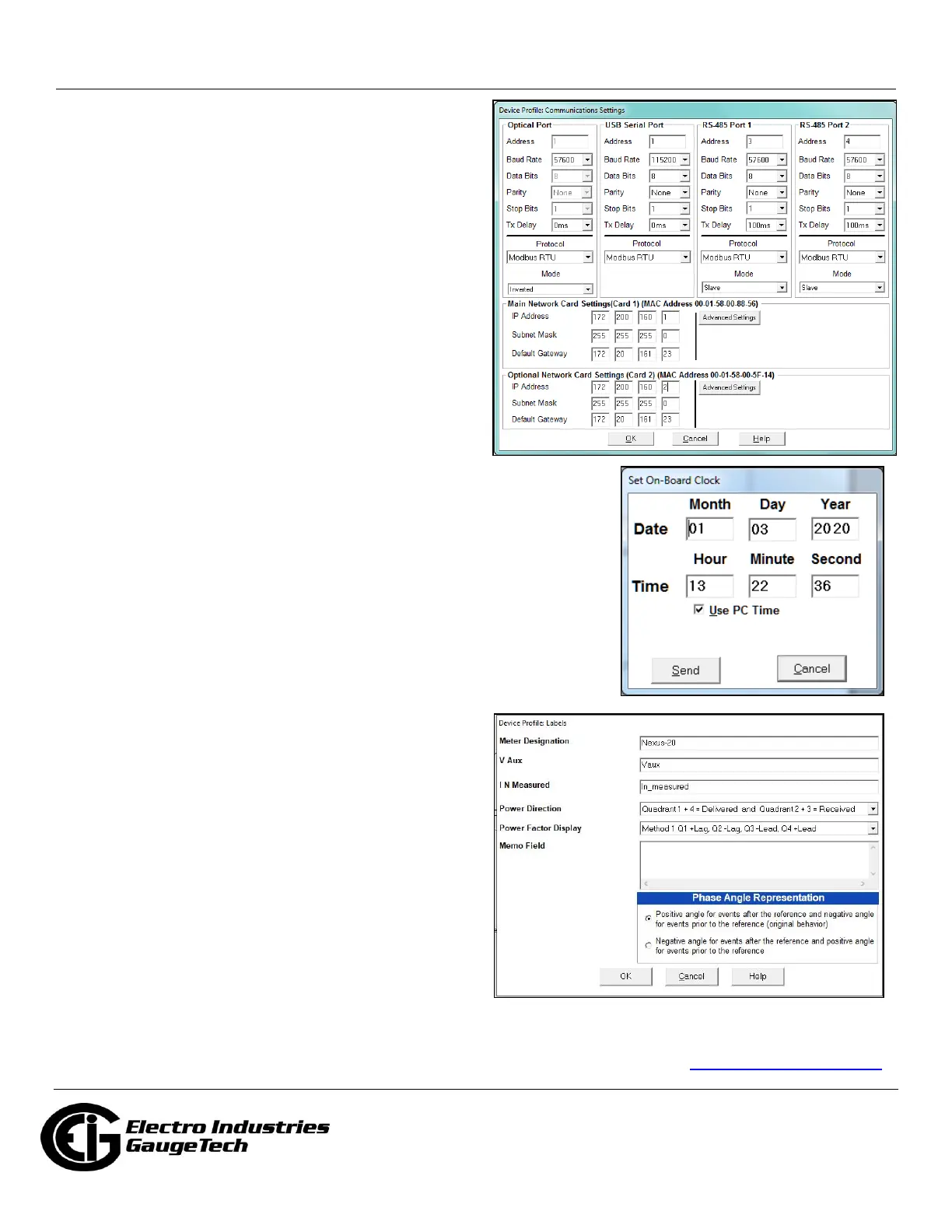
Communication Settings
1. From the Device Profile screen, double-click General
Settings>Communications. The current settings for
the meter’s Ports are shown on the screen.
2. Double-click one of the Port settings to open the
Communications screen, shown above.
3. You can configure the settings for all four
Communication Ports, as well as the two Network
Cards. Click Help to view instructions for configuring
these settings.
4. Click OK to close the screen. Click Update Device
from the Device Profile screen to save your settings.
NOTE: You can also use the standard or optional Ethernet
ports, the optional RS485 ports, or the ANSI optical port to
connect to and configure the Nexus® 1500+ meter. See
the meter's manual (see page QS-1), and the software
manual (click Help>Contents from the CommunicatorPQA™
application’s Main screen).
Program Meter Time
The meter is preset to United States Eastern time. To
change the meter time:
1. From the Main screen’s Title bar, click Tools>Set Device Time.
2. You can either enter the time in the Time fields or click Use PC Time to
match the meter time with the PC time.
3. Click Send.
Program Meter Name
The meter’s name is used in database files and report titles.
To give the meter a unique name:
1. From the meter’s Device Profile screen, click General
Settings>Labels, and then double-click on one of the
lines underneath to open the Labels screen.
2. Enter a name for the meter in the Meter
Designation field.
3. Click OK.
IMPORTANT! When you have made changes
to the meter’s Device Profile, click Update
Device at the bottom of the Device Profile
screen, to send the new settings to the meter.
The meter will reboot and then you can reconnect to it.
Nexus®, CommunicatorPQA®, MeterManagerPQA®, EnergyPQA.com®, and EnergyPQA® are registered trademarks of Electro Industries/GaugeTech.
The distinctive shape, style, and overall appearance of the Nexus® 1500+ meter is a trademark of Electro Industries/GaugeTech.
Windows® is a registered trademark of Microsoft Corporation in the United States and/or other countries. Littelfuse® is a registered trademark of
Littelfuse, Inc. https://electroind.com/



 To Previous Page
 Loading...

