Nexus® 1500+ Meter Quickstart Guide
Doc# E154714 V.1.07 Q-6
Connecting to the Meter via Software
1. Open CommunicatorPQA™ software (see page QS-1
for download instructions).
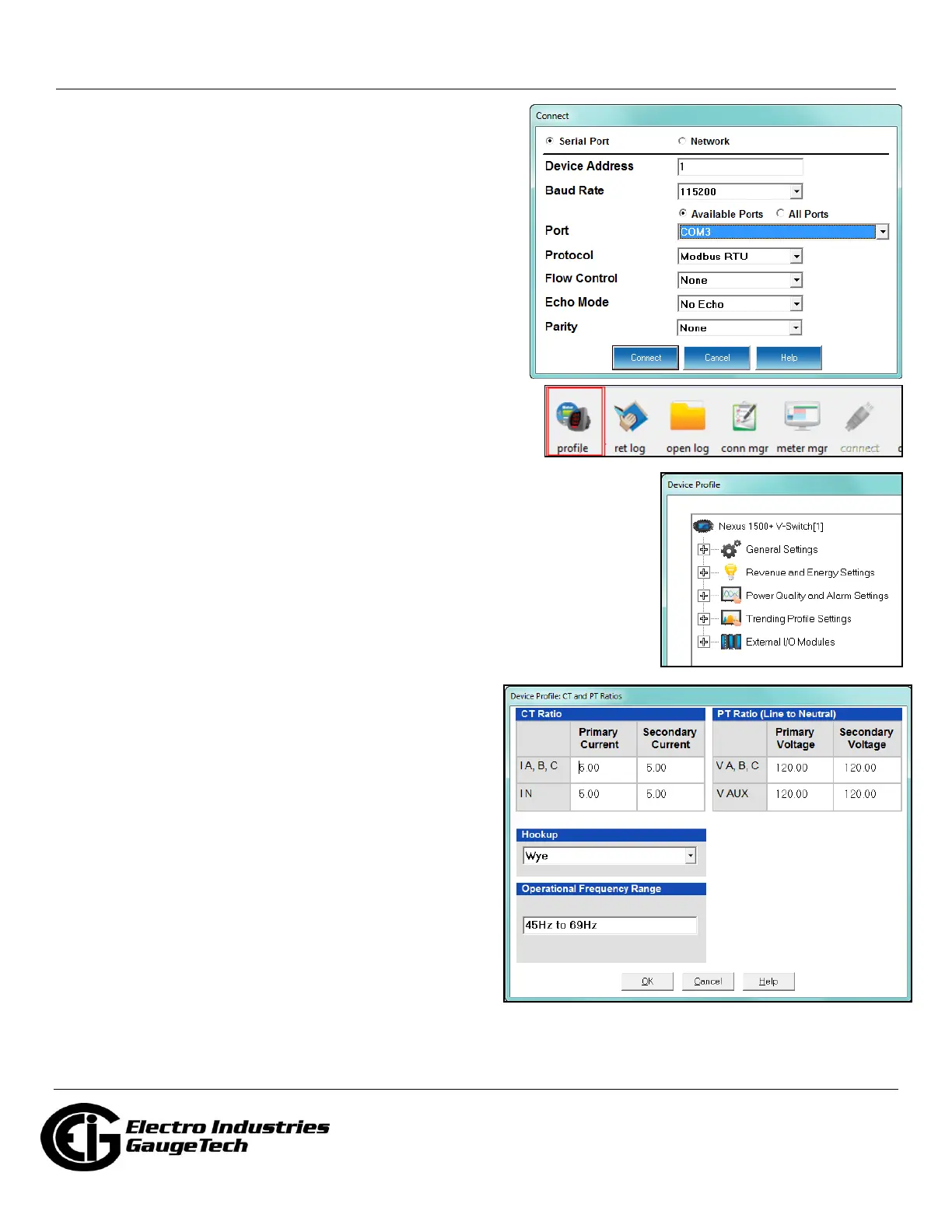
2. Click the Connect icon on the Tool Bar. You will see the
Connect screen.
3. Click Serial Port.
4. Select Baud rate of 115200.
5. Select the Port that is the USB Virtual Com port.
6. Click Connect. You will see the Device Status screen.
7. Click OK. You will see the Main CommunicatorPQA™
software screen.
Configuring the Meter via Software
Click the Profile icon on the Icon Bar. You will see the Device
Profile screen.
NOTE: Instructions for a few basic settings are given in this
Quickstart Guide. For more information, download the manual from EIG’s website
(see page QS-1) or click Help>Contents from the Title Bar of the
CommunicatorPQA™ application’s Main screen, to view the CommunicatorPQA™,
MeterManagerPQA™, and EnergyPQA.com™ Software User Manual.
CT, PT Ratios and System Hookup
From the Device Profile screen, double-click General Settings>CT, PT Ratios
and System Hookup. The current settings are shown on the screen.
1. Double-click one of the settings to open the CT and PT Ratios screen, shown
below.
2. You can enter CT and PT Ratios and select Hookup from
the pull-down menu. Click Help to view instructions for
configuring these settings.
3. Click OK to close the screen. Click Update Device from
the Device Profile screen to save your settings.
Example CT Settings:
200/5 Amps: set the Primary Current value as 200.00; set
the Secondary Current value as 5.00.
Example PT Settings:
14400/120 Volts: set the Primary Voltage value as
14400.00; set the Secondary Voltage as 120.00.



 To Next Page