Need help?
Do you have a question about the Nexxt Viking 150 and is the answer not in the manual?
Provides a general overview of the router's capabilities and target use cases.
Details the core functionalities and technical specifications of the router models.
Describes the physical interface elements and ports on both router models.
Outlines the initial hardware connection and setup requirements before configuration.
Guides users through the essential steps for initial network and router configuration.
Instructions for accessing and logging into the router's web-based utility.
Details the various operating modes available for the Polaris 150 model.
Explains the Wi-Fi Protected Setup process for secure wireless device addition.
Configuration options for network connectivity, including 3G, WAN, and LAN settings.
Allows cloning the MAC address for specific network requirements.
Configuration settings for the Local Area Network (LAN) interface.
Basic configuration for the wireless network, including SSID and channel.
Configuration options for securing the wireless network with encryption.
Controls wireless access by filtering devices based on MAC addresses.
Configures the DHCP server to assign IP addresses to network devices.
Allows reserving specific IP addresses for devices on the network.
Configures virtual servers to make local services accessible from the Internet.
Manages port forwarding rules for applications requiring multiple connections.
Configures a local host to be directly exposed to the Internet.
Configures fundamental security settings like Firewall and VPN passthrough.
Implements advanced security measures against network attacks like DoS.
Manages access rules for local computers to the router's utility.
Configures the router for remote access and management over the Internet.
Sets up rules to monitor and restrict internet access for specific users.
Manages rules for controlling internet access based on various criteria.
Defines and manages hosts (computers) that will be subject to access control rules.
Defines targets for access control, such as IP addresses, ports, or domain names.
Configures static routes for directing network traffic to specific destinations.
Configures bandwidth limits for upload and download speeds.
Sets up IP and MAC address binding to secure network connections.
Configures Dynamic DNS settings for the Comexe.cn service provider.
Configures Dynamic DNS settings for the Dyndns.org service provider.
Configures Dynamic DNS settings for the No-ip.com service provider.
Configures the router's date, time, and time zone settings.
Provides tools like Ping and Traceroute to test network connectivity.
Restores the router's configuration to its original factory default settings.
Allows saving router configuration to a file and restoring it later.
Allows changing the router's administrative username and password.
 General
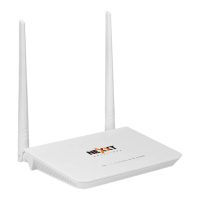
| Type | Wireless Router |
|---|---|
| Frequency Band | 2.4 GHz |
| Max Wireless Speed | 150 Mbps |
| Antenna Type | Fixed |
| Number of Antennas | 2 |
| Model | Viking 150 |
| Wi-Fi Standard | 802.11n |
| Wireless Standards | 802.11b/g/n |
| Security | WPA/WPA2 |
| Ports | 1 x WAN, 4 x LAN |

 To Next Page