Remote and Indoor Temperature
The remote temperature information line is located on the
top line of the main unit’s display.
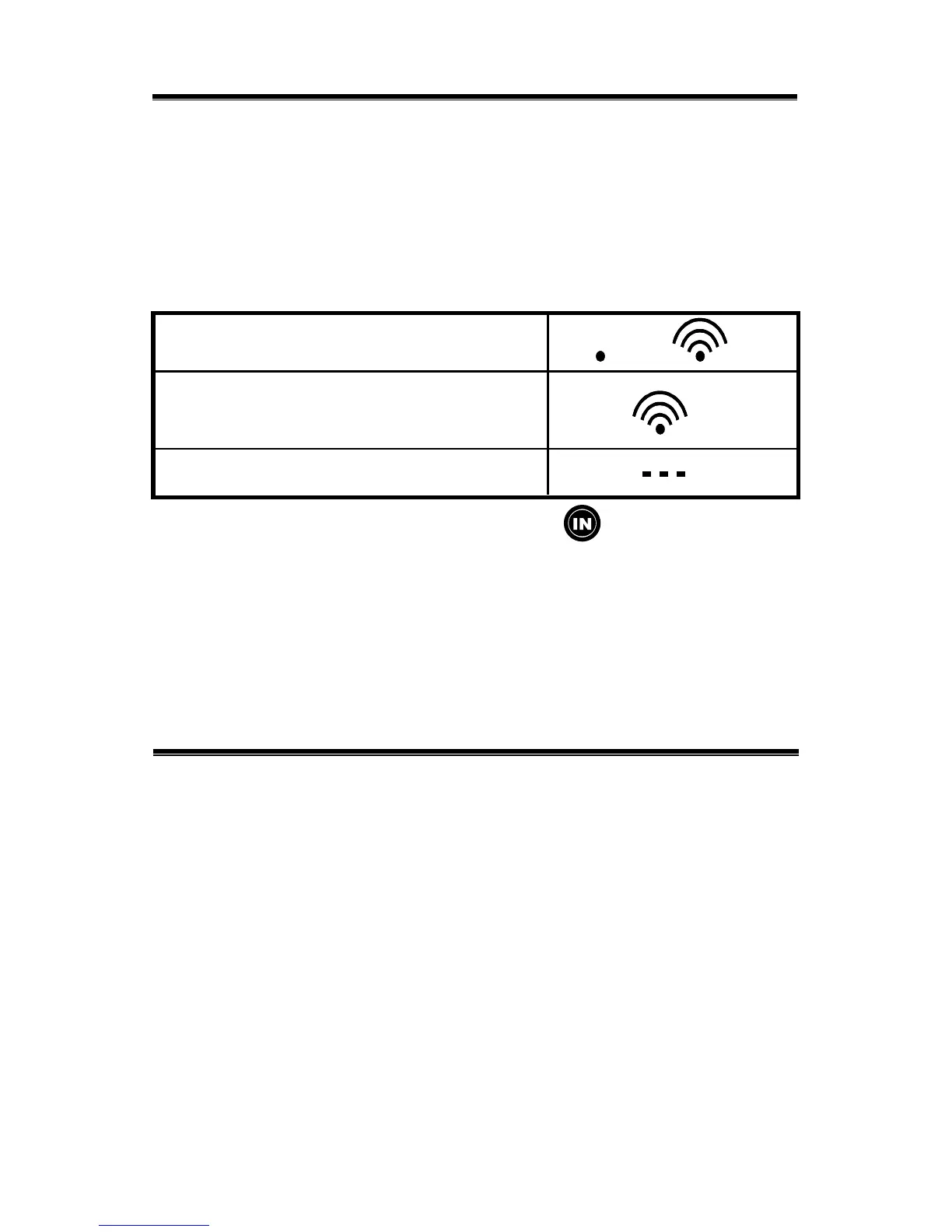
The wave icon is located above the remote channel
number to indicate the reception status from the
corresponding remote sensor.
Three different types of reception status may be displayed.
The unit is in search mode.
Temperature reading is
successfully registered.
No signals detected.
The indoor temperature with the icon is displayed
below the remote temperature information line.
NOTE: If the indoor or remote temperature goes above or
below the operating range stated in the specifications, the
main unit’s display (weather) will show dashes ”
---” on the
corresponding line.
Maximum and Minimum Readings
The maximum and minimum records of the indoor and
remote temperature will be automatically stored in the
memory of the main unit (receiver).
To display the minimum, maximum or the current reading
press the MEM button.
If no button is pressed in the next 15 seconds, the unit will
return to its current temperature display.
To clear the memory, press and hold the
MEM button
for two seconds and all previous stored readings will be
erased.
10


 To Next Page