
 Need help?
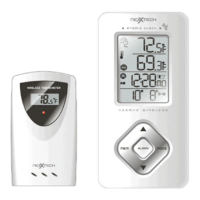
Do you have a question about the NexxTech Wireless thermometer and is the answer not in the manual?
Details the main unit's display, buttons, battery compartment, and stands.
Describes the remote sensor's LED, battery compartment, reset, channel switch, and mounting options.
Important notes and recommendations before starting device setup and operation.
Step-by-step guide for installing batteries in the main unit and remote sensor.
Initial setup, temperature display, signal reception, and sensor placement guidelines.
Explains how remote and indoor temperatures are displayed and reception status icons.
How to view, store, and clear maximum and minimum temperature records.
Solutions for issues when the remote sensor signal is lost.
Information on how household devices can interfere with signal reception.
Explanation of the atomic time signal reception and its influencing factors.
Details automatic time synchronization, time zones, and manual setting procedures.
How to manually set time, date, time zone, and configure display modes.
Instructions for setting weekday, single day, and ice warning alarms, and activation.
How to use the snooze feature and activate the display backlight.
Essential safety and care instructions to ensure product longevity and proper function.
Solutions for common problems like no signal, incorrect readings, or channel issues.
Technical details of the main unit and remote sensor, including operating ranges and dimensions.
FCC, Industry Canada compliance, and limited warranty details.
 General
| Brand | Nexxtech |
|---|---|
| Display | LCD |
| Usage | Indoor/Outdoor |
| Type | Wireless |
| Accuracy | ±1°C (±2°F) |
| Wireless Range | Up to 30m (100ft) in open area |
| Power Source | 2 AAA batteries |

 To Next Page