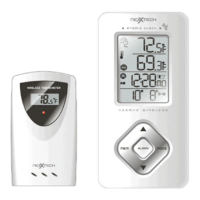
Product Overview
A. TEMPERATURE AND TIME IN LARGE
EASY-TO-READ DIGITS
B. SNOOZE/LIGHT button
• Stops the clock’s alarm temporarily
• Activates a blue backlight for 5 seconds
C. CHANNEL button
• Recalls a different remote sensor reading - 1, 2, or 3
• Activates a remote channel search
D. UP ( ) button
• Increases the parameters
• Activates Time Zone selection mode
• Activates manual search for atomic signal
• Enables time alarms (W), (S) and ICE WARNING
ALARM
E. MODE button
• Toggles between time modes - time with seconds or
time with the day of the week
• Activates clock’s manual programming mode
F. DOWN ( ) button
• Decreases the parameters
• Activates manual remote channel search
• Disables time alarms (W) and (S) and ICE WARNING
ALARM
G. ALARM button
• Allows toggling between the calendar display and
three time alarm modes
• Allows programming of available alarms
H. MEM button
• Toggles between current, minimum, maximum
readings of the indoor and remote temperature
• Clears the temporary memory
I. WALL-MOUNT RECESSED HOLE
• Keeps the unit on the wall
J. BATTERY COMPARTMENT
• Accomodates 2 “AA” 1.5V alkaline batteries
(not included)
K. REMOVABLE TABLE STAND
• Holds unit in upright position on a flat surface
5


 To Next Page