User Manual
Version 5.3
6 - Control and Indication:
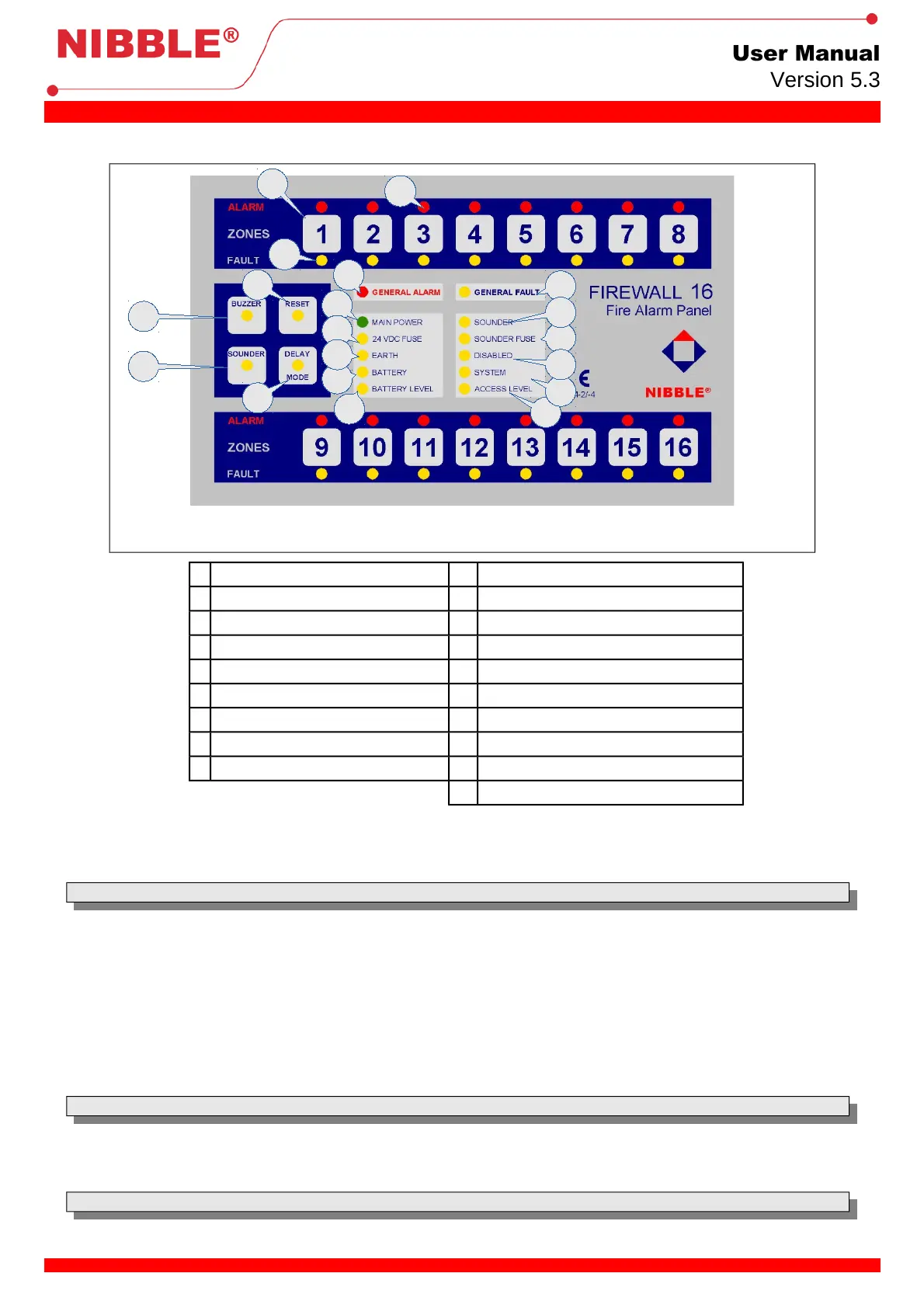
6.1 Front panel user interface:
1 Zone activation key 10 24VDC fuse fault indication LED
2 Zone fault indication LED 11 Earth circuit fault indication LED
3 Zone alarm indication LED 12 Battery presence indication LED
4 Internal buzzer silence key 13 Battery charging indication LED
5 External sounder silence key 14 General fault indication LED
6 Reset key 15 Sounder fault indication LED
7 Delay Mode key 16 Sounder fuse fault indication LED
8 General Alarm indication LED 17 Disabled indication LED
9 Main-power indication LED 18 System fault indication LED
19 Access level indication LED
Table 1: Legend of Front panel user interface
6.1.1 Zone activation key:
With this key is possible to activate or deactivate the corresponding zone.
Note: Action only available with level 2 access (after the introduction of the access code or key).
6.1.2 Zone fail indication LED:
The detection circuits of each zone are monitored to make possible to detect short-circuits or open-circuits. If a short-circuit is detected this LED
blinks fast, in case of open-circuit it will blink slowly.
This LED also indicates if a zone is active or not. When permanently ON it indicates inactive zone.
6.1.3 Zone alarm indication LED:
This LED indicates an alarm in the corresponding zone. If it blinks fast, it means that the alarm was signaled at a callpoint. If it is permanently ON,
it means that the alarm was signaled by a detector.
6.1.4 Internal buzzer silence key:
With this key, it is possible to silence the internal buzzer which is activated every time that an alarm or a fail occurs.
Note: Once silenced, the buzzer will only be activated when a new alarm or fail occurs.
6.1.5 External sounder silence key:
Once detected a fire alarm, the sounder will be activated. It is possible to silence the sounder pressing this key, or reactivate it by pressing again
the key. Even when there is not any alarm, it is possible to activate the sounder manually.
Note: Action only available with level 2 access (after the input of the access code or key).
4 / 8


 To Next Page