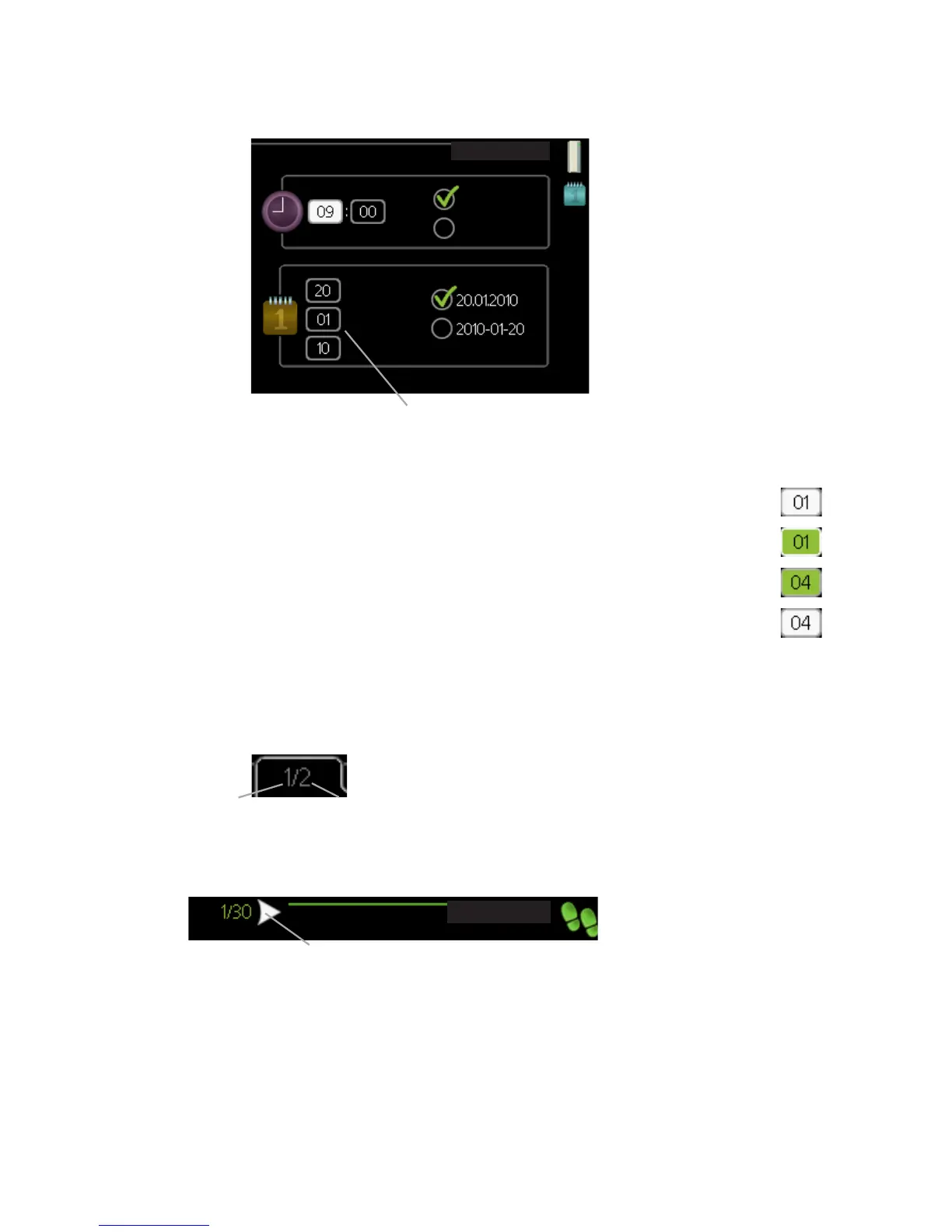
Setting a value
time & date4.4
time
day
year
month
24 hrs
12 h
date
Values to be changed
To set a value:
1.
Mark the value you want to set using the control knob.
2.
Press the OK button. The background of the value becomes
green, which means that you have accessed the setting mode.
3.
Turn the control knob to the right to increase the value and to
the left to reduce the value.
4.
Press the OK button to confirm the value you have set. To change
and return to the original value, press the Back button.
Scroll through the windows
A menu can consist of several windows. Turn the control knob to scroll
between the windows.
&XUUHQW PHQX
ZLQGRZ
1XPEHU RI ZLQGRZV
LQ WKH PHQX
Scroll through the windows in the start guide
ODQJXDJH
$UURZV WR VFUROO WKURXJK ZLQGRZ LQ VWDUW JXLGH
1.
Turn the control knob until one of the arrows in the top left corner (at
the page number) has been marked.
2.
Press the OK button to skip between the steps in the start guide.
17NIBE™ F1145Chapter 2 | The heat pump – the heart of the house



 To Next Page