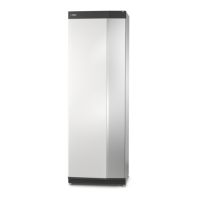
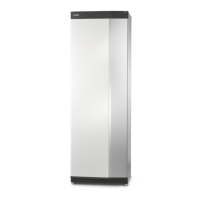
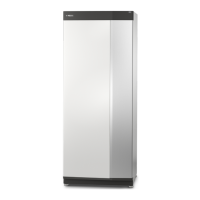
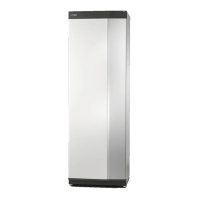
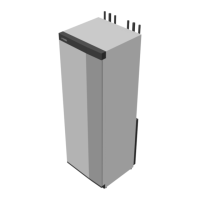
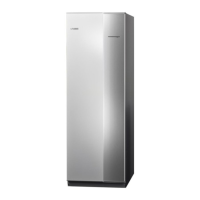
The NIBE S735 is an exhaust air heat pump designed to heat homes by recovering energy from the building's ventilation air and, if necessary, outdoor air. It operates through three main circuits: ventilation air, refrigerant, and heating medium, converting low-temperature recovered heat into high-temperature heat for domestic use.
Function Description
The NIBE S735 utilizes a sophisticated process to provide heating and hot water.
- Ventilation Air Circuit: Hot air from the rooms is drawn into the heat pump via the house's ventilation system. If needed, outdoor air is also used. This air then passes through the evaporator, where it releases its heat energy, causing its temperature to drop significantly. The now cold air is then expelled from the house.
- Refrigerant Circuit: A refrigerant, with a very low boiling point, circulates in a closed system within the heat pump. In the evaporator, the refrigerant absorbs heat from the ventilation air and begins to boil, turning into a gas. This gas is then compressed by an electrically powered compressor, which significantly increases its pressure and temperature (from approximately -5°C to 100°C). The high-pressure, high-temperature gas then flows into a condenser, a heat exchanger, where it releases its heat energy to the heating medium circuit. As it releases heat, the gas cools and condenses back into a liquid. Still under high pressure, the liquid refrigerant passes through an expansion valve, where its pressure drops, returning it to its original temperature, ready to repeat the cycle.
- Heating Medium Circuit: The heat energy transferred from the refrigerant in the condenser heats the climate system's water (heating medium) to approximately 55°C (supply temperature). This heated medium circulates in a closed system, distributing heat to the heat pump's integrated hot water heater and the house's radiators or heating coils. The integrated water heater uses this heating medium to produce domestic hot water.
The system is controlled via a touchscreen display, allowing users to navigate menus, adjust settings, and monitor the system's status. The display unit features a status lamp (white for normal, yellow for emergency, red for alarm, flashing white for active notice, blue when off), a USB port for software updates, and an on/off button with functions for starting, switching off, restarting, and activating emergency mode.
Important Technical Specifications
- Product Name: S735
- Power Supply: 1x230 V
- Heating Curve: Adjustable (heating curve and curve offset)
- Lowest Supply Heating: 20
- Fan Speed, Exhaust Air (Normal): 75%
- Fan Speed, Outdoor Air: 100%
- Max. Set Electrical Power: Max
- Pressure Gauge: Shows heating system pressure, ideally between 0.5 and 1.5 bar.
- Safety Valves: Three safety valves (two for hot water, one for climate system).
- Software: Version 1.0.0 (updatable via USB or myUplink).
Usage Features
- Quick Guide: Provides intuitive navigation instructions for selecting options, scrolling through menus, and browsing pages.
- Smartguide: Offers guidance on current system status and common settings, adapting information based on the product and connected accessories.
- Indoor Temperature Setting: Allows users to set the temperature for different zones of the installation.
- Hot Water Temperature Increase: Enables temporary increases in hot water temperature.
- Product Overview: Displays essential information such as product name, serial number, software version, and service contact. Software updates can be initiated here if connected to myUplink.
- Menu System: Organized into eight main menus for comprehensive control:
- Indoor climate: Settings for indoor temperatures and ventilation.
- Hot water: Settings for hot water operation.
- Info: Current operating information and logs.
- My system: Date, language, operating mode settings.
- Connection: myUplink connection and network settings.
- Scheduling: Schedule different parts of the system.
- Installer settings: Advanced settings for installers/service engineers.
- USB: For software updates via USB memory.
- myUplink Integration: Allows remote control of the installation, provides alarm notifications via email or app, and offers various service levels (Viewer, Alarm, History, Extended history, Manage) with basic and premium options.
- Help Menu: Accessible within many menus for on-screen assistance.
- Factory Settings: Marked with an asterisk (*), these values can be customized by the installer.
- Drop-down Menu: Provides quick access to current status, operational information, and active functions.
Maintenance Features
- Regular Checks: Annual checks and servicing by qualified personnel are recommended to ensure efficient operation and warranty validity.
- Alarm Management: The system notifies users of malfunctions via a red status lamp and on-screen messages with suggested actions. Alarms can often be reset from the display. "Auxiliary operation" is an emergency mode that attempts to produce heat/hot water despite problems.
- Replacing Exhaust Air Filter: The filter is not cleanable and must be replaced regularly, at least once a year, or more frequently depending on air quality. The display provides reminders.
- Cleaning Ventilation Devices: Building ventilation devices should be cleaned regularly with a small brush to maintain correct ventilation. Device settings should not be changed.
- Checking Pressure: The pressure gauge indicates heating system pressure. Frequent drops to 0 or rises to 2.5 bar require installer contact.
- Safety Valve Checks: Safety valves should be checked regularly by carefully turning the knob anti-clockwise to ensure water flow, then releasing it. If a valve doesn't close automatically, it needs attention.
- Filling the Climate System: If system pressure is too low, the installer should be contacted.
- Venting the Climate System: If bubbling sounds are heard or repeated filling is needed, the system may require venting via vent valves. A venting hose is provided for convenience. Vent valves should be held open for at least 5 seconds.
- Cleaning the Floor Drain: Condensation from the heat pump is routed to a floor drain. Regular checks are needed to ensure the drain is not blocked.
Saving Tips
- Thermostat Valves: Keep thermostat valves fully open (except in rooms needing lower temperatures) to ensure optimal flow in the climate system, preventing the S735 from working at higher temperatures and increasing energy consumption.
- Ventilation Adjustment: Ensure proper ventilation adjustment by a technician after installation.
- Scheduling: Use the scheduling function (menu 6) to lower operating costs when away from home.
- Hot Water Demand: Selecting "Small" in menu 2.2 ("Hot water demand") uses less energy.

 Need help?

 To Next Page


 General