25
CONNECTING THE CAMERA TO A PC
ConnectthecameratoaPCusingaUSBdatacable.UsetheOKbutton(8)toswitchbetweenthefollow-
ingmodes:
1. Storage:youcanusethePCtomanagelesstoredonthememorycardinsidethecamera(the
cameraactsasanexternaldriveconnectedtothePC).
2. PCcamera:canbeusedasaPCcameraforsoftwarethatallowstheconnectionofanexternalcam-
era.
PACKAGE CONTENTS
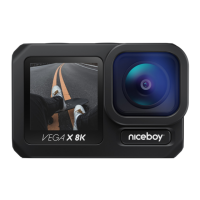
VEGAX8Kcamera
Battery
Openbracketforconnectingthecameratootheraccessories
Setofbasicaccessoriesandmountsforactioncameras(includingtripodmount,helmetmount)
Manual
SPECIFICATIONS
Chip: AmbarellaH22
Sensor: SonyIMX377
Cameralens: glass7G+anti-reectivesurface,170°
Lensaperture: f/2.5
Videoresolution: 8K15fps(interpol.),6K30fps(interpol.),4K60/30fps,
2.7K60/30fps,1440p60/30fps,1080p120/60/30fps,
720p240/120/60/30fps
Videoformat: MP4,H.264/H.265
Videodataow: upto100Mb/s
Stabilization: Yes(X-STEADY)
Max.photoresolution: 64MPx


 To Next Page