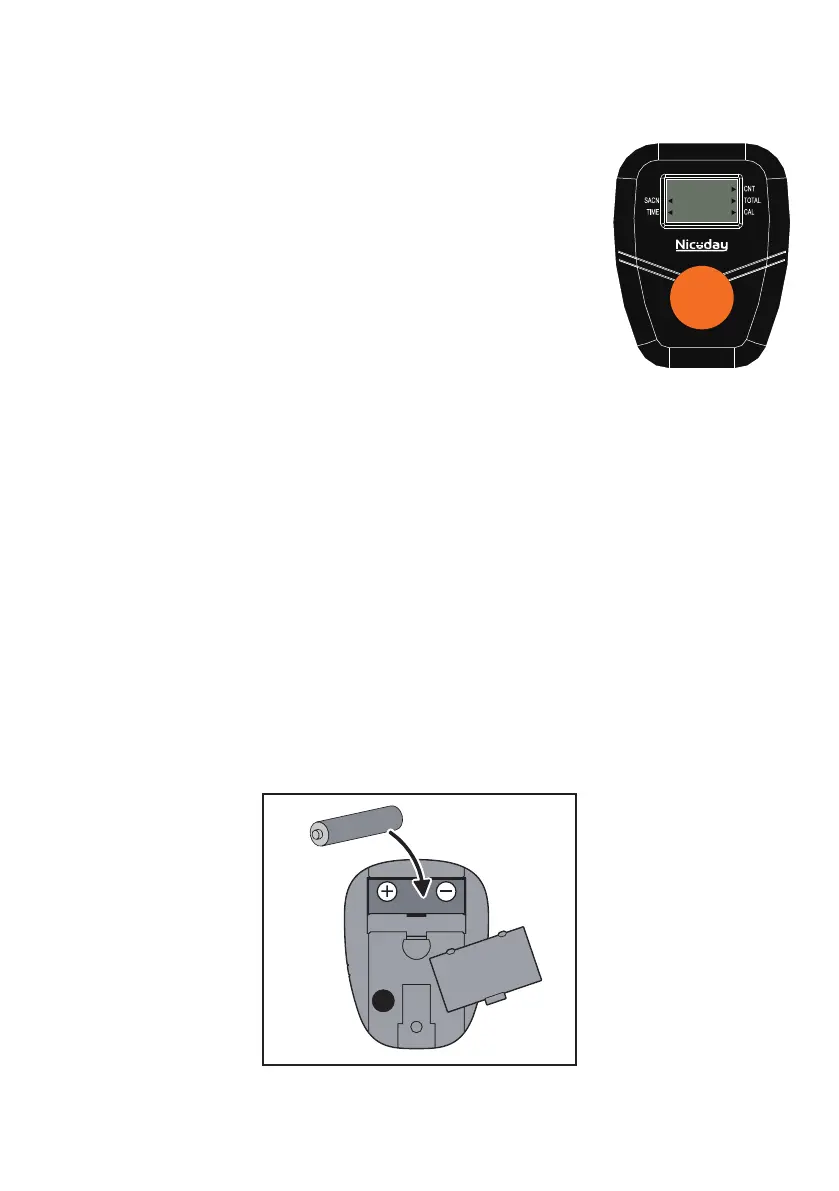
EXERCISE MONITOR
SPECIFICATIONS:
14
TIME ......................................................................... 00:00-99:59 MIN/SEC.
COUNT ......................................................................... ..0-9999 STROKES
CALORIES… ........................................................................ .. 0-9999 KCAL
TOTAL CNT ................................................................ ….0-9999 STROKES
FUNCTIONS:
TIME: Displays the workout time while exercising.
COUNT(CNT): Accumulate the strokes while exercising.
CALORIES(CAL): Displays calories amount burned while exercising.
TOTAL CNT(TOT.CNT): Displays the total number of strokes since batteries installed.
SCAN: Automatically scan through each function between ①TIME ②CAL ③TOT.CNT.
KEY FUNCTION:
MODE/SELECT: Press to select the function you want. Hold the key for 4 seconds to reset all values.
OPERATION PROCEDURES:
AUTO ON/OFF: The meter will turn on when start exercise or when press MODE.
The meter will shut off automatically after there is no activity for 4 minutes.
NOTE
BATTERY: This meter uses one “AA” battery. If there is a problem with the meter display, replace the
battery first. Dispose old battery according to your regional guidelines


 To Next Page