
 Need help?
Do you have a question about the NICEDAY 701ML and is the answer not in the manual?
Consult a doctor before starting any exercise program if you have medical conditions.
Stop exercising if you experience pain, chest tightness, irregular heartbeat, dizziness, or nausea.
This equipment is designed for adult use only. Keep children and pets at a safe distance.
Use on a flat, level surface with protective cover, ensuring at least 2 feet of free space around it.
Ensure all fasteners are tight and regularly inspect for damage or wear.
Use the equipment as indicated; discontinue use if defective parts or unusual noises are detected.
Wear suitable clothing and avoid loose garments that could get entangled in moving parts.
Do not place fingers or objects into any moving parts of the equipment during operation.
The maximum weight capacity for this unit is 220 pounds (100 kg).
This equipment is not designed or suitable for therapeutic or medical treatment purposes.
Use proper lifting techniques to avoid bodily injury and product damage when moving the equipment.
Store the product in cool, dry conditions, avoiding extreme temperatures or humidity to prevent damage.
This equipment is designed exclusively for indoor and home use, not for commercial applications.
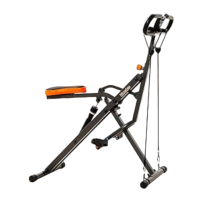
Assemble the main frame, attach the hydraulic cylinder using plug, screw, nut, pin ball, and pin.
Mount the front stabilizer onto the main frame using screws, nuts, and washers.
Mount the rear stabilizer onto the main frame using screws, nuts, and washers.
Insert the handlebar tube into the main frame and secure it using the knob.
Align and attach the handlebar to the handlebar tube using screws, nuts, and washers.
Mount the exercise monitor onto the designated tab on the handlebar.
Attach the left pedal to the pedal connecting tube, tightening it clockwise.
Attach the right pedal to the pedal connecting tube, tightening it clockwise.
Connect the resistance bands to the front stabilizer's D-type buckle.
Install the AA battery into the exercise monitor by opening the compartment.
Adjust the rear stabilizer end cap to level the machine on the floor surface.
Adjust seat tube height by aligning holes and inserting the pull plug.
Rotate the hydraulic cylinder to select the desired resistance level (16 levels).
Install the seat cushion and choose the desired position by locking the knob.
Adjust handlebar height by loosening, moving, and re-tightening the knob (5 positions).
Steps to fold the machine for storage, including seat, handlebar, and hydraulic cylinder adjustments.
Details the range for time, count, calories, and total strokes displayed on the monitor.
Explains what TIME, COUNT (CNT), CALORIES (CAL), and TOTAL CNT display.
Describes the MODE/SELECT button for function selection and resetting all values.
Explains how the meter turns on with exercise/button press and shuts off after inactivity.
Specifies using one 'AA' battery and provides guidance on replacement and disposal.
Bending forward with slightly curved knees to stretch back and shoulders.
Sitting stretch to target hamstring muscles by reaching for toes.
Stretching leg and foot tendons by leaning against a wall or stand.
Stretching quadriceps by pulling the heel towards the buttocks.
Inner thigh muscle stretch by sitting with knees outward and pulling feet.
 General
| Brand | NICEDAY |
|---|---|
| Model | 701ML |
| Category | Fitness Equipment |
| Language | English |

 To Next Page