5
PROGRAMMABLE FEATURES DESCRIPTION
Each of the programmable features described below can be
set independently for door 1 and door 2
Automatic Relock Function
When the DOOR input is used then the Automatic Relock
function can be used. This feature turns the ELC relay off 1
second after the door is opened (not unlocked) when a
momentary code or the EGRESS input has been used (no
matter how long the time for the ELC relay operation has
been set for in memory 83). The purpose of this feature is
to stop people following someone through the door by
ensuring that the door locks once it closes.
Door Open Too Long
The DOTL timer is used to warn if the door has been held
open for too long after a valid access (either via a code or
EGRESS). When the door has been opened a count down
timer is started (the time set in memory 85, refer to page
13). If the door has not closed again by the time this
counter expires then the DOTL output will activate (contacts
will close) and will remain active until the door is closed.
Note that if a value of 0 has been set for the DOTL time
then the door is allowed to remain open indefinitely.
Door Forced Open
A door forced open condition is defined by the situation
where the door has been opened but a code or EGRESS
has not been used to gain access. When this condition
occurs the DOTL output will activate (contacts will close)
and will remain active for 30 seconds or until the door is
closed again (whichever is the longer time). Note that the
Door Forced Open feature must be disabled (set in memory
86, refer to page 14) if a free (unmonitored) inside door
handle is used instead of an EGRESS button. When this
6
feature is disabled the Door Open Too Long timer will be
started when the PAC2 detects the door has been opened.
One Minute Lockout
To increase security the PAC2 can be set to lock out all
codes for a period of 1 minute after 5 incorrect codes have
been tried (set in memory 87, refer to page 14). Note that
this feature should not be enabled if access must be
guaranteed in an emergency situation.
Use Two Codes
The PAC2 can be set up to operate in one of the four
modes described below.
One User Code Only
Any one of the programmed user codes will operate the
ELC relay.
Any Two User Codes
Any two of the programmed user codes can be used
together to operate the ELC relay.
Code 000 or 001 and any other user code
The user code stored in memory 000 or 001 used
together with any other valid user code will operate the
ELC relay.
Sequentially Numbered User Codes
Two user codes in sequential memory locations must be
used together to operate the ELC relay. The pair of
locations start with an even numbered memory, eg. 000
and 001, 056 and 057, 138 and 139, etc. not 001 and 002.
IMPORTANT NOTE: When the PAC2 is set up to use any
of the two code combinations above the ELC relay will only
operate in Timed Mode even if the codes are programmed
as Toggle codes.
7
INSTALLATION
Read all instructions carefully before installing,
programming and using the system. It is vital that all power
be disconnected during wiring.
To maximise security ensure that the decoder and encoder
components are separated and that the decoder is
inaccessible to persons outside the restricted area. The
decoder should be installed indoors and in a dry secure
place. The maximum distance of separation between the
decoder and encoder is 1 kilometre.
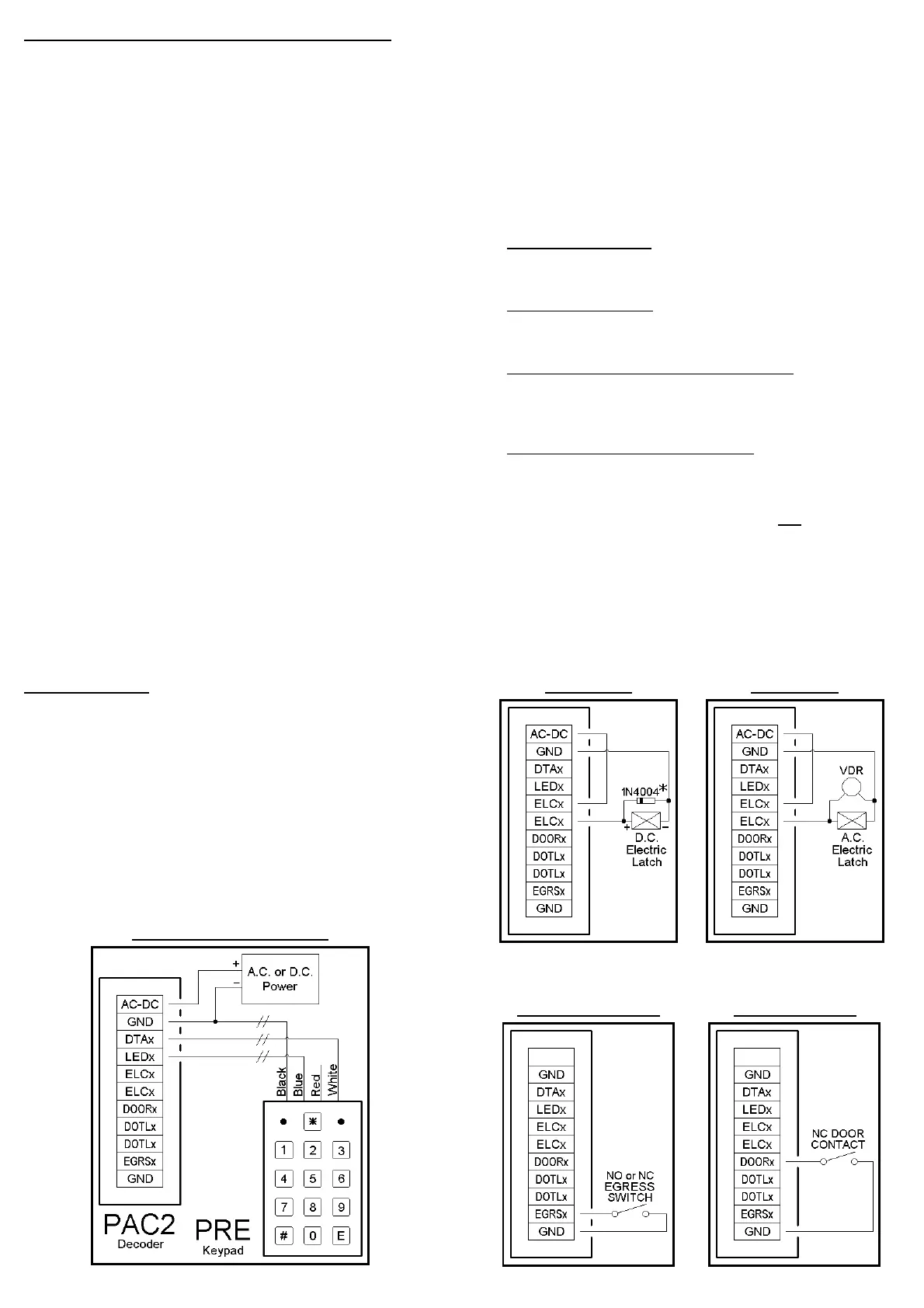
The wiring diagrams for installation are on the following
pages.
BASIC KEYPAD WIRING
8
D.C. LOCK A.C. LOCK
* Use 1N4004 diode only when using a door strike
not a Magnetic Lock or Drop Bolt.
EGRESS SWITCH DOOR SWITCH


 To Next Page