9
PROGRAMMING
A Presco™ keypad connected to DTA1 or a PACDL
revision 4.0 or higher connected to DLOG is required to
program the PAC2. To enable programming with a keypad
the PAC2 must first be put into program mode. This is
accomplished by pressing the program button located in the
bottom centre of the PAC2 below the “PUSH TO
PROGRAM” text. When the program mode is entered the
LED above the program button in the PAC2 will light up.
Pressing the program button again will take the PAC2 out of
program mode.
The PAC2 will remain in program mode for a period of 5
minutes after the button has been pressed. Each time the
keypad is used to enter information this time is extended to
5 minutes from that time.
The PAC2 can be forced to exit program mode from the
keypad by simply entering #99E.
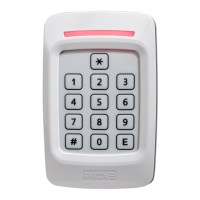
When the PAC2 is in program mode the green LED on an
attached PRE keypad will flash at a rate of once per second
(provided the PRE has been wired to DTA1 as shown in the
BASIC KEYPAD WIRING diagram on page 7).
IMPORTANT NOTES:
1. The d shown in the programming sequences must be
replaced by a 1 for door 1 or 2 for door 2.
2. When programming a new Management or User code the
two steps must be done from devices connected to DTA1.
i.e. you cannot open a user location using a keypad
connected to DTA1 and then enter the new user code on a
keypad (or other Presco™ device) attached to DTA2.
10
KEYPAD RESPONSES
• warble = successful programming operation finished.
• 3 x 2 beeps = code memory location opened.
• long beep = unsuccessful operation.
• 1 short beep = valid Momentary or Toggle user code
entered to operate ELC relay (unlock door).
• 2 short beeps = valid Toggle user code entered to
deactivate ELC relay (lock door).
• 5 short beeps = valid Management code entered.
The expected response from the keypad is shown in the
square brackets [] after each programming sequence.
NOTE all keys in a sequence (up to and including the e)
must be pressed within 10 seconds of each other. If
incorrect keys are pressed wait 10 seconds and then enter
the sequence again.
CLEAR ALL USER CODES.
All the user codes memories (000 to 399) can be cleared by
the use of the following sequence.
press #, 8, 7, 6, 5 & E. [warble]
RESET ALL MEMORIES CODE.
The PAC2 can be reset to factory defaults by the use of the
following sequence.
WARNING: Using this code will delete all user codes, the
management code and reset memories 80 to 89 back to
their default settings.
To reset the PAC2 to factory defaults…
press #, 8, 7, 6, 5, 4, 3, 2, 1, & E. [warble]
11
BASIC SETUP SEQUENCE
1/ Select ELC RELAY TYPE (Currently N/O). [Memory
82, page 12]
2/ Select EGRESS switch type (Currently N/O). [Memory
81, page 12]
3/ Set ELC OPERATE TIME (Currently 10 seconds).
[Memory 83, page 13]
4/ Enable/Disable DOOR INPUT (Currently disabled).
[Memory 84, page 13]
5/ Set Door Open Too Long time (Currently 60 seconds).
[Memory 85, page 13]
6/ Enable/Disable DOOR FORCED OPEN DETECTION
(Currently enabled). [Memory 86, page 14]
7/ Enable/Disable AUTOMATIC RELOCK (Currently
enabled). [Memory 80, page 12]
8/ Enable/Disable 1 MINUTE LOCKOUT (Currently
disabled). [Memory 87, page 14]
9/ Enable/Disable USE TWO MOMENTARY CODES
(Currently disabled). [Memory 88, page 14]
10/ Set TWO CODES TIMING, if enabled in step 9 above
(Currently 60 seconds). [Memory 89, page 15]
11/ Program MANAGEMENT CODE. [Memory 9, page 16]
12/ Program USER CODES. [Memories 000 to 399,
page 17]
12
Automatic Relock. Memory 80
(Factory Default: Automatic Relock is enabled)
Disabling the Automatic Relock function prevents the ELC
relay output from deactivating 1 second after the door is
opened. This function is only valid when the DOOR input is
being used.
To disable the Automatic Relock function…
press *, 8, 0, d, 0, & E. [warble]
To enable the Automatic Relock function…
press *, 8, 0, d, 1, & E. [warble]
EGRESS Switch Type. Memory 81
(Factory Default: Normally Open EGRESS device)
Either a normally open or normally closed EGRESS switch
setting may be selected.
To set the EGRESS switch input to normally closed…
press *, 8, 1, d, 1, & E. [warble]
To set the EGRESS switch input to normally open…
press *, 8, 1, d, 0, & E. [warble]
ELC Relay Type. Memory 82.
(Factory Default: ELC is Normally Open)
The electronic latch control (ELC) relay can be set to
operate as either Normally Open (NO) for fail secure or
Normally Closed (NC) for fail safe.
To set the ELC relay type to normally closed…
press *, 8, 2, d, 1, & E. [warble]
To set the ELC relay type to normally open…
press *, 8, 2, d, 0, & E. [warble]


 To Next Page